<?xml version="1.0" encoding="utf-8"?><feed xmlns="http://www.w3.org/2005/Atom" ><generator uri="https://jekyllrb.com/" version="3.10.0">Jekyll</generator><link href="https://mcguirev10.com/feed.xml" rel="self" type="application/atom+xml" /><link href="https://mcguirev10.com/" rel="alternate" type="text/html" /><updated>2025-12-27T07:19:56-05:00</updated><id>https://mcguirev10.com/feed.xml</id><title type="html">Forty Years of Code</title><subtitle>A developer blog about C#, .NET, Azure, Unity games, and other topics</subtitle><author><name>Jon McGuire</name></author><entry><title type="html">Monkey Hi Hat Getting Started Tutorial</title><link href="https://mcguirev10.com/2024/01/20/monkey-hi-hat-getting-started-tutorial.html" rel="alternate" type="text/html" title="Monkey Hi Hat Getting Started Tutorial" /><published>2024-01-20T00:00:00-05:00</published><updated>2024-01-20T00:00:00-05:00</updated><id>https://mcguirev10.com/2024/01/20/monkey-hi-hat-getting-started-tutorial</id><content type="html" xml:base="https://mcguirev10.com/2024/01/20/monkey-hi-hat-getting-started-tutorial.html"><![CDATA[<p>Installing the program and writing a visualization shader.</p>

<!--more-->

<p>Back in August of 2023, I published <a href="/2023/08/26/introducing-monkey-hi-hat-music-visualizer.html">Introducing the Monkey Hi Hat Music Visualizer</a> followed by several mostly-technical articles about the program and the underlying library. Version 2 added multi-pass rendering (described in <a href="/2023/09/09/monkey-hi-hat-multi-pass-rendering.html">this</a> article), and version 3 had no article, but it involved a vast number of changes (which you can see in the <a href="https://github.com/MV10/monkey-hi-hat/wiki/12.-Changelog#v300-2023-10-20">wiki changelog</a>). The most obvious version 3 improvement was the addition of post-processing effects. I have a lot of great new features and capabilities that I plan to release soon as version 4.</p>

<blockquote>
  <p>Edit: Check the <a href="https://github.com/MV10/monkey-hi-hat/releases">Releases</a> page for the newest version. Back in February 2024, a few related notes were added to this article, mostly involving installation and configuration changes.</p>
</blockquote>

<p><del>As I write this, the currently available version of Monkey Hi Hat (MHH) is 3.1.0, which you can find on the repository’s <a href="https://github.com/MV10/monkey-hi-hat/releases/tag/3.1.0">release</a> page.</del></p>

<p>Even in the early days of the program’s life, it was apparent that it’s a little difficult to know where to start. It was initially necessary to follow many steps to install and use the program. These weren’t particularly complicated steps, but it <em>looked</em> like a lot of work and was probably off-putting to a lot of people. (The repository has a lot more <em>views</em> than <em>downloads</em> at this point, unfortunately.) These days the program features a Windows install script that makes the initial setup a lot easier, but one of my goals was to let people create new content, and that can still be hard to understand at first.</p>

<p>Note that the program still isn’t supported for Linux yet, but that <em>is</em> coming … I am actively documenting how to get it working on Debian under Windows Subsystem for Linux, aka WSL2. The <em>Installation</em> section below relates only to Windows, but if you’re reading this later on after I have Linux support again, the rest should apply to Linux, too, other than the specific format of path names, of course.</p>

<h2 id="installation">Installation</h2>

<blockquote>
  <p>Edit: Version 4.0.0 and later includes a stand-alone install program which is much easier to use than the script-based installer described below. Just download it and run it and answer a few questions. This release also eliminates the need for the third-party audio loopback driver.</p>
</blockquote>

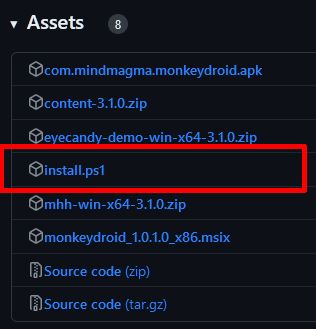
<p>In the <em>Assets</em> section of the repository’s <a href="https://github.com/MV10/monkey-hi-hat/releases/tag/3.1.0">release</a> page, you’ll see a link to <code class="language-csharp highlighter-rouge"><span class="n">install</span><span class="p">.</span><span class="n">ps1</span></code>:</p>

<p><img src="/assets/2024/01-20/release_assets.jpg" alt="release_assets" /></p>

<p>That script should be the <em>only</em> file you need to download to get the program working. You can just save it to your desktop, you won’t need it again after installation is complete. The installer is reasonably “smart” – it can handle partial installs, such as users who may already have some of the dependencies installed.</p>

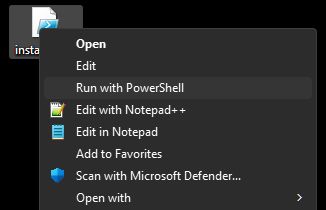
<p>In theory, you should be able to right-click the file and choose <em>Run with PowerShell</em>:</p>

<p><img src="/assets/2024/01-20/context_menu.jpg" alt="context_menu" /></p>

<p>Unfortunately, by default Microsoft <em>blocks</em> PowerShell script execution. If you choose this option, Windows will load the script into an editor. I could go on a long rant about this (why not prompt, like UAC does? why offer a <em>Run</em> context menu option that doesn’t work?), but the fix is pretty easy:</p>

<blockquote>
  <ul>
    <li>Open your Start menu and type <code class="language-csharp highlighter-rouge"><span class="n">Powershell</span></code> to launch the scripting console</li>
    <li>Run this command: <code class="language-csharp highlighter-rouge"><span class="n">Set</span><span class="p">-</span><span class="n">ExecutionPolicy</span> <span class="n">Unrestricted</span> <span class="p">-</span><span class="n">Scope</span> <span class="n">CurrentUser</span></code></li>
  </ul>
</blockquote>

<p>Sigh. So much for making things easier on people. Thanks, Microsoft. After that, the <em>Run</em> menu command will work as expected. You’ll probably see a brief window flash – the script needs to bump itself up to admin rights to perform the installation. After that, it collects some information, shows you what it found, and asks a short series of questions. Generally you want to answer <kbd>Y</kbd> for Yes to everything. The last few relate to how you want to launch the application and are a matter of personal preference.</p>

<p>After you answer the questions, you’ll see a little banner appear across the top of your screen as several files are downloaded. The script will run the installers for the various dependencies, do some cleanup, and set up a default configuration for you.</p>

<p>If you didn’t already have the VB-Cable loopback audio driver installed (most people don’t), the script will offer to walk you through the configuration process for that driver. This is how the program “sees” the audio playing on your system, so it’s pretty important, and unfortunately it’s the only part that I can’t automate, because Microsoft doesn’t document how all of those settings are stored (and they’re too insanely complicated to safely reverse-engineer). Also, the program can’t tell which sound devices your computer has are the ones you really use. So you have to do that part by hand.</p>

<p>Just follow those directions, and if you have problems, similar directions are available in the repository’s wiki, which brings us to the next section…</p>

<h2 id="post-installation-configuration">Post-Installation Configuration</h2>

<p>The wiki offers <a href="https://github.com/MV10/monkey-hi-hat/wiki/Post%E2%80%90Install%E2%80%90Instructions">this</a> page, which explains how to set up your computer’s audio after the installer runs. Once your audio is configured, you can do a test-run. That is also covered in the wiki in the <a href="https://github.com/MV10/monkey-hi-hat/wiki#running-for-the-first-time">Running for the First Time</a> section on the wiki’s landing page.</p>

<p>Configuring your audio and doing a successful test run is very important, but if you want to create new content, you aren’t done yet.</p>

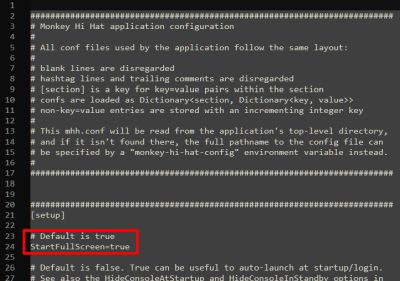
<p>The installer will automatically create a configuration file for you. On Windows you can find this at <code class="language-csharp highlighter-rouge"><span class="n">C</span><span class="p">:</span><span class="err">\</span><span class="n">Program</span> <span class="n">Files</span><span class="err">\</span><span class="n">mhh</span><span class="err">\</span><span class="n">mhh</span><span class="p">.</span><span class="n">conf</span></code>, and it’s just a text file that you can load into Notepad or any other plain text editor. When you first open it, you’ll see a whole bunch of settings. Near the top is a <code class="language-csharp highlighter-rouge"><span class="n">StartFullScreen</span></code> setting which is <code class="language-csharp highlighter-rouge"><span class="k">true</span></code> by default:</p>

<p><img src="/assets/2024/01-20/mhh_conf.jpg" alt="mhh_conf" /></p>

<p>At a minimum, change that to <code class="language-csharp highlighter-rouge"><span class="k">false</span></code> so that you can interactively work with the program from another window on the same computer. The <em>Configuration Suggestions</em> section is oriented to helping people who just want to run the program. If you’re planning to create your own content, there are some other config changes to consider.</p>

<p>The <code class="language-csharp highlighter-rouge"><span class="n">HideMousePointer</span></code> setting is <code class="language-csharp highlighter-rouge"><span class="k">true</span></code> by default, but it’s kind of annoying in windowed mode, so you may want to change that to <code class="language-csharp highlighter-rouge"><span class="k">false</span></code>.</p>

<p>MHH can cache visualizations and effects as it runs, but if you’re actively working on them, it’s better to disable caching. You can do this from the command-line with the <code class="language-csharp highlighter-rouge"><span class="p">--</span><span class="n">nocache</span></code> switch, but if you don’t want to have to remember to do this every time (or if you’re working on new content very frequently, as I do), it’s easier to permanently disable caching. Set the <code class="language-csharp highlighter-rouge"><span class="n">ShaderCacheSize</span></code>, <code class="language-csharp highlighter-rouge"><span class="n">FXCacheSize</span></code>, and <code class="language-csharp highlighter-rouge"><span class="n">LibraryCacheSize</span></code> options to <code class="language-csharp highlighter-rouge"><span class="m">0</span></code> to disable caching. Assuming your files are stored locally and you have a reasonably modern system, you probably won’t even notice the difference (caching makes a big difference if the files are stored on another computer or other network-based storage).</p>

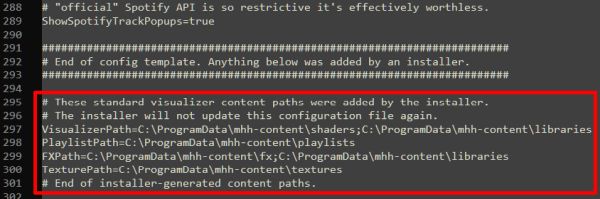
<p>Finally, at the end of the file you will find a <code class="language-csharp highlighter-rouge"><span class="p">[</span><span class="n">windows</span><span class="p">]</span></code> section, and at the end of that section are a bunch of directory-name entries created by the installer. As the names suggest, these tell the program where to find the content shown by the application:</p>

<p><img src="/assets/2024/01-20/conf_paths.jpg" alt="conf_paths" /></p>

<blockquote>
  <p>Edit: The Version 4.0.0 and newer releases are able to update the path settings “in place” – they will no longer appear at the end of the configuration file as shown above.</p>
</blockquote>

<p>“Out of the box” content comes from my <a href="https://github.com/MV10/volts-laboratory">Volt’s Laboratory</a> repository, and the installer puts them on your system at <code class="language-csharp highlighter-rouge"><span class="n">C</span><span class="p">:</span><span class="err">\</span><span class="n">ProgramData</span><span class="err">\</span><span class="n">mhh</span><span class="p">-</span><span class="n">content</span></code>. Generally speaking, you don’t want to mess with these since future updates will <em>completely replace</em> the contents of this directory.</p>

<p>For creating your own content, you want to create a whole separate directory structure, and those directories need to be added to the out-of-box directory names in the config file.</p>

<h2 id="create-your-content-directories">Create Your Content Directories</h2>

<p>You can put your personal, custom content anywhere you like. This article will assume a top-level directory of <code class="language-csharp highlighter-rouge"><span class="n">C</span><span class="p">:</span><span class="err">\</span><span class="n">MyViz</span></code>, but you can call it what you want, put it on other drives or a network share, nest it in your Documents directory, or whatever makes sense to you. After creating the top-level directory, create the five subdirectories shown below:</p>

<div class="language-csharp highlighter-rouge"><div class="highlight"><pre class="highlight"><code><table class="rouge-table"><tbody><tr><td class="rouge-gutter gl"><pre class="lineno">1
2
3
4
5
6
</pre></td><td class="rouge-code"><pre><span class="err">📂</span> <span class="n">C</span><span class="p">:</span><span class="err">\</span><span class="n">MyViz</span>
      <span class="p">|--</span><span class="err">📂</span> <span class="n">fx</span>
      <span class="p">|--</span><span class="err">📂</span> <span class="n">libraries</span>
      <span class="p">|--</span><span class="err">📂</span> <span class="n">playlists</span>
      <span class="p">|--</span><span class="err">📂</span> <span class="n">shaders</span>
      <span class="p">+--</span><span class="err">📂</span> <span class="n">textures</span>
</pre></td></tr></tbody></table></code></pre></div></div>

<blockquote>
  <p>Edit: The Version 4.0.0 and newer releases are able to update the path settings “in place” – they will no longer appear at the end of the configuration file as described in the rest of this section. Just find the applicable entries in the <code class="language-csharp highlighter-rouge"><span class="p">[</span><span class="n">windows</span><span class="p">]</span></code> section of the config file.</p>
</blockquote>

<p>Now go to the end of the configuration file and <em>add</em> those directories to the entries generated by the installer. The configuration most likely looks like this to start with:</p>

<div class="language-ini highlighter-rouge"><div class="highlight"><pre class="highlight"><code><table class="rouge-table"><tbody><tr><td class="rouge-gutter gl"><pre class="lineno">1
2
3
4
5
6
7
</pre></td><td class="rouge-code"><pre><span class="c"># These standard visualizer content paths were added by the installer.
# The installer will not update this configuration file again.
</span><span class="py">VisualizerPath</span><span class="p">=</span><span class="s">C:</span><span class="se">\P</span><span class="s">rogramData</span><span class="se">\m</span><span class="s">hh-content</span><span class="se">\s</span><span class="s">haders;C:</span><span class="se">\P</span><span class="s">rogramData</span><span class="se">\m</span><span class="s">hh-content</span><span class="se">\l</span><span class="s">ibraries</span>
<span class="py">PlaylistPath</span><span class="p">=</span><span class="s">C:</span><span class="se">\P</span><span class="s">rogramData</span><span class="se">\m</span><span class="s">hh-content</span><span class="se">\p</span><span class="s">laylists</span>
<span class="py">FXPath</span><span class="p">=</span><span class="s">C:</span><span class="se">\P</span><span class="s">rogramData</span><span class="se">\m</span><span class="s">hh-content</span><span class="se">\f</span><span class="s">x;C:</span><span class="se">\P</span><span class="s">rogramData</span><span class="se">\m</span><span class="s">hh-content</span><span class="se">\l</span><span class="s">ibraries</span>
<span class="py">TexturePath</span><span class="p">=</span><span class="s">C:</span><span class="se">\P</span><span class="s">rogramData</span><span class="se">\m</span><span class="s">hh-content</span><span class="se">\t</span><span class="s">extures</span>
<span class="c"># End of installer-generated content paths.
</span></pre></td></tr></tbody></table></code></pre></div></div>

<p>A semicolon <kbd>;</kbd> is used to separate the directories. Notice that the <code class="language-csharp highlighter-rouge"><span class="n">libraries</span></code> directory is referenced by both the FX and visualization directory lists (a list of directories or paths is called a “path specification”, commonly abbreviated to <em>pathspec</em>). Using the example, the config file pathspecs would change to this:</p>

<div class="language-ini highlighter-rouge"><div class="highlight"><pre class="highlight"><code><table class="rouge-table"><tbody><tr><td class="rouge-gutter gl"><pre class="lineno">1
2
3
4
5
6
7
</pre></td><td class="rouge-code"><pre><span class="c"># These standard visualizer content paths were added by the installer.
# The installer will not update this configuration file again.
</span><span class="py">VisualizerPath</span><span class="p">=</span><span class="s">C:</span><span class="se">\P</span><span class="s">rogramData</span><span class="se">\m</span><span class="s">hh-content</span><span class="se">\s</span><span class="s">haders;C:</span><span class="se">\P</span><span class="s">rogramData</span><span class="se">\m</span><span class="s">hh-content</span><span class="se">\l</span><span class="s">ibraries;C:</span><span class="se">\M</span><span class="s">yViz</span><span class="se">\s</span><span class="s">haders;C:</span><span class="se">\M</span><span class="s">yViz</span><span class="se">\l</span><span class="s">ibraries</span>
<span class="py">PlaylistPath</span><span class="p">=</span><span class="s">C:</span><span class="se">\P</span><span class="s">rogramData</span><span class="se">\m</span><span class="s">hh-content</span><span class="se">\p</span><span class="s">laylists;C:</span><span class="se">\M</span><span class="s">yViz</span><span class="se">\p</span><span class="s">laylists</span>
<span class="py">FXPath</span><span class="p">=</span><span class="s">C:</span><span class="se">\P</span><span class="s">rogramData</span><span class="se">\m</span><span class="s">hh-content</span><span class="se">\f</span><span class="s">x;C:</span><span class="se">\P</span><span class="s">rogramData</span><span class="se">\m</span><span class="s">hh-content</span><span class="se">\l</span><span class="s">ibraries;C:</span><span class="se">\M</span><span class="s">yViz</span><span class="se">\f</span><span class="s">x;C:</span><span class="se">\M</span><span class="s">yViz</span><span class="se">\l</span><span class="s">ibraries</span>
<span class="py">TexturePath</span><span class="p">=</span><span class="s">C:</span><span class="se">\P</span><span class="s">rogramData</span><span class="se">\m</span><span class="s">hh-content</span><span class="se">\t</span><span class="s">extures;C:</span><span class="se">\M</span><span class="s">yViz</span><span class="se">\t</span><span class="s">extures</span>
<span class="c"># End of installer-generated content paths.
</span></pre></td></tr></tbody></table></code></pre></div></div>

<h2 id="basic-concepts">Basic Concepts</h2>

<p>MHH runs OpenGL <em>shaders</em> which are graphics programs written in a language called GLSL. While a GLSL tutorial is far beyond the scope of anything I could cram into a blog article, you will need to know that language, but I will at least explain the code and commands used in the article. If you have any familiarity with C, it will be pretty easy to learn (though it is not identical by any means).</p>

<p>A single shader program is actually a combination of several smaller programs known as <em>stages</em> and MHH in particular only uses two of those: the vertex stage, and the fragment stage, or <em>vert</em> and <em>frag</em> as graphics programmers call them. These stages are usually also referred to as shaders, even though, technically, the shader is the combination of the two.</p>

<p>Although MHH is two-dimensional, OpenGL shader data is three-dimensional. The vertex stage sends the GPU a list of points in 3D space, and optionally other data like how to connect those points with lines, triangles, or a few other primitive shapes like line strips, triangle fans, and so on. Other shader stages convert that into screen output (the display area is usually called the <em>viewport</em> although I’ll probably screw up occasionally and write “screen”), and at the end of the process, the GPU knows which on-screen pixels represent “content” and which pixels are blank. It is the job of the fragment stage to color each of those pixels: the GPU will run the frag shader over and over again for each and every pixel that is part of the content described by the shader code in the vertex stage.</p>

<p>MHH visualizers can provide a program for both of these shader stages, or just one of the two. Currently the “out-of-box” shaders installed with MHH always uses just one or the other. Specifically, the vert-only shaders are mostly implementations adapted from the <a href="https://www.vertexshaderart.com">VertexShaderArt.com</a> website, and the frag-only shaders are mostly implementations adapted from the <a href="https://www.shadertoy.com">Shadertoy.com</a> website. Browse each site and you’ll quickly notice how they differ visually.</p>

<p>A vert-only shader is one which uses older-style OpenGL commands to draw very basic geometry, including individual points, possibly setting a larger-than-pixel point size, and the colors of the points, as well as simple shapes like lines or triangles. This tutorial won’t focus on those, but more information is available in the repository wiki.</p>

<p>A frag-only shader is what people usually think of if they have any experience with music visualization graphics like the famous MilkDrop. These can be challenging to write because the primary input data you have to work with is only the (x,y) coordinates of the pixel your program is supposed to color. That color is the output data. Virtually <em>everything</em> else has to be calculated – for <em>every</em> pixel.</p>

<p>Post-processing effects (FX) shaders work on the output of other primary visualization shaders, so they are always frag-only shaders.</p>

<p>Because a complete shader program is actually a combination of vert and frag shader stages, a vert-only shader still requires some frag code, but it’s a very simple pass-through that simply accepts the vert shader’s output color and itself outputs that color unchanged. Similarly, a frag-only shader has a reusable vert shader that simply provides coordinates for a shape that covers the entire display area, thereby ensuring the frag stage is called for every pixel. MHH is designed so that you only have to write the part you’re interested in (unless you really need to write both).</p>

<p>MHH coordinates all of this using different configuration or <em>conf</em> files. For example, the Volt’s Laboratory visualization called “acrylic” uses a file named <code class="language-csharp highlighter-rouge"><span class="n">acrylic</span><span class="p">.</span><span class="n">conf</span></code> to describe the visualizer to MHH, and a GLSL frag stage program in a file named <code class="language-csharp highlighter-rouge"><span class="n">acrylic</span><span class="p">.</span><span class="n">frag</span></code>. You’ll find both of them in <code class="language-csharp highlighter-rouge"><span class="n">C</span><span class="p">:</span><span class="err">\</span><span class="n">ProgramData</span><span class="err">\</span><span class="n">mhh</span><span class="p">-</span><span class="n">content</span><span class="err">\</span><span class="n">shaders</span></code> on your local installation.</p>

<p>In addition to the basic inputs like (x,y) pixel coordinates, a shader can accept other data as inputs. There are two categories of inputs: varying and uniform inputs. The names refer to the nature of the data while a shader is generating a video frame. Varying data can change every time the program is called, whereas uniforms will not change for the duration of the frame being rendered. Generally speaking MHH shaders work with uniforms. Some are provided by MHH itself, like the number of seconds the shader has been running, the screen resolution, and other useful information. Others can be defined in the viz and fx config files. These can be fixed numbers, a random range of numbers, or external graphics files, known as <em>textures</em>.</p>

<p>The “primary” content for MHH is stored in the <code class="language-csharp highlighter-rouge"><span class="n">shaders</span></code> directory for historical reasons, but they are referred to as <em>visualizations</em>, often shortened to <em>viz</em>. Special post-processing effects are referred to as <em>FX</em> and are stored in the <code class="language-csharp highlighter-rouge"><span class="n">fx</span></code> directory. Reusable content is stored in the <code class="language-csharp highlighter-rouge"><span class="n">libraries</span></code> directory and can be referenced by viz or FX shaders as needed.</p>

<p>Finally, you will probably want a text editor that understads the GLSL shader language. The popular <a href="https://notepad-plus-plus.org">Notepad++</a> can do this. If you are a programmer using Visual Studio, I recommend installing Daniel Scherzer’s excellent <a href="https://marketplace.visualstudio.com/items?itemName=DanielScherzer.GLSL2022">GLSL Language Integration</a> extension.</p>

<h2 id="draw-a-box">Draw a Box</h2>

<p>We’ll start with an extremely trivial example that just draws a white box on the screen. The <code class="language-csharp highlighter-rouge"><span class="p">.</span><span class="n">conf</span></code> file describes the visualization to Monkey Hi Hat. Use your editor to create a text file called <code class="language-csharp highlighter-rouge"><span class="n">box</span><span class="p">.</span><span class="n">conf</span></code> in your custom <code class="language-csharp highlighter-rouge"><span class="n">shaders</span></code> directory (ie. <code class="language-csharp highlighter-rouge"><span class="n">C</span><span class="p">:</span><span class="err">\</span><span class="n">MyViz</span><span class="err">\</span><span class="n">shaders</span><span class="err">\</span><span class="n">box</span><span class="p">.</span><span class="n">conf</span></code>). Copy this to the file and save it:</p>

<div class="language-ini highlighter-rouge"><div class="highlight"><pre class="highlight"><code><table class="rouge-table"><tbody><tr><td class="rouge-gutter gl"><pre class="lineno">1
2
3
4
</pre></td><td class="rouge-code"><pre><span class="nn">[shader]</span>
<span class="py">Description</span><span class="p">=</span><span class="s">My First Shader</span>
<span class="py">VertexSourceTypeName</span><span class="p">=</span><span class="s">VertexQuad</span>
<span class="py">FragmentShaderFilename</span><span class="p">=</span><span class="s">box.frag</span>
</pre></td></tr></tbody></table></code></pre></div></div>

<p>The <code class="language-csharp highlighter-rouge"><span class="n">Description</span></code> line can be shown on-screen when MHH initially loads a visualization, and if you use my <a href="https://github.com/MV10/monkey-droid">Monkey Droid</a> remote-control application, it’ll be shown in that UI as well. Don’t worry about <code class="language-csharp highlighter-rouge"><span class="n">VertexSourceTypeName</span></code> for now – suffice to say <code class="language-csharp highlighter-rouge"><span class="n">VertexQuad</span></code> means that the vertex stage will describe a “quad” (rectangle) which covers the entire screen. Finally, <code class="language-csharp highlighter-rouge"><span class="n">FragmentShaderFilename</span></code> is self-explanatory – the name of your frag program.</p>

<p>We’ll cover some of the other parts of a viz config later, but <a href="https://github.com/MV10/monkey-hi-hat/wiki/06.-Visualization-Configuration">this</a> wiki page documents all the available sections and settings. For now, let’s move on to the shader program itself.</p>

<p>Create another text file in your personal <code class="language-csharp highlighter-rouge"><span class="n">shaders</span></code> directory called <code class="language-csharp highlighter-rouge"><span class="n">box</span><span class="p">.</span><span class="n">frag</span></code>. Copy this to the file:</p>

<div class="language-glsl highlighter-rouge"><div class="highlight"><pre class="highlight"><code><table class="rouge-table"><tbody><tr><td class="rouge-gutter gl"><pre class="lineno">1
2
3
4
5
6
7
8
9
</pre></td><td class="rouge-code"><pre><span class="cp">#version 450
</span><span class="k">precision</span> <span class="kt">highp</span> <span class="kt">float</span><span class="p">;</span>

<span class="k">in</span> <span class="kt">vec2</span> <span class="n">fragCoord</span><span class="p">;</span>
<span class="k">out</span> <span class="kt">vec4</span> <span class="n">fragColor</span><span class="p">;</span>

<span class="kt">void</span> <span class="nf">main</span><span class="p">()</span>
<span class="p">{</span>
<span class="p">}</span>
</pre></td></tr></tbody></table></code></pre></div></div>

<p>This is the skeleton of the most basic-possible fragment shader.</p>

<p><code class="language-csharp highlighter-rouge"><span class="err">#</span><span class="n">version</span> <span class="m">450</span></code> indicates OpenGL 4.5 is required. (The currently-available MHH and content uses 4.6, which is the newest [and final] version of OpenGL, but Linux MESA drivers only support 4.5, and 4.6 doesn’t have any features needed by MHH, so going forward MHH will only require the OpenGL 4.5 core API level.) The <code class="language-csharp highlighter-rouge"><span class="err">#</span><span class="n">version</span></code> directive must <em>always</em> be the first line in the shader (verts and frags).</p>

<p>The second line, <code class="language-csharp highlighter-rouge"><span class="n">precision</span> <span class="n">highp</span> <span class="kt">float</span></code>, just tells the GPU to use high-precision numbers. Some older, cheaper GPUs don’t support this, but you probably wouldn’t be able to run MHH visualizations on those anyway.</p>

<p>The next two lines define inputs and outputs. The <code class="language-csharp highlighter-rouge"><span class="n">vec2</span></code> and <code class="language-csharp highlighter-rouge"><span class="n">vec4</span></code> data types are two- and four-component <em>vector</em> variables, respectively. This means your program can refer to individual <code class="language-csharp highlighter-rouge"><span class="n">x</span></code> and <code class="language-csharp highlighter-rouge"><span class="n">y</span></code> values stored in the <code class="language-csharp highlighter-rouge"><span class="n">fragCoord</span></code> input data: <code class="language-csharp highlighter-rouge"><span class="n">fragCoord</span><span class="p">.</span><span class="n">x</span></code> and <code class="language-csharp highlighter-rouge"><span class="n">fragCoord</span><span class="p">.</span><span class="n">y</span></code>, which represent the (x,y) coordinates the fragment program is supposed to generate. The four components for <code class="language-csharp highlighter-rouge"><span class="n">fragColor</span></code> are <code class="language-csharp highlighter-rouge"><span class="n">xyzw</span></code>, or alternately <code class="language-csharp highlighter-rouge"><span class="n">rgba</span></code>, so to read or change the red channel of the output color, you would reference <code class="language-csharp highlighter-rouge"><span class="n">fragColor</span><span class="p">.</span><span class="n">r</span></code>.</p>

<p>The <code class="language-csharp highlighter-rouge"><span class="k">void</span> <span class="nf">main</span><span class="p">()</span></code> section is the program entry point. You can define functions and variables outside of this, but they generally must be declared above the <code class="language-csharp highlighter-rouge"><span class="nf">main</span><span class="p">()</span></code> function, otherwise most driver’s compilers will refuse to compile the shader programs. (These source code text files are read into memory and passed to the graphics driver in real time, as the program runs. Shaders are normally not pre-compiled since every vendor’s drivers handle compilation differently, so you can’t know ahead of time what your users will have installed.)</p>

<p>The OpenGL coordinate system is <em>normalized</em> which just means all values are in the zero-to-one range. Generally speaking, most shader data uses the <code class="language-csharp highlighter-rouge"><span class="kt">float</span></code> data type. GPUs are highly optimized for working with fractional floating-point numbers. Thus, the (x,y) coordinates across the whole viewport ranges from (0, 0) to (1, 1). The exact center of the viewport (regardless of resolution or aspect ratio) is always (0.5, 0.5). Coordinate (0, 0) is the bottom left, and (1, 1) is the top right (exactly like the positive quadrant of a Cartesian grid in the geometry lessons you probably had in school).</p>

<p>In fact, just about everything is normalized, even color data. The RGB value for pure white is (1,1,1), which raises an important point: the GLSL language is very picky about how you represent numbers. Since vectors like <code class="language-csharp highlighter-rouge"><span class="n">vec2</span></code> and <code class="language-csharp highlighter-rouge"><span class="n">vec4</span></code> store floating-point values, you have to explicitly write your code to use decimal values:</p>

<div class="language-csharp highlighter-rouge"><div class="highlight"><pre class="highlight"><code><table class="rouge-table"><tbody><tr><td class="rouge-gutter gl"><pre class="lineno">1
2
3
4
</pre></td><td class="rouge-code"><pre><span class="n">vec3</span> <span class="n">white</span><span class="p">;</span>
<span class="n">white</span><span class="p">.</span><span class="n">r</span> <span class="p">=</span> <span class="m">1.0</span><span class="p">;</span>  <span class="c1">// compiler recognizes "1.0" as floating-point</span>
<span class="n">white</span><span class="p">.</span><span class="n">g</span> <span class="p">=</span> <span class="m">1.0</span><span class="p">;</span>
<span class="n">white</span><span class="p">.</span><span class="n">b</span> <span class="p">=</span> <span class="m">1.0</span><span class="p">;</span>
</pre></td></tr></tbody></table></code></pre></div></div>

<p>This will not compile:</p>

<div class="language-glsl highlighter-rouge"><div class="highlight"><pre class="highlight"><code><table class="rouge-table"><tbody><tr><td class="rouge-gutter gl"><pre class="lineno">1
2
3
4
</pre></td><td class="rouge-code"><pre><span class="kt">vec3</span> <span class="n">white</span><span class="p">;</span>
<span class="n">white</span><span class="p">.</span><span class="n">r</span> <span class="o">=</span> <span class="mi">1</span><span class="p">;</span>  <span class="c1">// error: compiler thinks "1" is an integer</span>
<span class="n">white</span><span class="p">.</span><span class="n">g</span> <span class="o">=</span> <span class="mi">1</span><span class="p">;</span>
<span class="n">white</span><span class="p">.</span><span class="n">b</span> <span class="o">=</span> <span class="mi">1</span><span class="p">;</span>
</pre></td></tr></tbody></table></code></pre></div></div>

<p>Update <code class="language-csharp highlighter-rouge"><span class="n">box</span><span class="p">.</span><span class="n">frag</span></code> with the code to draw a white box at the center of the screen:</p>

<div class="language-glsl highlighter-rouge"><div class="highlight"><pre class="highlight"><code><table class="rouge-table"><tbody><tr><td class="rouge-gutter gl"><pre class="lineno">1
2
3
4
5
6
7
8
9
10
11
12
13
14
15
16
17
18
</pre></td><td class="rouge-code"><pre><span class="cp">#version 450
</span><span class="k">precision</span> <span class="kt">highp</span> <span class="kt">float</span><span class="p">;</span>

<span class="k">in</span> <span class="kt">vec2</span> <span class="n">fragCoord</span><span class="p">;</span>
<span class="k">out</span> <span class="kt">vec4</span> <span class="n">fragColor</span><span class="p">;</span>

<span class="kt">void</span> <span class="nf">main</span><span class="p">()</span>
<span class="p">{</span>
    <span class="n">fragColor</span> <span class="o">=</span> <span class="kt">vec4</span><span class="p">(</span><span class="mi">0</span><span class="p">.</span><span class="mi">0</span><span class="p">);</span>

    <span class="k">if</span><span class="p">(</span><span class="n">fragCoord</span><span class="p">.</span><span class="n">y</span> <span class="o">&gt;=</span> <span class="mi">0</span><span class="p">.</span><span class="mi">25</span> <span class="o">&amp;&amp;</span> <span class="n">fragCoord</span><span class="p">.</span><span class="n">y</span> <span class="o">&lt;=</span> <span class="mi">0</span><span class="p">.</span><span class="mi">75</span><span class="p">)</span>
    <span class="p">{</span>
        <span class="k">if</span><span class="p">(</span><span class="n">fragCoord</span><span class="p">.</span><span class="n">x</span> <span class="o">&gt;=</span> <span class="mi">0</span><span class="p">.</span><span class="mi">25</span> <span class="o">&amp;&amp;</span> <span class="n">fragCoord</span><span class="p">.</span><span class="n">x</span> <span class="o">&lt;=</span> <span class="mi">0</span><span class="p">.</span><span class="mi">75</span><span class="p">)</span>
        <span class="p">{</span>
            <span class="n">fragColor</span> <span class="o">=</span> <span class="kt">vec4</span><span class="p">(</span><span class="mi">1</span><span class="p">.</span><span class="mi">0</span><span class="p">,</span> <span class="mi">1</span><span class="p">.</span><span class="mi">0</span><span class="p">,</span> <span class="mi">1</span><span class="p">.</span><span class="mi">0</span><span class="p">,</span> <span class="mi">1</span><span class="p">.</span><span class="mi">0</span><span class="p">);</span>
        <span class="p">}</span>
    <span class="p">}</span>
<span class="p">}</span>
</pre></td></tr></tbody></table></code></pre></div></div>

<p>First, we initialize the output color to black using a single input value to the <code class="language-csharp highlighter-rouge"><span class="n">vec4</span></code> constructor – all four components, the RGB values and the alpha value, are set to zero, expressed as a floating-point number, <code class="language-csharp highlighter-rouge"><span class="m">0.0</span></code>. (It is a strange quirk of GLSL that you can actually specify an integer here, even though it’ll be stored as floating point, but I don’t like to do that because they aren’t freely interchangeable anywhere else.)</p>

<p>Next we inspect the (x,y) coordinates to see if they’re within the center 50% of the screen area vertically and horizontally (remember that <code class="language-csharp highlighter-rouge"><span class="n">fragCoord</span></code> holds normalized values, 0.0 through 1.0). If both of those are true, we change the output color to white by specifying all four components of the <code class="language-csharp highlighter-rouge"><span class="n">vec4</span></code> constructor.</p>

<p>Save these changes and run Monkey Hi Hat. When the idle shader is visible, open another console window, change to the MHH program directory, and issue the command to load your new visualization:</p>

<div class="language-csharp highlighter-rouge"><div class="highlight"><pre class="highlight"><code><table class="rouge-table"><tbody><tr><td class="rouge-gutter gl"><pre class="lineno">1
</pre></td><td class="rouge-code"><pre><span class="n">mhh</span> <span class="p">--</span><span class="n">load</span> <span class="n">box</span>
</pre></td></tr></tbody></table></code></pre></div></div>

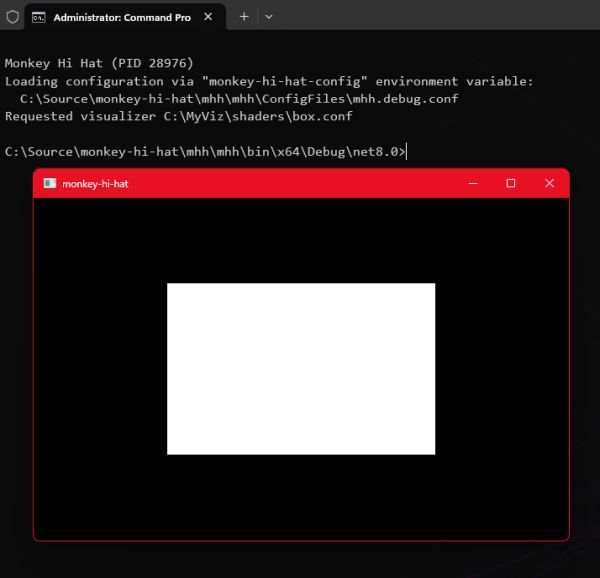
<p>If everything is set up correctly, you’ll see the results of your program:</p>

<p><img src="/assets/2024/01-20/box_viz.jpg" alt="box_viz" /></p>

<h2 id="use-a-uniform-input">Use a Uniform Input</h2>

<p>MHH exposes a number of useful values that a shader can use. They’re all documented <a href="https://github.com/MV10/monkey-hi-hat/wiki/08.-Shader-Basics#uniforms">here</a> in the wiki, but in this case we’ll use <code class="language-csharp highlighter-rouge"><span class="n">randomrun</span></code> which is a normalized (0.0 to 1.0) random number that is generated each time a shader is loaded. Here is the new code for <code class="language-csharp highlighter-rouge"><span class="n">box</span><span class="p">.</span><span class="n">frag</span></code>:</p>

<div class="language-glsl highlighter-rouge"><div class="highlight"><pre class="highlight"><code><table class="rouge-table"><tbody><tr><td class="rouge-gutter gl"><pre class="lineno">1
2
3
4
5
6
7
8
9
10
11
12
13
14
15
16
17
18
19
20
21
</pre></td><td class="rouge-code"><pre><span class="cp">#version 450
</span><span class="k">precision</span> <span class="kt">highp</span> <span class="kt">float</span><span class="p">;</span>

<span class="k">in</span> <span class="kt">vec2</span> <span class="n">fragCoord</span><span class="p">;</span>
<span class="k">uniform</span> <span class="kt">float</span> <span class="n">randomrun</span><span class="p">;</span>
<span class="k">out</span> <span class="kt">vec4</span> <span class="n">fragColor</span><span class="p">;</span>

<span class="kt">void</span> <span class="nf">main</span><span class="p">()</span>
<span class="p">{</span>
    <span class="n">fragColor</span> <span class="o">=</span> <span class="kt">vec4</span><span class="p">(</span><span class="mi">0</span><span class="p">.</span><span class="mi">0</span><span class="p">);</span>

    <span class="kt">float</span> <span class="n">r</span> <span class="o">=</span> <span class="n">clamp</span><span class="p">(</span><span class="n">randomrun</span> <span class="o">*</span> <span class="mi">0</span><span class="p">.</span><span class="mi">5</span><span class="p">,</span> <span class="mi">0</span><span class="p">.</span><span class="mo">05</span><span class="p">,</span> <span class="mi">0</span><span class="p">.</span><span class="mi">45</span><span class="p">);</span>

    <span class="k">if</span><span class="p">(</span><span class="n">fragCoord</span><span class="p">.</span><span class="n">y</span> <span class="o">&gt;=</span> <span class="n">r</span> <span class="o">&amp;&amp;</span> <span class="n">fragCoord</span><span class="p">.</span><span class="n">y</span> <span class="o">&lt;=</span> <span class="p">(</span><span class="mi">1</span><span class="p">.</span><span class="mi">0</span> <span class="o">-</span> <span class="n">r</span><span class="p">))</span>
    <span class="p">{</span>
        <span class="k">if</span><span class="p">(</span><span class="n">fragCoord</span><span class="p">.</span><span class="n">x</span> <span class="o">&gt;=</span> <span class="n">r</span> <span class="o">&amp;&amp;</span> <span class="n">fragCoord</span><span class="p">.</span><span class="n">x</span> <span class="o">&lt;=</span> <span class="p">(</span><span class="mi">1</span><span class="p">.</span><span class="mi">0</span> <span class="o">-</span> <span class="n">r</span><span class="p">))</span>
        <span class="p">{</span>
            <span class="n">fragColor</span> <span class="o">=</span> <span class="kt">vec4</span><span class="p">(</span><span class="mi">1</span><span class="p">.</span><span class="mi">0</span><span class="p">,</span> <span class="mi">1</span><span class="p">.</span><span class="mi">0</span><span class="p">,</span> <span class="mi">1</span><span class="p">.</span><span class="mi">0</span><span class="p">,</span> <span class="mi">1</span><span class="p">.</span><span class="mi">0</span><span class="p">);</span>
        <span class="p">}</span>
    <span class="p">}</span>
<span class="p">}</span>
</pre></td></tr></tbody></table></code></pre></div></div>

<p>In this version, line 5 declares a <code class="language-csharp highlighter-rouge"><span class="n">uniform</span></code> input that is a normalized <code class="language-csharp highlighter-rouge"><span class="kt">float</span></code> data type named <code class="language-csharp highlighter-rouge"><span class="n">randomrun</span></code>. The MHH program tries to pass this value (and the other uniforms listed in the wiki) regardless of whether the shader actually uses it. Now each time you load the box visualization, the size of the white box will change. In reality we’re working from the center of the viewport, which is halfway to 1.0, so we multiply <code class="language-csharp highlighter-rouge"><span class="n">randomrange</span></code> by half. We also use the <em>clamp</em> function to ensure the result is never less than 0.05 and never more than 0.45, which ensures the box is always visible but never covers the entire viewport.</p>

<h2 id="load-an-image-file">Load an Image File</h2>

<p>That box is pretty dull, so let’s try something more interesting. Find a graphics file and drop it into your <code class="language-csharp highlighter-rouge"><span class="n">textures</span></code> directory. Generally speaking, you should avoid very large files, both in raw size and in resolution dimensions. GPUs are extremely good at scaling images and you’d be quite surprised at the picture quality you can get from even a relatively small input (in modern terms) such as 1024x1024.</p>

<p>For the article, my example uses a JPEG named <code class="language-csharp highlighter-rouge"><span class="n">Queen</span> <span class="n">Cersei</span> <span class="n">Lannister</span><span class="p">.</span><span class="n">jpg</span></code>, which features one of our food-obsessed dogs. As you can see, spaces are fine in the filename. Add the <code class="language-csharp highlighter-rouge"><span class="p">[</span><span class="n">textures</span><span class="p">]</span></code> section to your <code class="language-csharp highlighter-rouge"><span class="n">box</span><span class="p">.</span><span class="n">conf</span></code> viz config file as shown below, but replace the filename with whatever you copied to your <code class="language-csharp highlighter-rouge"><span class="n">textures</span></code> directory:</p>

<div class="language-ini highlighter-rouge"><div class="highlight"><pre class="highlight"><code><table class="rouge-table"><tbody><tr><td class="rouge-gutter gl"><pre class="lineno">1
2
3
4
5
6
7
</pre></td><td class="rouge-code"><pre><span class="nn">[shader]</span>
<span class="py">Description</span><span class="p">=</span><span class="s">My First Shader</span>
<span class="py">VertexSourceTypeName</span><span class="p">=</span><span class="s">VertexQuad</span>
<span class="py">FragmentShaderFilename</span><span class="p">=</span><span class="s">box.frag</span>

<span class="nn">[textures]</span>
<span class="err">tutorial</span> <span class="err">:</span> <span class="err">Queen</span> <span class="err">Cersei</span> <span class="err">Lannister.jpg</span>
</pre></td></tr></tbody></table></code></pre></div></div>

<p>The <code class="language-csharp highlighter-rouge"><span class="n">tutorial</span></code> portion is the name of the uniform that MHH will use to provide a copy of the image to the shader at runtime. This is a good time to point out that GLSL (like the C language) is case-sensitive.</p>

<p>Update the code in the <code class="language-csharp highlighter-rouge"><span class="n">box</span><span class="p">.</span><span class="n">frag</span></code> shader as follows:</p>

<div class="language-glsl highlighter-rouge"><div class="highlight"><pre class="highlight"><code><table class="rouge-table"><tbody><tr><td class="rouge-gutter gl"><pre class="lineno">1
2
3
4
5
6
7
8
9
10
11
12
</pre></td><td class="rouge-code"><pre><span class="cp">#version 450
</span><span class="k">precision</span> <span class="kt">highp</span> <span class="kt">float</span><span class="p">;</span>

<span class="k">in</span> <span class="kt">vec2</span> <span class="n">fragCoord</span><span class="p">;</span>
<span class="k">uniform</span> <span class="kt">sampler2D</span> <span class="n">tutorial</span><span class="p">;</span>
<span class="k">out</span> <span class="kt">vec4</span> <span class="n">fragColor</span><span class="p">;</span>

<span class="kt">void</span> <span class="nf">main</span><span class="p">()</span>
<span class="p">{</span>
    <span class="kt">vec3</span> <span class="n">image</span> <span class="o">=</span> <span class="n">texture</span><span class="p">(</span><span class="n">tutorial</span><span class="p">,</span> <span class="n">fragCoord</span><span class="p">).</span><span class="n">rgb</span><span class="p">;</span>
    <span class="n">fragColor</span> <span class="o">=</span> <span class="kt">vec4</span><span class="p">(</span><span class="n">image</span><span class="p">,</span> <span class="mi">1</span><span class="p">.</span><span class="mi">0</span><span class="p">);</span>
<span class="p">}</span>
</pre></td></tr></tbody></table></code></pre></div></div>

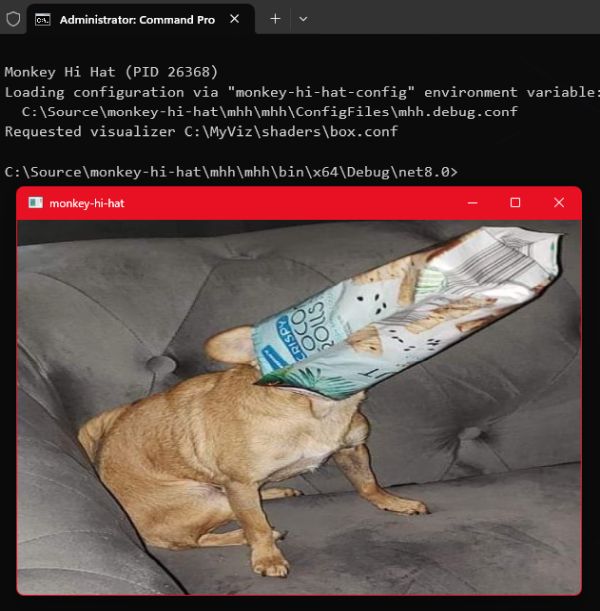
<p>When you tell MHH to load this visualization, you should see the image you chose, scaled (and probably distorted) to match whatever dimensions your viewport happens to be using. You can resize the window and the image will adjust to keep the viewport filled with the image.</p>

<p><img src="/assets/2024/01-20/bag_dog.jpg" alt="bag_dog" /></p>

<p>This code shows a couple of important things. First, obviously, is that the texture data is a special <code class="language-csharp highlighter-rouge"><span class="n">sampler2D</span></code> data type, and of course the uniform name <code class="language-csharp highlighter-rouge"><span class="n">tutorial</span></code> matches the name we assigned in the viz config file.</p>

<p>It uses the GLSL <code class="language-csharp highlighter-rouge"><span class="n">texture</span></code> command to read (or <em>sample</em> in shader terminology) a portion of the graphics buffer which stores the image. The command returns a <code class="language-csharp highlighter-rouge"><span class="n">vec4</span></code> (RGBA data), but in this case we’re only storing the RGB channels into a <code class="language-csharp highlighter-rouge"><span class="n">vec3</span></code> variable named <code class="language-csharp highlighter-rouge"><span class="n">image</span></code> – notice the <code class="language-csharp highlighter-rouge"><span class="p">.</span><span class="n">rgb</span></code> at the end of the command. The two arguments to this command are the reference to the texture itself (which we’ve stored in the <code class="language-csharp highlighter-rouge"><span class="n">tutorial</span></code> uniform), and the normalized coordinates to be sampled.</p>

<p>Using normalized coordinates for the texture implies that the image stored in the texture buffer, regardless of the original file’s resolution or other details like the aspect ratio, is also represented by a range of floating-point values from (0.0, 0.0) through (1.0, 1.0).</p>

<p>This is why we can specify <code class="language-csharp highlighter-rouge"><span class="n">fragCoord</span></code> as the second argument, even though <code class="language-csharp highlighter-rouge"><span class="n">fragCoord</span></code> is one of the shader’s <em>input</em> values that describes which pixel to output. The rendering viewport might be 1920 x 1080 but the texture image might only be 1024 x 768 – not even the same aspect. But thanks to normalized coordinates, 0.5 is always going to represent the center of both. Because the shader program is executed with <code class="language-csharp highlighter-rouge"><span class="n">fragCoord</span></code> values ranging from (0.0, 0.0) to (1.0, 1.0), telling the <code class="language-csharp highlighter-rouge"><span class="n">texture</span></code> command “give me the texture color at position (0.25, 0.25)” is always going to be a point from the lower left quarter of the image, and outputting it for that same coordinate will always display in the lower left quarter of the viewport.</p>

<p>This is why it’s called a <em>sampler</em> and we say we are <em>sampling</em> the texture: the GPU is able to very, very quickly “interpolate” the colors – sort of like resizing the image on the fly, scaling it up <em>or</em> down as needed. In fact, we don’t refer to “pixels” when we’re sampling a texture this way, we refer to <em>texels</em> so that it’s clear we’re talking about something other than the original raw image data.</p>

<p>To put it another way, if the viewport is 1920 x 1080, rendering a <code class="language-csharp highlighter-rouge"><span class="n">fragCoord</span></code> of (0.3, 0.3) means we’re <em>calculating</em> the final displayed color of the pixel at (576, 324), but if we’re <em>sampling</em> (0.3, 0.3) from a 1024 x 768 texture, we’re <em>reading</em> interpolated texel color data from position (307.2, 230.4): not exactly one specific pixel from the source image, but a value that is a mix of the pixels nearest to the requested location.</p>

<h2 id="aspect-ratio-correction">Aspect Ratio Correction</h2>

<p>You may have suspected that the picture of my dog is “squished” as my wife described it. The program simply spits out the <code class="language-csharp highlighter-rouge"><span class="n">fragCoord</span></code>-based texels with no consideration for how it looks. Specifically, it ignores the original texture’s aspect ratio, which is simply the relationship between the original image file’s width and height. There is a simple calculation to scale an image to a target viewport.</p>

<p>Even though this section is going to show you how to address this, shader programmers actually don’t commonly worry about aspect ratio in most texture scenarios, because input textures are rarely directly used as stand-alone images. They are more often used to provide abstract data (such as pseudo-random noise, or in the case of MHH, a representation of audio), or “texturing” via small tiling images used to simulate a material or surface like cloth, wood, or stone. But correcting for aspect ratio is easy, it’s a good example of the sorts of problems you need to solve when you write a shader, and it gives us an excuse to discuss <em>uv</em> which is another shader programming convention that you’ll encounter frequently.</p>

<p>So, while our little dog may be food-obsessed, she isn’t actually fat (or squished) … let’s do something about that aspect ratio.</p>

<p>The GLSL command <em>textureSize</em> returns the source image resolution. The question then becomes what to do with the rendered pixels that are <em>not</em> covered by the image? We are going to adaptively scale by the largest dimension, whether it is the width or the height, and any “unused” pixels will simply be rendered in black. Alternately, you could calculate other display strategies, such as filling the screen regardless of clipping, for example, or rendering a faded and blurred version of the edges of the image in the unused areas, as some image viewing programs do. It all depends on what you’re trying to achieve. But for now, we’ll keep it simple.</p>

<p>Here is the new <code class="language-csharp highlighter-rouge"><span class="n">box</span><span class="p">.</span><span class="n">frag</span></code> shader:</p>

<div class="language-glsl highlighter-rouge"><div class="highlight"><pre class="highlight"><code><table class="rouge-table"><tbody><tr><td class="rouge-gutter gl"><pre class="lineno">1
2
3
4
5
6
7
8
9
10
11
12
13
14
15
16
17
18
19
20
21
22
23
</pre></td><td class="rouge-code"><pre><span class="cp">#version 450
</span><span class="k">precision</span> <span class="kt">highp</span> <span class="kt">float</span><span class="p">;</span>

<span class="k">in</span> <span class="kt">vec2</span> <span class="n">fragCoord</span><span class="p">;</span>
<span class="k">uniform</span> <span class="kt">vec2</span> <span class="n">resolution</span><span class="p">;</span>
<span class="k">uniform</span> <span class="kt">sampler2D</span> <span class="n">tutorial</span><span class="p">;</span>
<span class="k">out</span> <span class="kt">vec4</span> <span class="n">fragColor</span><span class="p">;</span>

<span class="kt">void</span> <span class="nf">main</span><span class="p">()</span>
<span class="p">{</span>
    <span class="kt">vec2</span> <span class="n">texRes</span> <span class="o">=</span> <span class="kt">vec2</span><span class="p">(</span><span class="n">textureSize</span><span class="p">(</span><span class="n">tutorial</span><span class="p">,</span> <span class="mi">0</span><span class="p">));</span>
    <span class="kt">vec2</span> <span class="n">scaling</span> <span class="o">=</span> <span class="n">resolution</span> <span class="o">/</span> <span class="n">texRes</span><span class="p">;</span>

    <span class="kt">vec2</span> <span class="n">uv</span> <span class="o">=</span> <span class="n">fragCoord</span> <span class="o">*</span> <span class="n">resolution</span><span class="p">;</span>

    <span class="n">uv</span> <span class="o">-=</span> <span class="mi">0</span><span class="p">.</span><span class="mi">5</span> <span class="o">*</span> <span class="n">texRes</span> <span class="o">*</span> <span class="n">max</span><span class="p">(</span><span class="kt">vec2</span><span class="p">(</span><span class="n">scaling</span><span class="p">.</span><span class="n">x</span> <span class="o">-</span> <span class="n">scaling</span><span class="p">.</span><span class="n">y</span><span class="p">,</span> <span class="n">scaling</span><span class="p">.</span><span class="n">y</span> <span class="o">-</span> <span class="n">scaling</span><span class="p">.</span><span class="n">x</span><span class="p">),</span> <span class="mi">0</span><span class="p">.</span><span class="mi">0</span><span class="p">);</span>

    <span class="n">uv</span> <span class="o">/=</span> <span class="n">texRes</span> <span class="o">*</span> <span class="n">min</span><span class="p">(</span><span class="n">scaling</span><span class="p">.</span><span class="n">x</span><span class="p">,</span> <span class="n">scaling</span><span class="p">.</span><span class="n">y</span><span class="p">);</span>
    
    <span class="n">fragColor</span> <span class="o">=</span> <span class="p">(</span><span class="n">uv</span> <span class="o">==</span> <span class="n">fract</span><span class="p">(</span><span class="n">uv</span><span class="p">))</span>
        <span class="o">?</span> <span class="n">texture</span><span class="p">(</span><span class="n">tutorial</span><span class="p">,</span> <span class="n">uv</span><span class="p">)</span>
        <span class="o">:</span> <span class="kt">vec4</span><span class="p">(</span><span class="mi">0</span><span class="p">.</span><span class="mi">0</span><span class="p">);</span>
<span class="p">}</span>
</pre></td></tr></tbody></table></code></pre></div></div>

<p>When you run this version, no matter what dimensions you make the window, the image will be shown at the correct aspect ratio:</p>

<p><img src="/assets/2024/01-20/bag_dog_corrected.jpg" alt="bag_dog_corrected" /></p>

<p>Notice that we’ve declared another input uniform provided by MHH: <code class="language-csharp highlighter-rouge"><span class="n">resolution</span></code> is a <code class="language-csharp highlighter-rouge"><span class="n">vec2</span></code> that represents the (x,y) size of the viewport.</p>

<p>The <code class="language-csharp highlighter-rouge"><span class="n">textureSize</span></code> command accepts two arguments – the sampler uniform, and the <em>level of detail</em> or LOD index. We aren’t using LOD (it’s more useful in 3D applications), so we simply set that to zero to use the original image (MHH doesn’t configure the textures to generate LOD, so they aren’t available even if you wanted to use them). Notice that we don’t directly use the return value from <code class="language-csharp highlighter-rouge"><span class="n">textureSize</span></code>, but instead we wrap it with a <code class="language-csharp highlighter-rouge"><span class="n">vec2</span></code> constructor. This is because we want floating point (x,y) values, but <code class="language-csharp highlighter-rouge"><span class="n">textureSize</span></code> returns integers using the <code class="language-csharp highlighter-rouge"><span class="n">ivec2</span></code> data type.</p>

<p>Next, we create a pair of scaling factors. Notice that <code class="language-csharp highlighter-rouge"><span class="n">scaling</span></code> is a <code class="language-csharp highlighter-rouge"><span class="n">vec2</span></code> meaning it provides <code class="language-csharp highlighter-rouge"><span class="n">scaling</span><span class="p">.</span><span class="n">x</span></code> and <code class="language-csharp highlighter-rouge"><span class="n">scaling</span><span class="p">.</span><span class="n">y</span></code> elements. It is set to the viewport resolution divided by the texture resolution. GLSL allows us to perform mathematical operations on variables of the same type without having to reference each individual component. This is equivalent to separately writing:</p>

<div class="language-glsl highlighter-rouge"><div class="highlight"><pre class="highlight"><code><table class="rouge-table"><tbody><tr><td class="rouge-gutter gl"><pre class="lineno">1
2
3
</pre></td><td class="rouge-code"><pre><span class="kt">vec2</span> <span class="n">scaling</span><span class="p">;</span>
<span class="n">scaling</span><span class="p">.</span><span class="n">x</span> <span class="o">=</span> <span class="n">resolution</span><span class="p">.</span><span class="n">x</span> <span class="o">/</span> <span class="n">texRes</span><span class="p">.</span><span class="n">x</span><span class="p">;</span>
<span class="n">scaling</span><span class="p">.</span><span class="n">y</span> <span class="o">=</span> <span class="n">resolution</span><span class="p">.</span><span class="n">y</span> <span class="o">/</span> <span class="n">texRes</span><span class="p">.</span><span class="n">y</span><span class="p">;</span>
</pre></td></tr></tbody></table></code></pre></div></div>

<p>We’ll get back to the scaling factor in a moment.</p>

<p>We use the same feature to multiply two other <code class="language-csharp highlighter-rouge"><span class="n">vec2</span></code> values: the <code class="language-csharp highlighter-rouge"><span class="n">fragCoord</span></code> value, which is the normalized 0.0 to 1.0 (x,y) coordinates of the pixel to render, by the viewport resolution, which is the true pixel size of the rendering window’s drawing surface. The result is stored in the <code class="language-csharp highlighter-rouge"><span class="n">vec2</span></code> variable named <code class="language-csharp highlighter-rouge"><span class="n">uv</span></code>. This result the <em>denormalized</em> (x,y) coordinate – the actual discrete pixel x and y values. In other words, if the resolution is 800 x 600, and <code class="language-csharp highlighter-rouge"><span class="n">fragCoord</span></code> is (0.5, 0.5), that yields the pixel coordinate (400, 300) at the center of the screen. Why <em>uv</em>? This is another convention in the graphics programming world. Any variable named “uv” is understood to (usually) hold some alternate representation of (x,y) coordinates. To confuse matters, in some systems like Shadertoy, both <code class="language-csharp highlighter-rouge"><span class="n">fragCoord</span></code> and <code class="language-csharp highlighter-rouge"><span class="n">uv</span></code> generally mean the <em>opposite</em> of what they mean in pure OpenGL: the Shadertoy <code class="language-csharp highlighter-rouge"><span class="n">fragCoord</span></code> input is a denormalized pixel coordinate, and <code class="language-csharp highlighter-rouge"><span class="n">uv</span></code> is commonly assigned to the normalized equivalent. For now, the important point is to remember that when you see <code class="language-csharp highlighter-rouge"><span class="n">uv</span></code> you’re probably looking at some sort of coordinate data.</p>

<p>Next is a calculation which basically offsets the center of the image from the center of the screen. You might wish to draw this out on a scrap of paper to understand how and why it works. (It should go without saying that the GLSL <em>max</em> command simply returns the larger of two values.)</p>

<p>There is no “right” or “wrong” resolution or aspect ratio, and in this age of portrait-mode mobile phone pictures and videos, we can’t even say that wider images are more common than taller images. Much of the time, shader programming is about taking mathematical shortcuts. In this case, we calculated two <code class="language-csharp highlighter-rouge"><span class="n">scaling</span></code> factors in one shot, which accomodates both aspect ratio scenarios – images that are either wider or taller. It’s easier to understand with hard numbers.</p>

<p>The picture of my dog happens to have a resolution of 495 x 529. These odd dimensions are because I clipped it from a much larger source image without worrying about the specific dimensions. Let’s assume for a moment that our output viewport is 800 x 600. This yields a horizontal scaling factor of 800 / 495, or 1.61, and a vertical scaling factor of 600 / 529, or 1.13. These are calculated and stored in <code class="language-csharp highlighter-rouge"><span class="n">scaling</span><span class="p">.</span><span class="n">xy</span></code> by the single <code class="language-csharp highlighter-rouge"><span class="n">resolution</span> <span class="p">/</span> <span class="n">texRes</span></code> operation. The <em>smaller</em> of these two, which is 1.13 on the vertical axis, tells us which dimension is <em>larger</em>. To fit the entire image into the viewport, we’ll scale the texture by that factor. This fits the largest dimension into the viewport, and keeps the other dimension scaled by the same factor so that the image looks correct.</p>

<p>So the next line uses the same vector math support to multiply the original texture resolution by the smallest viewport scaling factor, and the phyiscal coordinates offset from the center are divided by this value, which turns <em>uv</em> back into normalized (0.0 to 1.0) coordinates, which will be required by the <code class="language-csharp highlighter-rouge"><span class="n">texture</span></code> sampling command.</p>

<p>Finally, a <em>ternary assignment</em> is used to either output the sampled texel at the <code class="language-csharp highlighter-rouge"><span class="n">uv</span></code> coordinate, or a black pixel (RGBA all set to zero). A ternary assignment is shorthand for an if/else conditional statement block. The syntax is <code class="language-csharp highlighter-rouge"><span class="n">variable</span> <span class="p">=</span> <span class="p">(</span><span class="n">conditional</span><span class="p">)</span> <span class="p">?</span> <span class="n">true_value</span> <span class="p">:</span> <span class="n">false_value</span></code> and the long form would be written this way:</p>

<div class="language-glsl highlighter-rouge"><div class="highlight"><pre class="highlight"><code><table class="rouge-table"><tbody><tr><td class="rouge-gutter gl"><pre class="lineno">1
2
3
4
5
6
7
8
</pre></td><td class="rouge-code"><pre><span class="k">if</span><span class="p">(</span><span class="n">uv</span> <span class="o">==</span> <span class="n">fract</span><span class="p">(</span><span class="n">uv</span><span class="p">))</span>
<span class="p">{</span>
    <span class="n">fragColor</span> <span class="o">=</span> <span class="n">texture</span><span class="p">(</span><span class="n">tutorial</span><span class="p">,</span> <span class="n">uv</span><span class="p">);</span>
<span class="p">}</span>
<span class="k">else</span>
<span class="p">{</span>
    <span class="n">fragColor</span> <span class="o">=</span> <span class="kt">vec4</span><span class="p">(</span><span class="mi">0</span><span class="p">.</span><span class="mi">0</span><span class="p">);</span>
<span class="p">}</span>
</pre></td></tr></tbody></table></code></pre></div></div>

<p>The GLSL command <code class="language-csharp highlighter-rouge"><span class="n">fract</span></code> returns the fractional portion of a number. That conditional is just a trick that is equivalent to <code class="language-csharp highlighter-rouge"><span class="n">uv</span> <span class="p">&lt;</span> <span class="m">1.0</span></code> and is another example of the sort of oddities you will see “in the wild” on sites like Shadertoy. In fact, this example was simplified and translated for readability from <a href="https://www.shadertoy.com/view/XlG3DW">this</a> Shadertoy program, believe it or not (click the link and compare the code).</p>

<p>A few other things you could do with very minor changes to this code (which are mentioned as comments in the Shadertoy original linked above):</p>

<ul>
  <li>Always scale by height, even if the width is larger: <code class="language-csharp highlighter-rouge"><span class="n">uv</span> <span class="p">/=</span> <span class="n">texRes</span> <span class="p">*</span> <span class="n">scaling</span><span class="p">.</span><span class="n">y</span><span class="p">;</span></code></li>
  <li>Always scale by width, regardless of height: <code class="language-csharp highlighter-rouge"><span class="n">uv</span> <span class="p">/=</span> <span class="n">texRes</span> <span class="p">*</span> <span class="n">scaling</span><span class="p">.</span><span class="n">x</span><span class="p">;</span></code></li>
  <li>Half-scale the image by <strong>adding</strong> a line before <code class="language-csharp highlighter-rouge"><span class="n">fragColor</span></code> is set: <code class="language-csharp highlighter-rouge"><span class="n">uv</span> <span class="p">*=</span> <span class="m">2.0</span><span class="p">;</span></code></li>
</ul>

<h2 id="but-what-about-music">But What About Music?</h2>

<p>The point of MHH, of course, is <em>music</em> visualization. Earlier we mentioned textures can be used for <em>abstract</em> data sharing, rather than anything we’d consider an image. Audio data is available in several formats, all of which are discussed in my September 2023 article, <a href="/2023/09/01/monkey-hi-hat-eyecandy-audio-textures.html">Monkey Hi Hat and Eyecandy Audio Textures</a>. Decibel-scale frequency data is probably the most useful representation, so we’ll use the eyecandy <code class="language-csharp highlighter-rouge"><span class="n">AudioTextureFrequencyDecibelHistory</span></code> which the <a href="https://github.com/MV10/monkey-hi-hat/wiki/07.-Understanding-Audio-Textures">Understanding Audio Textures</a> page of the MHH wiki tells us is available as a uniform named <code class="language-csharp highlighter-rouge"><span class="n">eyecandyFreqDB</span></code>.</p>

<p>First we’ll add an <code class="language-csharp highlighter-rouge"><span class="p">[</span><span class="n">audiotextures</span><span class="p">]</span></code> section to <code class="language-csharp highlighter-rouge"><span class="n">box</span><span class="p">.</span><span class="n">conf</span></code> to tell MHH that the visualizer needs that data. It’s as simple as listing the uniform name under the section tag:</p>

<div class="language-ini highlighter-rouge"><div class="highlight"><pre class="highlight"><code><table class="rouge-table"><tbody><tr><td class="rouge-gutter gl"><pre class="lineno">1
2
3
4
5
6
7
8
9
10
</pre></td><td class="rouge-code"><pre><span class="nn">[shader]</span>
<span class="py">Description</span><span class="p">=</span><span class="s">My First Shader</span>
<span class="py">VertexSourceTypeName</span><span class="p">=</span><span class="s">VertexQuad</span>
<span class="py">FragmentShaderFilename</span><span class="p">=</span><span class="s">box.frag</span>

<span class="nn">[textures]</span>
<span class="err">tutorial</span> <span class="err">:</span> <span class="err">Queen</span> <span class="err">Cersei</span> <span class="err">Lannister.jpg</span>

<span class="nn">[audiotextures]</span>
<span class="err">eyecandyFreqDB</span>
</pre></td></tr></tbody></table></code></pre></div></div>

<p>Now let’s modify the frag shader to use this data:</p>

<div class="language-glsl highlighter-rouge"><div class="highlight"><pre class="highlight"><code><table class="rouge-table"><tbody><tr><td class="rouge-gutter gl"><pre class="lineno">1
2
3
4
5
6
7
8
9
10
11
12
13
14
15
16
17
18
19
20
21
22
23
24
25
26
27
</pre></td><td class="rouge-code"><pre><span class="cp">#version 450
</span><span class="k">precision</span> <span class="kt">highp</span> <span class="kt">float</span><span class="p">;</span>

<span class="k">in</span> <span class="kt">vec2</span> <span class="n">fragCoord</span><span class="p">;</span>
<span class="k">uniform</span> <span class="kt">vec2</span> <span class="n">resolution</span><span class="p">;</span>
<span class="k">uniform</span> <span class="kt">sampler2D</span> <span class="n">tutorial</span><span class="p">;</span>
<span class="k">uniform</span> <span class="kt">sampler2D</span> <span class="n">eyecandyFreqDB</span><span class="p">;</span>
<span class="k">out</span> <span class="kt">vec4</span> <span class="n">fragColor</span><span class="p">;</span>

<span class="kt">void</span> <span class="nf">main</span><span class="p">()</span>
<span class="p">{</span>
    <span class="kt">vec2</span> <span class="n">texRes</span> <span class="o">=</span> <span class="kt">vec2</span><span class="p">(</span><span class="n">textureSize</span><span class="p">(</span><span class="n">tutorial</span><span class="p">,</span> <span class="mi">0</span><span class="p">));</span>
    <span class="kt">vec2</span> <span class="n">scaling</span> <span class="o">=</span> <span class="n">resolution</span> <span class="o">/</span> <span class="n">texRes</span><span class="p">;</span>

    <span class="kt">vec2</span> <span class="n">uv</span> <span class="o">=</span> <span class="n">fragCoord</span> <span class="o">*</span> <span class="n">resolution</span><span class="p">;</span>

    <span class="n">uv</span> <span class="o">-=</span> <span class="mi">0</span><span class="p">.</span><span class="mi">5</span> <span class="o">*</span> <span class="n">texRes</span> <span class="o">*</span> <span class="n">max</span><span class="p">(</span><span class="kt">vec2</span><span class="p">(</span><span class="n">scaling</span><span class="p">.</span><span class="n">x</span> <span class="o">-</span> <span class="n">scaling</span><span class="p">.</span><span class="n">y</span><span class="p">,</span> <span class="n">scaling</span><span class="p">.</span><span class="n">y</span> <span class="o">-</span> <span class="n">scaling</span><span class="p">.</span><span class="n">x</span><span class="p">),</span> <span class="mi">0</span><span class="p">.</span><span class="mi">0</span><span class="p">);</span>

    <span class="n">uv</span> <span class="o">/=</span> <span class="n">texRes</span> <span class="o">*</span> <span class="n">min</span><span class="p">(</span><span class="n">scaling</span><span class="p">.</span><span class="n">x</span><span class="p">,</span> <span class="n">scaling</span><span class="p">.</span><span class="n">y</span><span class="p">);</span>
  
    <span class="kt">float</span> <span class="n">beat</span> <span class="o">=</span> <span class="n">texelFetch</span><span class="p">(</span><span class="n">eyecandyFreqDB</span><span class="p">,</span> <span class="kt">ivec2</span><span class="p">(</span><span class="mi">1</span><span class="p">,</span> <span class="mi">0</span><span class="p">),</span> <span class="mi">0</span><span class="p">).</span><span class="n">g</span><span class="p">;</span>
    <span class="n">uv</span> <span class="o">*=</span> <span class="mi">1</span><span class="p">.</span><span class="mi">5</span> <span class="o">+</span> <span class="n">beat</span><span class="p">;</span>

    <span class="n">fragColor</span> <span class="o">=</span> <span class="p">(</span><span class="n">uv</span> <span class="o">==</span> <span class="n">fract</span><span class="p">(</span><span class="n">uv</span><span class="p">))</span>
        <span class="o">?</span> <span class="n">texture</span><span class="p">(</span><span class="n">tutorial</span><span class="p">,</span> <span class="n">uv</span><span class="p">)</span>
        <span class="o">:</span> <span class="kt">vec4</span><span class="p">(</span><span class="mi">0</span><span class="p">.</span><span class="mi">0</span><span class="p">);</span>
<span class="p">}</span>
</pre></td></tr></tbody></table></code></pre></div></div>

<p>There isn’t anything I could show you as a still-frame image, but if you play some music and run this, the image is slightly scaled according to the beat. It won’t win any awards, but it demonstrates the technique.</p>

<p>Instead of sampling the data with the <code class="language-csharp highlighter-rouge"><span class="n">texture</span></code> command, this example uses a command called <code class="language-csharp highlighter-rouge"><span class="n">texelFetch</span></code>. The input is, again, a <code class="language-csharp highlighter-rouge"><span class="n">sampler2D</span></code> texture buffer, but the coordinate is a denormalized integer-based <code class="language-csharp highlighter-rouge"><span class="n">ivec2</span></code> data type. The output is a specific pixel from the original texture – interpolation is not used. In this case we’re reading the (x,y) coordinate (1, 0), meaning the second column of the first row of pixel data. The third argument is level of detail (LOD) like we mentioned for the <code class="language-csharp highlighter-rouge"><span class="n">textureSize</span></code> command, and again we aren’t using it so we pass a zero. Finally, we only retrieve the green channel (<code class="language-csharp highlighter-rouge"><span class="p">.</span><span class="n">g</span></code>) since that is where eyecandy stores audio data in most of these textures.</p>

<h2 id="fx-post-processing-effects">FX: Post-Processing Effects</h2>

<p>This article is already running very long, so I’m going to speed things up a bit. I wanted to quickly walk through the creation of an FX shader. The basic concepts are similar: a config file describes the FX to MHH, and a frag file contains the code. However, an FX uses the <em>output</em> of a primary visualization shader (like our simple “box” example) as the <em>input</em> to the FX shader. Whatever the viz generates is stored into a texture, and that is handed off as a <code class="language-csharp highlighter-rouge"><span class="n">sampler2D</span></code> uniform to the FX shader. This is the most basic example of <em>multi-pass</em> rendering (if you like technical details, check out my article <a href="/2023/09/09/monkey-hi-hat-multi-pass-rendering.html">Monkey Hi Hat OpenGL Multi-Pass Rendering</a>). This makes the config file a little more complicated because many FX use several passes.</p>

<p>We’re going to create a simple spiral displacement effect that is similar to the <em>Swirly</em> FX included with an MHH install.</p>

<p>Go to your custom content <code class="language-csharp highlighter-rouge"><span class="n">fx</span></code> directory and create <code class="language-csharp highlighter-rouge"><span class="n">sprial</span><span class="p">.</span><span class="n">conf</span></code> (ie. <code class="language-csharp highlighter-rouge"><span class="n">C</span><span class="p">:</span><span class="err">\</span><span class="n">MyViz</span><span class="err">\</span><span class="n">fx</span><span class="err">\</span><span class="n">spiral</span><span class="p">.</span><span class="n">conf</span></code>) and save this in the file:</p>

<div class="language-ini highlighter-rouge"><div class="highlight"><pre class="highlight"><code><table class="rouge-table"><tbody><tr><td class="rouge-gutter gl"><pre class="lineno">1
2
3
4
5
</pre></td><td class="rouge-code"><pre><span class="nn">[fx]</span>
<span class="py">Description</span><span class="p">=</span><span class="s">My First FX</span>

<span class="nn">[multipass]</span>
<span class="err">1</span> <span class="err">0</span> <span class="err">spiral.frag</span>
</pre></td></tr></tbody></table></code></pre></div></div>

<p>Like a visualizer config, <code class="language-csharp highlighter-rouge"><span class="n">Description</span></code> can be shown on-screen when the FX is loaded. (Currently the Monkey Droid remote-control program doesn’t support FX, but eventually it will also be visible in that UI.) There are many other options which you can read about <a href="https://github.com/MV10/monkey-hi-hat/wiki/09.-Post%E2%80%90Processing-FX">here</a> in the MHH wiki.</p>

<p>The <code class="language-csharp highlighter-rouge"><span class="p">[</span><span class="n">multipass</span><span class="p">]</span></code> section defines output buffers and input textures for shader passes. The first column lists the output buffer used for each pass. These are zero-based, but the visualizer being modified by the FX is always buffer zero, so an FX always starts by outputting to buffer 1. The second column lists which buffers are used as input textures. This example uses buffer 0 as the input, which means the visualizer’s final output frame is provided as an input texture to this FX shader. The uniform names reflect these buffer numbers, so <code class="language-csharp highlighter-rouge"><span class="n">spiral</span><span class="p">.</span><span class="n">frag</span></code> should expect to receive a <code class="language-csharp highlighter-rouge"><span class="n">sampler2D</span></code> named <code class="language-csharp highlighter-rouge"><span class="n">input0</span></code>.</p>

<p>In your <code class="language-csharp highlighter-rouge"><span class="n">fx</span></code> directory, create <code class="language-csharp highlighter-rouge"><span class="n">spiral</span><span class="p">.</span><span class="n">frag</span></code> with this content:</p>

<div class="language-glsl highlighter-rouge"><div class="highlight"><pre class="highlight"><code><table class="rouge-table"><tbody><tr><td class="rouge-gutter gl"><pre class="lineno">1
2
3
4
5
6
7
8
9
10
11
12
13
14
15
16
17
18
19
20
21
22
23
24
25
26
27
28
29
30
31
</pre></td><td class="rouge-code"><pre><span class="cp">#version 450
</span><span class="k">precision</span> <span class="kt">highp</span> <span class="kt">float</span><span class="p">;</span>

<span class="k">in</span> <span class="kt">vec2</span> <span class="n">fragCoord</span><span class="p">;</span>
<span class="k">uniform</span> <span class="kt">vec2</span> <span class="n">resolution</span><span class="p">;</span>
<span class="k">uniform</span> <span class="kt">float</span> <span class="n">time</span><span class="p">;</span>
<span class="k">uniform</span> <span class="kt">sampler2D</span> <span class="n">input0</span><span class="p">;</span>
<span class="k">out</span> <span class="kt">vec4</span> <span class="n">fragColor</span><span class="p">;</span>

<span class="kt">float</span> <span class="n">time_frequency</span> <span class="o">=</span> <span class="mi">1</span><span class="p">.</span><span class="mi">0</span><span class="p">;</span>       <span class="c1">// change over time (hertz)</span>
<span class="kt">float</span> <span class="n">spiral_frequency</span> <span class="o">=</span> <span class="mi">10</span><span class="p">.</span><span class="mi">0</span><span class="p">;</span>    <span class="c1">// vertical ripple peaks</span>
<span class="kt">float</span> <span class="n">displacement_amount</span> <span class="o">=</span> <span class="mi">0</span><span class="p">.</span><span class="mo">02</span><span class="p">;</span> <span class="c1">// how much the spiral twists</span>

<span class="cp">#define fragCoord (fragCoord * resolution)
</span>
<span class="k">const</span> <span class="kt">float</span> <span class="n">PI</span> <span class="o">=</span> <span class="mi">3</span><span class="p">.</span><span class="mi">14159265359</span><span class="p">;</span>
<span class="k">const</span> <span class="kt">float</span> <span class="n">TWO_PI</span> <span class="o">=</span> <span class="mi">6</span><span class="p">.</span><span class="mi">28318530718</span><span class="p">;</span>
<span class="k">const</span> <span class="kt">float</span> <span class="n">PI_OVER_TWO</span> <span class="o">=</span> <span class="mi">1</span><span class="p">.</span><span class="mi">57079632679</span><span class="p">;</span>

<span class="kt">void</span> <span class="nf">main</span><span class="p">()</span>
<span class="p">{</span>
    <span class="kt">vec2</span> <span class="n">uv_screen</span> <span class="o">=</span> <span class="n">fragCoord</span> <span class="o">/</span> <span class="n">resolution</span><span class="p">.</span><span class="n">xy</span><span class="p">;</span>
    <span class="kt">vec2</span> <span class="n">uv</span> <span class="o">=</span> <span class="p">(</span><span class="n">fragCoord</span> <span class="o">-</span> <span class="n">resolution</span><span class="p">.</span><span class="n">xy</span> <span class="o">*</span> <span class="mi">0</span><span class="p">.</span><span class="mi">5</span><span class="p">)</span> <span class="o">/</span> <span class="n">resolution</span><span class="p">.</span><span class="n">y</span><span class="p">;</span>
    
    <span class="kt">vec2</span> <span class="n">uv_spiral</span> <span class="o">=</span> <span class="n">sin</span><span class="p">(</span><span class="kt">vec2</span><span class="p">(</span><span class="o">-</span><span class="n">TWO_PI</span> <span class="o">*</span> <span class="n">time</span> <span class="o">*</span> <span class="n">time_frequency</span> <span class="o">+</span>         <span class="c1">//causes change over time</span>
                              <span class="n">atan</span><span class="p">(</span><span class="n">uv</span><span class="p">.</span><span class="n">x</span><span class="p">,</span> <span class="n">uv</span><span class="p">.</span><span class="n">y</span><span class="p">)</span> <span class="o">+</span>                        <span class="c1">//creates the spiral</span>
                              <span class="n">length</span><span class="p">(</span><span class="n">uv</span><span class="p">)</span> <span class="o">*</span> <span class="n">spiral_frequency</span> <span class="o">*</span> <span class="n">TWO_PI</span><span class="p">,</span>   <span class="c1">//creates the ripples</span>
                              <span class="mi">0</span><span class="p">.));</span>

    <span class="n">fragColor</span> <span class="o">=</span> <span class="kt">vec4</span><span class="p">(</span><span class="n">texture</span><span class="p">(</span><span class="n">input0</span><span class="p">,</span> <span class="n">uv_screen</span> <span class="o">+</span> <span class="n">uv_spiral</span> <span class="o">*</span> <span class="n">displacement_amount</span><span class="p">));</span>
<span class="p">}</span>
</pre></td></tr></tbody></table></code></pre></div></div>

<p>By now, you should be able to recognize most of this. We’re declaring another MHH-provided uniform called <code class="language-csharp highlighter-rouge"><span class="n">time</span></code> which is the number of seconds elapsed since the shader started running. (In this case, that refers to the FX shader only; the visualizer has a separate <code class="language-csharp highlighter-rouge"><span class="n">time</span></code> uniform that is only available to that program.)</p>

<p>Since this code is based on something from Shadertoy, it assumes the “backwards” interpretation of <code class="language-csharp highlighter-rouge"><span class="n">fragCoord</span></code>, so we add a <code class="language-csharp highlighter-rouge"><span class="err">#</span><span class="n">define</span></code> macro in line 14. Anywhere the program refers to <code class="language-csharp highlighter-rouge"><span class="n">fragCoord</span></code>, the calculation <code class="language-csharp highlighter-rouge"><span class="p">(</span><span class="n">fragCoord</span> <span class="p">*</span> <span class="n">resolution</span><span class="p">)</span></code> is applied, which gives us the Shadertoy-style denormalized interpretation of <code class="language-csharp highlighter-rouge"><span class="n">fragCoord</span></code>. Ironically, this is often to support a <code class="language-csharp highlighter-rouge"><span class="n">uv</span></code> calculation which turns right around and normalizes that value. But such tricks do make porting easier, and most compilers will optimize that anyway, so it isn’t worth worrying about too much.</p>

<p>You can load a visualizer plus a specific FX with one command:</p>

<div class="language-csharp highlighter-rouge"><div class="highlight"><pre class="highlight"><code><table class="rouge-table"><tbody><tr><td class="rouge-gutter gl"><pre class="lineno">1
</pre></td><td class="rouge-code"><pre><span class="n">mhh</span> <span class="p">--</span><span class="n">load</span> <span class="n">box</span> <span class="n">spiral</span>
</pre></td></tr></tbody></table></code></pre></div></div>

<p>For this section, I reverted <code class="language-csharp highlighter-rouge"><span class="n">box</span><span class="p">.</span><span class="n">frag</span></code> to the non-audio version. The result is a moving spiral displacement of the correctly-scaled target image:</p>

<p><img src="/assets/2024/01-20/bag_dog_spiral.jpg" alt="bag_dog_spiral" /></p>

<h2 id="custom-uniform-values">Custom Uniform Values</h2>

<p>One final technique I want to demonstrate is modifying uniforms from config files.</p>

<p>Change the three <code class="language-csharp highlighter-rouge"><span class="kt">float</span></code> variables in <code class="language-csharp highlighter-rouge"><span class="n">spiral</span><span class="p">.</span><span class="n">frag</span></code> to uniforms:</p>

<div class="language-glsl highlighter-rouge"><div class="highlight"><pre class="highlight"><code><table class="rouge-table"><tbody><tr><td class="rouge-gutter gl"><pre class="lineno">1
2
3
</pre></td><td class="rouge-code"><pre><span class="k">uniform</span> <span class="kt">float</span> <span class="n">time_frequency</span> <span class="o">=</span> <span class="mi">1</span><span class="p">.</span><span class="mi">0</span><span class="p">;</span>       <span class="c1">// change over time (hertz)</span>
<span class="k">uniform</span> <span class="kt">float</span> <span class="n">spiral_frequency</span> <span class="o">=</span> <span class="mi">10</span><span class="p">.</span><span class="mi">0</span><span class="p">;</span>    <span class="c1">// vertical ripple peaks</span>
<span class="k">uniform</span> <span class="kt">float</span> <span class="n">displacement_amount</span> <span class="o">=</span> <span class="mi">0</span><span class="p">.</span><span class="mo">02</span><span class="p">;</span> <span class="c1">// how much the spiral twists</span>
</pre></td></tr></tbody></table></code></pre></div></div>

<p>As you can see, these uniforms have a default value. If the program does not provide a value, the defaults will be used.</p>

<p>MHH doesn’t know about these particular uniforms, so we can control them from the FX config file. Add this <code class="language-csharp highlighter-rouge"><span class="p">[</span><span class="n">uniforms</span><span class="p">]</span></code> section to your FX <code class="language-csharp highlighter-rouge"><span class="n">spiral</span><span class="p">.</span><span class="n">conf</span></code>:</p>

<div class="language-ini highlighter-rouge"><div class="highlight"><pre class="highlight"><code><table class="rouge-table"><tbody><tr><td class="rouge-gutter gl"><pre class="lineno">1
2
3
4
5
6
7
8
</pre></td><td class="rouge-code"><pre><span class="nn">[fx]</span>
<span class="py">Description</span><span class="p">=</span><span class="s">My First FX</span>

<span class="nn">[multipass]</span>
<span class="err">1</span> <span class="err">0</span> <span class="err">spiral.frag</span>

<span class="nn">[uniforms]</span>
<span class="py">time_frequency</span> <span class="p">=</span> <span class="s">4.0</span>
</pre></td></tr></tbody></table></code></pre></div></div>

<p>Now if you execute the visualizer and the FX, the ripples move much more quickly.</p>

<p>You can also randomize that value. Change the line in the configuration file to this:</p>

<div class="language-ini highlighter-rouge"><div class="highlight"><pre class="highlight"><code><table class="rouge-table"><tbody><tr><td class="rouge-gutter gl"><pre class="lineno">1
</pre></td><td class="rouge-code"><pre><span class="py">time_frequency</span> <span class="p">=</span> <span class="s">0.25 : 4.0</span>
</pre></td></tr></tbody></table></code></pre></div></div>

<p>Now when the FX is started the uniform will be set to some random value between those two numbers (inclusive).</p>

<p>A visualizer config can control uniforms in its own shader programs in the same way. But a visualizer can also control the uniforms for a specific FX when it is applied to that visualizer. Go back to your <code class="language-csharp highlighter-rouge"><span class="n">box</span><span class="p">.</span><span class="n">conf</span></code> file and add this to the end:</p>

<div class="language-ini highlighter-rouge"><div class="highlight"><pre class="highlight"><code><table class="rouge-table"><tbody><tr><td class="rouge-gutter gl"><pre class="lineno">1
2
3
</pre></td><td class="rouge-code"><pre><span class="nn">[fx-uniforms:spiral]</span>
<span class="py">spiral_frequency</span> <span class="p">=</span> <span class="s">5.0 : 20.0</span>
<span class="py">displacement_amount</span> <span class="p">=</span> <span class="s">0.01 : 0.10</span>
</pre></td></tr></tbody></table></code></pre></div></div>

<p>Now when you run the visualizer and the FX, everything is randomized. The FX config randomizes <code class="language-csharp highlighter-rouge"><span class="n">time_frequency</span></code>, but the visualizer config randomizes <code class="language-csharp highlighter-rouge"><span class="n">spiral_frequency</span></code> and <code class="language-csharp highlighter-rouge"><span class="n">displacement_amount</span></code>.</p>

<p>Note that if a uniform is defined in <em>both</em> config files, the visualizer will take precedence. This is interesting because an FX can provide some randomized values for visualizers which are “unaware” of the FX, but visualizers with special needs (or that have problems with certain FX values) can override those settings. This also allows FX to expose “controls” to the visualizers. For example, the first pass shader in Volt’s Laboratory FX <a href="https://github.com/MV10/volts-laboratory/blob/master/fx/meltdown1.frag">meltdown</a> exposes an <code class="language-csharp highlighter-rouge"><span class="n">option_mode</span></code> uniform that lets a visualizer “activate” one of four color-matching calculations.</p>

<h2 id="conclusion">Conclusion</h2>

<p>I realize this “simple” tutorial ran pretty long, but hopefully it will help people get their bearings with Monkey Hi Hat. Visualizers and FX can do a lot more than is covered here, and we haven’t scratched the surface of other Monkey Hi Hat features like library and crossfade support. If you use the program, please drop me a note to tell me what you think, and as always, I’m interested in questions, ideas, pull requests, new content, or whatever else comes to mind.</p>]]></content><author><name>Jon McGuire</name></author><category term="c#" /><category term=".net" /><category term="opengl" /><category term="openal" /><category term="visualization" /><category term="graphics" /><summary type="html"><![CDATA[Installing the program and writing a visualization shader.]]></summary></entry><entry><title type="html">Monkey Hi Hat OpenGL Multi-Pass Rendering</title><link href="https://mcguirev10.com/2023/09/09/monkey-hi-hat-multi-pass-rendering.html" rel="alternate" type="text/html" title="Monkey Hi Hat OpenGL Multi-Pass Rendering" /><published>2023-09-09T00:00:00-04:00</published><updated>2023-09-09T00:00:00-04:00</updated><id>https://mcguirev10.com/2023/09/09/monkey-hi-hat-multi-pass-rendering</id><content type="html" xml:base="https://mcguirev10.com/2023/09/09/monkey-hi-hat-multi-pass-rendering.html"><![CDATA[<p>How framebuffer-based multi-stage post-processing works.</p>

<!--more-->

<p>I’ve been writing a series of articles about my new Monkey Hi Hat music visualizer (<a href="https://github.com/MV10/monkey-hi-hat">repo</a> and <a href="https://github.com/MV10/monkey-hi-hat/releases">releases</a>), starting with the introductory <a href="/2023/08/26/introducing-monkey-hi-hat-music-visualizer.html">article</a> a few weeks ago. Since then, I’ve made some pretty significant improvements, including a version 2 release just a couple of days ago, which includes an important new feature: multi-pass rendering. See the previous articles for other details about Monkey Hi Hat and the various libraries, this article is focused on multi-pass.</p>

<p>I have also created a stand-alone example in my <a href="https://github.com/MV10/opentk-multipass-demo">opentk-multipass-demo</a> repository which, as the name suggests, is primarily “pure” OpenTK (the exception being the conveneince of the <code class="language-csharp highlighter-rouge"><span class="n">Shader</span></code> class from my <a href="https://github.com/MV10/eyecandy">eyecandy</a> library, since the details of loading and compiling shaders is irrelevant to the technique.) Since that example also lets the user view the results of any stage of processing, I’m using it for some of the screenshots in this article. (Currently Monkey Hi Hat has no such facility, although that is planned, it’s handy for visualizer debugging.)</p>

<blockquote>
  <p>Edit: Check the <a href="https://github.com/MV10/monkey-hi-hat/releases">Releases</a> page for the newest version and a fully-automated stand-alone install program.</p>
</blockquote>

<h2 id="the-leeloo-release">The Leeloo Release</h2>

<p>Why an entire article specifically focused on multi-pass rendering? From the Monkey Hi Hat standpoint, apart from just being cool, it’s a pretty important new feature: it made visualizer cross-fading rationally possible, and in a future release, it will allow me to add randomized post-processing effects. I hope these effects will eventually make Monkey Hi Hat as interesting and varied as the famous MilkDrop, yet much easier to use – high aspirations indeed!</p>

<p>Another reason from the standpoint of a writer is that the Monkey Hi Hat articles represent a bit of a deviation from most of what I’ve written over the years. My articles have tended to be “how-to” focused on relatively narrow technologies. I get about 45,000 to 65,000 page-views most months (occasionally up to 100,000), and my most popular article by far is still <a href="/2019/08/17/how-to-close-websocket-correctly.html">How to Close a WebSocket (Correctly)</a>, written a little over four years ago. I think this topic will prove both useful and interesting. I don’t monetize the site at all (I loathe web-style spam-trash advertising, and the tax implications of feeding our bloated welfare-state means the money would never be enough to warrant the cost, risk, and effort of generating income), so this is mostly about helping people.</p>

<p>Speaking of the topic of helping people, when I decided to implement this feature, I realized <em>a lot</em> of people struggle to understand how OpenGL multi-pass rendering works. There are mostly-unanswered questions about this all over the web. Usually it goes like this: somebody posts a question to SuperUser or StackOverflow about <em>“multipass shaders”</em> and then some pedantic basement-dweller dev with a bit of OpenGL experience derails the whole thing by pretending not to understand the question. That’s because there is no concept at the <em>shader</em> level, specifically. This kind of nonsense is extremely annoying to me, plus, mentioning it means the phrase “multipass shaders” gets indexed for this article. Bonus! If you found this article that way, mission accomplished, right?</p>

<p>Anyway, on to the good stuff.</p>

<h2 id="pretty-pictures">Pretty Pictures</h2>

<p>So what is this all about? The background of the article header includes a screenshot from the output of the multipass demo repository, but the demo repo’s README has this full screenshot, sans Corbin Dallas and Leeloo:</p>

<p><img src="https://user-images.githubusercontent.com/794270/264474741-bb948f00-0bc4-4040-9ca0-082e005bdc3f.png" alt="multipass-rendering" /></p>

<p>That output is the result of <em>five</em> rendering passes – which means five different shaders. This is why Mr. Snooty on StackOverflow feigns puzzlement over the term “multipass shader” – the rendering <em>process</em> might be multipass, but the <em>shaders</em> are not. Other common terms for this are post-processing, post-effects, or post-FX, although that has traditionally been more about video and photography than computer graphics. Game engines in particular have popularized those terms for rendering, as they often supply generic special-effect renderers like “film grain” or “CRT scanlines” – all of which could be rendered now by Monkey Hi Hat.</p>

<p>In this demo, these are the five stages, four of which were adpated from Shadertoy code for expediency, since my focus is the application, not the shaders:</p>

<ul>
  <li>Render a plasma field (credit:<a href="https://www.shadertoy.com/view/XsVSzW">Simple Plasma</a>)</li>
  <li>Desaturate (grayscale) that output (credit: <a href="https://www.shadertoy.com/view/lsdXDH">Desaturate filter</a>)</li>
  <li>Apply Sobel edge-detection (credit: <a href="https://www.shadertoy.com/view/wtVGzh">Sobel Operator 2D</a>)</li>
  <li>Overlay a cloud border effect (credit: <a href="https://www.shadertoy.com/view/llcXW7">Foamy Water</a>)</li>
  <li>Use the original plasma field output to colorize the result (credit: <em>me</em>)</li>
</ul>

<p>The neat thing about the stand-alone multipass demo is that you can hit the spacebar to “interrupt” the processing stages at any point and output the results of that stage to the screen. Here are the five stages described above:</p>

<h4 id="pass-1-plasma-field">Pass 1: Plasma Field</h4>
<p><img src="/assets/2023/09-09/pass1.png" alt="pass1" /></p>

<h4 id="pass-2-desaturation">Pass 2: Desaturation</h4>
<p><img src="/assets/2023/09-09/pass2.png" alt="pass2" /></p>

<h4 id="pass-3-sobel-edge-detection">Pass 3: Sobel Edge-Detection</h4>
<p><img src="/assets/2023/09-09/pass3.png" alt="pass3" /></p>

<h4 id="pass-4-add-cloud-border-overlay">Pass 4: Add Cloud Border Overlay</h4>
<p><img src="/assets/2023/09-09/pass4.png" alt="pass4" /></p>

<h4 id="pass-5-colorize-from-original-buffer">Pass 5: Colorize from Original Buffer</h4>
<p><img src="/assets/2023/09-09/pass5.png" alt="pass5" /></p>

<p>Now that you’ve seen the result of these render passes, we’ll quickly discuss the basic concept.</p>

<h2 id="draw-and-read-buffers">Draw and Read Buffers</h2>

<p>OpenGL has something called a <em>FramebufferObject</em> and for our purposes, the important feature is that they can “attach” graphical texture objects to these. Then you can tell OpenGL “I want my shader to draw to framebuffer X” and, optionally, “I want my shader to be able to read from framebuffers X, Y, and Z”. As you can see from the <code class="language-csharp highlighter-rouge"><span class="n">OnRenderFrame</span></code> method in the <code class="language-csharp highlighter-rouge"><span class="n">Win</span><span class="p">.</span><span class="n">cs</span></code> class in the demo repository, juggling these framebuffer textures is the key to multi-pass rendering.</p>

<p>The five-pass example only requires <em>three</em> framebuffers. If we number them 0, 1, and 2, it looks like this:</p>

<table>
  <thead>
    <tr>
      <th>Draw</th>
      <th>Read</th>
      <th>Redering Pass</th>
    </tr>
  </thead>
  <tbody>
    <tr>
      <td>0</td>
      <td>none</td>
      <td>Render a plasma field</td>
    </tr>
    <tr>
      <td>1</td>
      <td>0</td>
      <td>Desaturate the plasma field output</td>
    </tr>
    <tr>
      <td>2</td>
      <td>1</td>
      <td>Sobel edge-detection of the desaturated output</td>
    </tr>
    <tr>
      <td>1</td>
      <td>2</td>
      <td>Mix a cloud border into the edge-detection output</td>
    </tr>
    <tr>
      <td>2</td>
      <td>0,1</td>
      <td>Colorize the results using the original plasma field output</td>
    </tr>
  </tbody>
</table>

<p>Since we want to use buffer 0 for input in the final pass, we draw to it only once. Buffer 0 also becomes an input to the second pass, which means it is declared as a <code class="language-csharp highlighter-rouge"><span class="n">sampler2D</span></code> uniform to the pass 2 desaturation shader.</p>

<p>We continue this process of shuffling around the buffers until the final pass, which draws to buffer 2, but uses <em>two</em> earlier outputs as input textures – the original full-coverage plasma field still in buffer 0, and the most recent output to buffer 1, the the wisply cloud border that pass 4 overlaid on the results of the pass 3 edge detection.</p>

<p>You could name these input uniforms anything you want, but for the demo I found it easiest to use “inputN” where N matches the buffer number. So the fourth pass declares <em>input2</em> whereas the final pass declares <em>input0</em> and <em>input1</em> as texture uniforms.</p>

<p>After the fifth pass, some additional code is added to <em>blit</em> (a very old computer graphics term that simply refers to a high-speed bulk-memory-copy operation) the contents of the buffer 2 texture to OpenGL’s <em>back buffer</em>, then the standard OpenGL <code class="language-csharp highlighter-rouge"><span class="n">SwapBuffer</span></code> command makes the back buffer the front (visible) buffer and the results appear on-screen.</p>

<h2 id="monkey-hi-hat-abstractions">Monkey Hi Hat Abstractions</h2>

<p>One of my primary goals with Monkey Hi Hat was to make it relatively easy to create interesting visualizations. Although it’s fair to say Ryan Geiss’ MilkDrop is the gold-standard for visualizations, it was written before the era of dedicated GPUs and modern shaders. He had to basically invent a pseudo-shader-language to allow customization, which are called presets. The <a href="http://www.geisswerks.com/hosted/milkdrop2/milkdrop_preset_authoring.html">instructions</a> are long and complex, and preset files are hard to write and nearly impossible to understand (check out this randomly-selected <a href="https://raw.githubusercontent.com/jberg/butterchurn-presets/master/presets/milkdrop/Geiss%20%2B%20Flexi%20%2B%20Martin%20-%20disconnected.milk">example</a> from the web-based ButterChurn implementation). The results are amazing but frankly it’s more effort than I was willing to invest. And, of course, it’s the 21st century and we do have insane GPU horsepower at our fingertips.</p>

<p>But even the modern stuff requires some effort. If you take a look at the source code for the multipass demo repository, you’ll find that the simple-sounding five-step operation described earlier is actually a fairly lengthy collection of OpenGL operations. Ten commands to initialize every framebuffer and texture, multiple commands to prepare for each pass, careful allocation of OpenGL texture units to avoid collisions, coordination of shader uniform declarations and mapping buffer textures to the same names, and so on.</p>

<p>I wanted to sweep all of this under the rug. To a large extent, defining a multi-pass visualization in a Monkey Hi Hat visualizer configuration file is not much more complicated than the table in the previous section showing buffer usage.</p>

<p>In fact, this is the entire visualizer configuration file (sans explanatory comments) needed to implement the stand-alone demo in Monkey Hi Hat (it’s <a href="https://github.com/MV10/monkey-hi-hat/blob/master/testcontent/multipass.conf">here</a> in the Monkey Hi Hat repository):</p>

<div class="language-ini highlighter-rouge"><div class="highlight"><pre class="highlight"><code><table class="rouge-table"><tbody><tr><td class="rouge-gutter gl"><pre class="lineno">1
2
3
4
5
6
7
8
9
10
11
12
</pre></td><td class="rouge-code"><pre><span class="nn">[shader]</span>
<span class="py">Description</span><span class="p">=</span><span class="s">Multipass visualizer test</span>
<span class="py">VisualizerTypeName</span><span class="p">=</span><span class="s">VisualizerFragmentQuad</span>
<span class="py">VertexShaderFilename</span><span class="p">=</span><span class="s">VisualizerFragmentQuad.vert</span>
<span class="py">FragmentShaderFilename</span><span class="p">=</span><span class="s">fine-scale-plasma.frag</span>

<span class="nn">[multipass]</span>
<span class="err">0</span> <span class="err">*</span>   <span class="err">*</span> <span class="err">*</span>
<span class="err">1</span> <span class="err">0</span>   <span class="err">*</span> <span class="err">fx-desaturate</span>
<span class="err">2</span> <span class="err">1</span>   <span class="err">*</span> <span class="err">fx-sobel-edge</span>
<span class="err">1</span> <span class="err">2</span>   <span class="err">*</span> <span class="err">fx-cloud-fringe</span>
<span class="err">2</span> <span class="err">0,1</span> <span class="err">*</span> <span class="err">fx-colorize</span>
</pre></td></tr></tbody></table></code></pre></div></div>

<p>That last part still looks a little cryptic now, but it’s essentially whitespace-separate columns and <code class="language-csharp highlighter-rouge"><span class="p">*</span></code> generally means “use the defaults” unless a shader name is provided, as is the case in the last four steps. In any case, compare this to a MilkDrop preset file and you can see what I mean (of course, in all fairness you have to consider the shader source code files, too, but they’re still more comprehensible if you ask me – and trivially resuable).</p>

<h2 id="the-multipass-section">The [multipass] Section</h2>

<p>As you’ve no doubt realized, each line in the <code class="language-csharp highlighter-rouge"><span class="p">[</span><span class="n">multipass</span><span class="p">]</span></code> section defines a separate shader pass. The line consists of four to six space-separated columns. The actual <code class="language-csharp highlighter-rouge"><span class="n">multipass</span><span class="p">.</span><span class="n">conf</span></code> in the repository test directory has many lines of comments explaining this format, and also provides some column headings that help clarify things a bit better:</p>

<div class="language-ini highlighter-rouge"><div class="highlight"><pre class="highlight"><code><table class="rouge-table"><tbody><tr><td class="rouge-gutter gl"><pre class="lineno">1
2
3
4
5
6
7
8
9
10
11
12
13
</pre></td><td class="rouge-code"><pre><span class="nn">[shader]</span>
<span class="py">Description</span><span class="p">=</span><span class="s">Multipass visualizer test</span>
<span class="py">VisualizerTypeName</span><span class="p">=</span><span class="s">VisualizerFragmentQuad</span>
<span class="py">VertexShaderFilename</span><span class="p">=</span><span class="s">VisualizerFragmentQuad.vert</span>
<span class="py">FragmentShaderFilename</span><span class="p">=</span><span class="s">fine-scale-plasma.frag</span>

<span class="nn">[multipass]</span>
<span class="c"># draw  inputs  vert  frag            viz/settings
</span>  <span class="err">0</span>     <span class="err">*</span>       <span class="err">*</span>     <span class="err">*</span>
  <span class="err">1</span>     <span class="err">0</span>       <span class="err">*</span>     <span class="err">fx-desaturate</span>
  <span class="err">2</span>     <span class="err">1</span>       <span class="err">*</span>     <span class="err">fx-sobel-edge</span>
  <span class="err">1</span>     <span class="err">2</span>       <span class="err">*</span>     <span class="err">fx-cloud-fringe</span>
  <span class="err">2</span>     <span class="err">0,1</span>     <span class="err">*</span>     <span class="err">fx-colorize</span>
</pre></td></tr></tbody></table></code></pre></div></div>

<h4 id="column-1-draw-buffer">Column 1: Draw Buffer</h4>
<p>The first column declares the draw-buffer number. These must begin at 0 and must not be declared with any gaps. If you’ve drawn to buffers 0 and 1, you can’t draw to buffer 3 yet because you haven’t drawn to buffer 2. But, as you can see above, you can draw to any already-used buffer in any order.</p>

<p>This probably rasises the question, “How many buffers can I use?” and the answer is, “Don’t worry about it.” They’re allocated on the fly and you’re probably going to choke the GPU before you could use enough buffers to matter. I’ll discuss it more later, but the true resource limitation is OpenGL texture units, and on my card with 192 available, a visualizer with 20 passes or more wouldn’t come close to those limits (assuming it could handle that much work and store that many full-screen textures without destroying the frame rate).</p>

<h4 id="column-2-input-buffers">Column 2: Input Buffers</h4>
<p>The second column declares comma-separated input-buffer numbers, or an asterisk to indicate the pass does not use any input buffers. For obvious reasons, you can only declare input buffers which have been drawn into previously, and you can’t declare a buffer as both the draw buffer and an input buffer on the same pass.</p>

<h4 id="columns-3-and-4-shader-filenames">Columns 3 and 4: Shader Filenames</h4>
<p>The third and fourth columns are the names of vertex and fragment shader files (in that order). The <code class="language-csharp highlighter-rouge"><span class="p">.</span><span class="n">vert</span></code> or <code class="language-csharp highlighter-rouge"><span class="p">.</span><span class="n">frag</span></code> extensions are added automatically and the full shader pathspec is searched. If you specify an asterisk, the pass will use the shader(s) declared in the configuration file’s <code class="language-csharp highlighter-rouge"><span class="p">[</span><span class="n">shader</span><span class="p">]</span></code> section.</p>

<p>For example, the demo configuration uses <code class="language-csharp highlighter-rouge"><span class="p">*</span></code> for all vertex shaders, which is the simple pass-through <code class="language-csharp highlighter-rouge"><span class="n">VisualizerFragmentQuad</span><span class="p">.</span><span class="n">vert</span></code> shader commonly used with the <code class="language-csharp highlighter-rouge"><span class="n">VisualizerFragmentQuad</span></code> visualizer type.</p>

<p>Because the <code class="language-csharp highlighter-rouge"><span class="p">[</span><span class="n">shader</span><span class="p">]</span></code> section <em>must</em> specify a vertex and fragment shader filename, the demo <code class="language-csharp highlighter-rouge"><span class="p">[</span><span class="n">shader</span><span class="p">]</span></code> section also references the fragment shader <code class="language-csharp highlighter-rouge"><span class="n">fine</span><span class="p">-</span><span class="n">scale</span><span class="p">-</span><span class="n">plasma</span><span class="p">.</span><span class="n">frag</span></code> which is the frag shader for the first pass. Thus, the first pass specifies <code class="language-csharp highlighter-rouge"><span class="p">*</span> <span class="p">*</span></code> as the shader filenames, whereas subsequent passes specify other post-processing effects as frag shaders.</p>

<h4 id="column-5-visualizer-type-name">Column 5: Visualizer Type Name</h4>

<p>Column 5 can simply be omitted (as in the demo above) to reuse the visualizer type defined in the <code class="language-csharp highlighter-rouge"><span class="p">[</span><span class="n">shader</span><span class="p">]</span></code> section, or you may specify one of the available visualizer type names. Currently there are only two: <code class="language-csharp highlighter-rouge"><span class="n">VisualizerFragmentQuad</span></code> and <code class="language-csharp highlighter-rouge"><span class="n">VisualizerVertexIntegerArray</span></code>.</p>

<h4 id="column-6-visualizer-settings">Column 6: Visualizer Settings</h4>

<p>If you specify a visualizer type name, and that visualizer supports settings, you <em>must</em> also provide those settings in column 6. Currently this only applies to <code class="language-csharp highlighter-rouge"><span class="n">VisualizerVertexIntegerArray</span> </code>. The settings are the same as the visualizer settings you’d provide in a simple configuration, separated by a semicolon. For example:</p>

<div class="language-csharp highlighter-rouge"><div class="highlight"><pre class="highlight"><code><table class="rouge-table"><tbody><tr><td class="rouge-gutter gl"><pre class="lineno">1
</pre></td><td class="rouge-code"><pre><span class="n">VertexIntegerCount</span> <span class="p">=</span> <span class="m">1000</span><span class="p">;</span> <span class="n">ArrayDrawingMode</span> <span class="p">=</span> <span class="n">Triangles</span>
</pre></td></tr></tbody></table></code></pre></div></div>

<p>And that’s all it takes from the visualization-creation standpoint.</p>

<h2 id="the-implementation">The Implementation</h2>

<p>In my previous article, <a href="/2023/09/08/inside-monkey-hi-hat.html">Inside Monkey Hi Hat</a>, I purposely ignored the details of multi-pass rendering because it’s relatively complicated. That article explains that a <code class="language-csharp highlighter-rouge"><span class="n">RenderManager</span></code> creates and interacts with <code class="language-csharp highlighter-rouge"><span class="n">IRenderer</span></code> objects, and <code class="language-csharp highlighter-rouge"><span class="n">MultipassRenderer</span></code> implements that interface. When <code class="language-csharp highlighter-rouge"><span class="n">RenderManager</span></code> finds a <code class="language-csharp highlighter-rouge"><span class="p">[</span><span class="n">multipass</span><span class="p">]</span></code> section in the configuration, it creates this type of render. Like the single-pass renderer, the constructor receives a <code class="language-csharp highlighter-rouge"><span class="n">VisualizerConfig</span></code> object.</p>

<p>A method called <code class="language-csharp highlighter-rouge"><span class="n">ParseMultipassConfig</span></code> handles parsing and validating everything described in the previous section. Each pass populates a <code class="language-csharp highlighter-rouge"><span class="n">MultipassDrawCall</span></code> object which has two groups of fields:</p>

<div class="language-csharp highlighter-rouge"><div class="highlight"><pre class="highlight"><code><table class="rouge-table"><tbody><tr><td class="rouge-gutter gl"><pre class="lineno">1
2
3
4
5
6
7
8
9
10
11
12
13
</pre></td><td class="rouge-code"><pre><span class="k">public</span> <span class="k">class</span> <span class="nc">MultipassDrawCall</span>
<span class="p">{</span>
    <span class="c1">// Data used during rendering</span>
    <span class="k">public</span> <span class="kt">int</span> <span class="n">DrawBufferHandle</span><span class="p">;</span>
    <span class="k">public</span> <span class="n">List</span><span class="p">&lt;</span><span class="kt">int</span><span class="p">&gt;</span> <span class="n">InputTextureHandle</span><span class="p">;</span>
    <span class="k">public</span> <span class="n">List</span><span class="p">&lt;</span><span class="n">TextureUnit</span><span class="p">&gt;</span> <span class="n">InputTextureUnit</span><span class="p">;</span>
    <span class="k">public</span> <span class="n">CachedShader</span> <span class="n">Shader</span><span class="p">;</span>
    <span class="k">public</span> <span class="n">IVisualizer</span> <span class="n">Visualizer</span><span class="p">;</span>

    <span class="c1">// Data collected during parsing</span>
    <span class="k">public</span> <span class="kt">int</span> <span class="n">DrawBufferIndex</span><span class="p">;</span>
    <span class="k">public</span> <span class="n">List</span><span class="p">&lt;</span><span class="kt">int</span><span class="p">&gt;</span> <span class="n">InputBufferIndex</span><span class="p">;</span>
<span class="p">}</span>
</pre></td></tr></tbody></table></code></pre></div></div>

<p>As the comments indicate, the first group represents data used during rendering, and the second group represents data used during this parsing and initialization process – the “index” values are the draw and input buffer numbers used in the <code class="language-csharp highlighter-rouge"><span class="p">[</span><span class="n">multipass</span><span class="p">]</span></code> section. These objects are stored in a class-level collection called <code class="language-csharp highlighter-rouge"><span class="n">DrawCalls</span></code> (a “draw call” is a commonly-used term for what we’ve been referring to as a “pass” because the final OpenGL command is some variation on <code class="language-csharp highlighter-rouge"><span class="n">glDraw</span></code>).</p>

<p>When that list is complete, the parser knows how many buffers are required, and it passes this to the program’s <code class="language-csharp highlighter-rouge"><span class="n">GLResourceManager</span></code>, which returns a list of allocated framebuffers, attached textures, and texture unit assignments. The previous article explained how and why these are treated as “scarce resources” but momentarily we’ll discuss a few additional considerations.</p>

<p>Finally, a quick loop assigns the allocated resources to the rendering fields in the draw call objects, and the last draw buffer number is stored to a field called <code class="language-csharp highlighter-rouge"><span class="n">OutputFramebuffer</span></code> which will be explained shortly.</p>

<p>When <code class="language-csharp highlighter-rouge"><span class="n">RenderManager</span></code> calls the renderer’s <code class="language-csharp highlighter-rouge"><span class="n">RenderFrame</span></code> method, it simply loops over those draw call objects and performs the various OpenGL calls to prepare the shader and the buffers for each pass, then invokes the visualizer object’s <code class="language-csharp highlighter-rouge"><span class="n">RenderFrame</span></code> method to actually output to the active (bound) draw buffer’s texture.</p>

<p>Finally, a few lines of code blits the final draw buffer’s texture to OpenGL’s back buffer and the render loop is finished.</p>

<h2 id="crossfade-support">Crossfade Support</h2>

<p>The previous article also mentioned a new crossfade effect when a new visualizer has been loaded. It does this by “intercepting” the output of the old and new renderers, so that it can “mix” them before sending the output to the display. To do this, it needs to know how to find the renderer output. I didn’t want to hard-code a dependency on specific renderer types, so instead it looks for an interface called <code class="language-csharp highlighter-rouge"><span class="n">IFramebufferOwner</span></code>, which indicates that the renderer explicitly allocates framebuffers and associated resources.</p>

<p>During initialization, the crossfade renderer stores references to either internally-owned resources (framebuffer and texture handles, and texture units) or to the final draw call resources owned by the renderer. That interface requires a <code class="language-csharp highlighter-rouge"><span class="n">GetFinalDrawTargetResource</span></code> method which returns the <code class="language-csharp highlighter-rouge"><span class="n">GLResources</span></code> object used during the last draw call, which is where that <code class="language-csharp highlighter-rouge"><span class="n">OutputFramebuffer</span></code> field in the multipass shader comes into play. The method also takes an <code class="language-csharp highlighter-rouge"><span class="n">interceptActive</span></code> argument which a multi-pass renderer can use to skip the final operations to copy (blit) the last draw buffer to OpenGL’s back buffer, as these are relatively expensive operations, and they’re unnecessary because the multi-pass renderer isn’t directly outputting the results to the screen during crossfade.</p>

<p>Later, when the crossfade is finished, the new renderer (if it is multi-pass) will receive another call that sets <code class="language-csharp highlighter-rouge"><span class="n">interceptActive</span></code> to false so that when the crossfade renderer is removed, the new renderer can resume direct screen output.</p>

<h2 id="opengl-resource-scarcity">OpenGL Resource Scarcity</h2>

<p>Earlier I mentioned you don’t realistically need to worry about how many draw buffers you use, but it’s still useful to understand what gets allocated and why. Until they’re actually filled with texture data, merely <em>generating</em> new framebuffers and textures is simply allocating handles. They’re just ID numbers that don’t point to anything yet. But other than GPU memory, the truly scarce resource is texture units, which are the “slot” numbers where the GPU stores texture data.</p>

<p>The previous article explained that there is an upper limit on the total number of texture units supported by a given graphics card, and also that they should be carefully and permanently allocated to a given texture buffer, since they represent storage slots, and changing these will result in large memory copy operations. This is one of the main reasons the <code class="language-csharp highlighter-rouge"><span class="n">GLResourceManager</span></code> class was created.</p>

<p>There is also the problem that crossfade implies up to three multipass rendering operations could be happening at once – the old renderer, the new renderer, and the crossfade render itself. Since the multipass renderers represent their buffer requirements as simple 0-based index values, a higher level of abstraction was needed to make sure those index values point to discrete underlying OpenGL resources. In other words, both the old and new renderers will declare a buffer 0, buffer 1, and so on, so the program can’t simply use texture unit 0 and texture unit 1 for both renderers (at least, not efficiently).</p>

<p>That article also explains that the eyecandy library “reserves” the seven highest-numbered texture units for audio texture usage. Two more are allocated whenever crossfade is active, and all the rest are available for visualizer usage. However, crossfade also implies that two multipass shaders might temporarily run at the same time, so really half of the remainder is available for any given visualizer.</p>

<p>If you ignore total memory usage (which is actually quite hard to quantify when it comes to runtime GPU usage), taken together, these factors represent the true upper boundary of the most extreme possible multipass scenario.</p>

<p>My GPU reports that it supports 192 texture units. After allocating seven to eyecandy, and two more for crossfade, that leaves 181 texture units. Dividing that in half to accomodate crossfading two multipass shaders, you could say that <em>90 buffers</em> is theoretically the upper limit of a single multipass shader on my GPU.</p>

<p>Realistically, it’s unlikely my GPU could sustain any useful framerate anywhere near that number, nor does it have enough memory to actually store that many full-resolution textures.</p>

<p>Also, earlier I mentioned that one of the multipass features that I intend to explore is randomized post-processing effects, which should produce a more MilkDrop-like experience. These effects will amount to additional programmatically-added rendering passes, which implies they will add resource allocations to the equation.</p>

<p>While it’s useful to understand the situation, realistically, with any modern hardware you’re not likely to have to be concerned about it.</p>

<h2 id="conclusion">Conclusion</h2>

<p>That concludes my articles about the Monkey Hi Hat music visualizer itself, although I still have a couple more related topics to write about soon.</p>

<p>If you were here simply to learn about multipass rendering, you should check out the demo repository mentioned at the start. Even if you aren’t using the OpenTK .NET wrapper, you won’t have any difficulty translating that into true OpenGL calls in C or C++, or using any other reasonably-thin GL wrapper to do the same thing.</p>

<p>I hope that you enjoy Monkey Hi Hat and…</p>

<p><img src="/assets/2023/09-09/multipass.gif" alt="leeloo-multipass" /></p>]]></content><author><name>Jon McGuire</name></author><category term="c#" /><category term=".net" /><category term="opengl" /><category term="openal" /><category term="visualization" /><category term="graphics" /><category term="multipass" /><category term="postprocessing" /><category term="postfx" /><summary type="html"><![CDATA[How framebuffer-based multi-stage post-processing works.]]></summary></entry><entry><title type="html">Inside the Monkey Hi Hat Music Visualizer</title><link href="https://mcguirev10.com/2023/09/08/inside-monkey-hi-hat.html" rel="alternate" type="text/html" title="Inside the Monkey Hi Hat Music Visualizer" /><published>2023-09-08T00:00:00-04:00</published><updated>2023-09-08T00:00:00-04:00</updated><id>https://mcguirev10.com/2023/09/08/inside-monkey-hi-hat</id><content type="html" xml:base="https://mcguirev10.com/2023/09/08/inside-monkey-hi-hat.html"><![CDATA[<p>A look at how the visualizer application works.</p>

<!--more-->

<p>When I first wrote the Monkey Hi Hat introductory <a href="/2023/08/26/introducing-monkey-hi-hat-music-visualizer.html">article</a> just a few weeks ago, the application was still in the version 1.x release range. Yesterday I finally <a href="https://github.com/MV10/monkey-hi-hat/releases">released</a> version 2.0, which greatly improves maintainability, adds some great new features, and paves the way for some other changes I hope to make relatively soon.</p>

<p>While I was actively working on those changes, I debated whether to continue focusing on the 1.x series because that’s where the articles began, but now that I’m done, the new code is such a major improvement that it only makes sense to look at the current state. I will note, however, that the underlying <a href="https://github.com/MV10/eyecandy">eyecandy</a> library that intercepts music playback and generates audio textures is still generally as described in the 1.x <a href="/2023/08/31/monkey-hi-hat-eyecandy-library.html">article</a>, even though it has undergone some internal revisions that I felt warranted a v2.0 release.</p>

<p>The new version brings two changes to the requirements. The application is only 64-bit now, and it only supports the full OpenGL version 4.6 API (which has been current for more than five years).</p>

<h2 id="startup-and-control">Startup and Control</h2>

<p>Although it is a graphics program, Monkey Hi Hat doesn’t have a graphical interface – at least, not as part of the application itself. There is a stand-alone remote-control GUI, <a href="https://github.com/MV10/monkey-droid">Monkey Droid</a>, which runs on Windows 10/11 or Android. It can control a PC running Monkey Hi Hat over the local network. Binaries are available on the Monkey Hi Hat release page linked earlier. You can also issue commands via an SSH terminal session (refer to the repository wiki if you need help setting this up).</p>

<p>OpenGL and OpenAL interaction is achieved through native-library wrappers provided by the <a href="https://github.com/opentk/opentk">OpenTK</a> library. That library also wraps the cross-platform <a href="https://www.glfw.org/">GLFW</a> (OpenGL Framework for Windowing) native-libraries. Monkey Hi Hat is technically a console program and windowing is managed by GLFW.</p>

<p>Like all .NET console applications, the static <code class="language-csharp highlighter-rouge"><span class="n">Program</span></code> class is home to the <code class="language-csharp highlighter-rouge"><span class="nf">main</span><span class="p">()</span></code> entrypoint. The class also exposes to very important fields: <code class="language-csharp highlighter-rouge"><span class="n">AppConfig</span></code> and <code class="language-csharp highlighter-rouge"><span class="n">AppWindow</span></code>. It was necessary to read configuration fairly early in the app lifecycle, so there was little harm in exposing it in this very basic fashion. The window object has to be created, started, and disposed by the main console loop, so it also made sense to make it readily available in this way.</p>

<p>The <code class="language-csharp highlighter-rouge"><span class="nf">main</span><span class="p">()</span></code> method performs the following tasks:</p>

<ul>
  <li>Loads the configuration file (<code class="language-csharp highlighter-rouge"><span class="n">mhh</span><span class="p">.</span><span class="n">conf</span></code>, or <code class="language-csharp highlighter-rouge"><span class="n">mhh</span><span class="p">.</span><span class="n">debug</span><span class="p">.</span><span class="n">conf</span></code> in VS debug mode)</li>
  <li>Initalizes logging via <a href="https://github.com/serilog/serilog">Serilog</a></li>
  <li>Tries to pass any command-line switches to a running instance via <a href="https://github.com/MV10/CommandLineSwitchPipe">CommandLineSwitchPipe</a></li>
  <li>Sets up a command-line switch server if a running instance isn’t found</li>
  <li>Prepares eyecandy’s audio and visual configuration objects</li>
  <li>Creates the <code class="language-csharp highlighter-rouge"><span class="n">HostWindow</span></code> object and invokes the <code class="language-csharp highlighter-rouge"><span class="nf">Run</span><span class="p">()</span></code> method and blocks, waiting for exit</li>
  <li>Performs disposal and other cleanup tasks like cancelling tokens to end background threads</li>
</ul>

<p>Log output goes to <code class="language-csharp highlighter-rouge"><span class="n">mhh</span><span class="p">.</span><span class="n">log</span></code> in the application directory by default. Each new run will overwrite any previous log. You can control the log levels in the <code class="language-csharp highlighter-rouge"><span class="n">mhh</span><span class="p">.</span><span class="n">config</span></code> file. The program can be fairly “chatty” at anything settings lower than <code class="language-csharp highlighter-rouge"><span class="n">Warning</span></code> or <code class="language-csharp highlighter-rouge"><span class="n">Error</span></code>.</p>

<p>The <code class="language-csharp highlighter-rouge"><span class="n">Program</span></code> class is also home to several simple helper functions, most of which are used by the <code class="language-csharp highlighter-rouge"><span class="n">ProcessExecutionSwitches</span></code> method, which receives commands at runtime via named pipe or TCP from the command-line switch server. I won’t go into the commands here (you can read about them on the repository <a href="https://github.com/MV10/monkey-hi-hat/wiki/04.-Commands">wiki</a>), but they allow the user to load new playlists or visualizers, retrieve content lists and status information, and so on.</p>

<p>It is important to remember that these will be invoked on a separate thread (where the command-line switch server is running), which means some of the operations that interact with <code class="language-csharp highlighter-rouge"><span class="n">HostWindow</span></code> must be handled in a thread-safe fashion.</p>

<h2 id="reading-configuration-files">Reading Configuration Files</h2>

<p>Monkey Hi Hat uses a simple ini-like syntax for <code class="language-csharp highlighter-rouge"><span class="p">.</span><span class="n">conf</span></code> configuration files. They can be separated into <code class="language-csharp highlighter-rouge"><span class="p">[</span><span class="n">sections</span><span class="p">]</span></code> and the contents of a section can either be a list of strings that are stored in the same order they appear in the file, or a list of <code class="language-csharp highlighter-rouge"><span class="n">key</span><span class="p">=</span><span class="k">value</span></code> pairs. These are organized into nested dictionaries. The outer key is each section name, and the inner dictionary is either the key/value pair, or the string list with an incrementing integer key to maintain sequence. All of this processing is handled by the <code class="language-csharp highlighter-rouge"><span class="n">ConfigFile</span></code> class.</p>

<p>Three specific configuration file formats are defined, <code class="language-csharp highlighter-rouge"><span class="n">ApplicationConfiguration</span></code>, <code class="language-csharp highlighter-rouge"><span class="n">VisualizerConfiguration</span></code>, and <code class="language-csharp highlighter-rouge"><span class="n">PlaylistConfiguration</span></code>, and their purposes are obvious from their names. Their constructors create and store a <code class="language-csharp highlighter-rouge"><span class="n">ConfigFile</span></code> object, then use various query and default-setting extensions to set the various properties that correspond to those file formats.</p>

<p>Some of the extensions are a little interesting. For example, this line of code checks the nested dictionary for the requested section and setting (key), and either converts the value to an enum or returns the specified default enum:</p>

<div class="language-csharp highlighter-rouge"><div class="highlight"><pre class="highlight"><code><table class="rouge-table"><tbody><tr><td class="rouge-gutter gl"><pre class="lineno">1
2
3
</pre></td><td class="rouge-code"><pre><span class="n">Order</span> <span class="p">=</span> <span class="n">ConfigSource</span>
	<span class="p">.</span><span class="nf">ReadValue</span><span class="p">(</span><span class="s">"setup"</span><span class="p">,</span> <span class="s">"order"</span><span class="p">)</span>
	<span class="p">.</span><span class="nf">ToEnum</span><span class="p">(</span><span class="n">PlaylistOrder</span><span class="p">.</span><span class="n">RandomWeighted</span><span class="p">);</span>
</pre></td></tr></tbody></table></code></pre></div></div>

<p>You can find all of the program’s extensions in the cleverly-named <code class="language-csharp highlighter-rouge"><span class="n">Extensions</span></code> class in the <em>Utils/Global</em> project directory.</p>

<p>Currently the <code class="language-csharp highlighter-rouge"><span class="n">PlaylistConfig</span></code> class also has a pair of helper functions, <code class="language-csharp highlighter-rouge"><span class="n">GeneratePlaylist</span></code> (which implements things like randomization) and <code class="language-csharp highlighter-rouge"><span class="n">LoadNames</span></code> (which finds the visualizer config files within the playlist). These will probably be moved into <code class="language-csharp highlighter-rouge"><span class="n">PlaylistManager</span></code> in a future release, they’re in the config class as an artifact of the version 1 code which had no manager.</p>

<h2 id="application-window">Application Window</h2>

<p>One of the major goals of version 2.0 was to dramatically simplify the code in <code class="language-csharp highlighter-rouge"><span class="n">HostWindow</span></code>. Most functionality was offloaded to classes like <code class="language-csharp highlighter-rouge"><span class="n">PlaylistManager</span></code>, <code class="language-csharp highlighter-rouge"><span class="n">RenderManager</span></code>, and <code class="language-csharp highlighter-rouge"><span class="n">GLResourceManager</span></code>, and a great deal of state information was centralized into a static <code class="language-csharp highlighter-rouge"><span class="n">Caching</span></code> class. In the future, I may take this one step further and also offload all the supporting methods the <code class="language-csharp highlighter-rouge"><span class="n">Program</span></code> object uses to interact with the running application when new command-line switches are received.</p>

<p>The constructor initializes the eyecandy audio texture engine, creates instances of all seven of the currently-available audio texture types, initializes the cache, and kicks off the default idle visualizer (choosing a more interesting idle visualizer is on my to-do list). The class is a subclass of the eyecandy <code class="language-csharp highlighter-rouge"><span class="n">BaseWindow</span></code> which handles a few minor chores like starting full-screen.</p>

<p>The eyecandy library allows the library consumer to create, enable, disable, and destroy instances of audio texture types, but to my surprise, the overhead of simply running all of the available texture types simultaneously is almost immeasurably insignificant on modern hardware. That code runs on its own thread, and even on laptop-class hardware, it ticks along happily processing 23ms chunks of audio into seven OpenGL texture buffers. To be fair, the buffers are pretty small (five are 1024 x 128 32bpp, a little over half a megabyte each, and the other two are merely 4K and just 512 bytes, respectively), but combined they’re writing about 7,000 <code class="language-csharp highlighter-rouge"><span class="n">floats</span></code> into multiple buffers and invoking OpenGL texture operations inside synchronous <code class="language-csharp highlighter-rouge"><span class="k">lock</span></code> regions, in addition to all the FFT and other audio post-processing … every 23 milliseconds. Modern hardware is amazing.</p>

<p>Apart from the event handlers, the remainder of <code class="language-csharp highlighter-rouge"><span class="n">HostWindow</span></code> consists of helper functions called by <code class="language-csharp highlighter-rouge"><span class="n">Program</span></code> when new commands arrive, and some simple internal helper functions. These are generally self-explanatory, the handlers are where the interesting work happens. The window class overrides just four of the OpenTK / GLFW / eyecandy <code class="language-csharp highlighter-rouge"><span class="n">BaseWindow</span></code> event-handlers.</p>

<h3 id="onload">OnLoad</h3>

<p>The <code class="language-csharp highlighter-rouge"><span class="n">OnLoad</span></code> event tells OpenGL to enable a feature called <code class="language-csharp highlighter-rouge"><span class="n">ProgramPointSize</span></code>, then directs the eyecandy audio texture engine to begin processing audio data. The OpenGL feature call was necessary in version 2.0 because of the change to OpenGL 4.6 API support. Earlier versions supported OpenGL ES 3.x which has that feature enabled by default. Without that feature, the VertexShaderArt-style visualizations that draw OpenGL points which shaders that set the <code class="language-csharp highlighter-rouge"><span class="n">gl_PointSize</span></code> variable wouldn’t work correctly. Instead of points of varying size, the driver would only draw points that were a single pixel.</p>

<h3 id="onrenderframe">OnRenderFrame</h3>

<p>Considering this is the heart of Monkey Hi Hat, there is surprisingly little code here. First, a couple of fast-exit flags are checked. Then the public <code class="language-csharp highlighter-rouge"><span class="n">ResolutionUniform</span></code> value is re-created from the current viewport dimensions, the eyecandy engine is invoked to update audio texture data (which only happens if the audio buffers have actually changed; some of the shaders can run at 4000 to 5000 FPS on my desktop machine, which means new data is only available every 8 or 10 frames), the rendering manager is called to render a new frame, the OpenGL <code class="language-csharp highlighter-rouge"><span class="n">SwapBuffers</span></code> command is invoked, and a simple frame-rate calculator is called.</p>

<p>It’s worth noting that the eyecandy texture update doesn’t need <code class="language-csharp highlighter-rouge"><span class="k">lock</span></code> protection. The background thread that samples and processes audio data uses double-buffered <code class="language-csharp highlighter-rouge"><span class="n">Interlocked</span><span class="p">.</span><span class="n">Exchange</span></code> process so that any data referenced by the foreground process is not at risk of simultaneous access from the background process.</p>

<p>And that’s it. Everything else of interest happens <em>Somewhere Else</em>.</p>

<h3 id="onupdateframe">OnUpdateFrame</h3>

<p>The OpenTK documentation states that this event is meant for non-graphical processing. Monkey Hi Hat performs all “housekeeping” chores in this event handler.</p>

<p>First, it simply checks to see if the <code class="language-csharp highlighter-rouge"><span class="p">--</span><span class="n">quit</span></code> command was received. If so, the rendering manager is disposed and the window is closed. The window’s <code class="language-csharp highlighter-rouge"><span class="n">Dispose</span></code> method called from <code class="language-csharp highlighter-rouge"><span class="n">Program</span><span class="p">.</span><span class="nf">main</span><span class="p">()</span></code> handles shutdown and cleanup of other resources like the eyecandy engine.</p>

<p>Next, if the  user has pressed the <kbd>ESC</kbd> key, the same quit flag checked above is set and processing ends.</p>

<p>Although the program is designed to be remotely controlled, this event handler checks for a right-arrow keypress. If a playlist is active, this will direct the playlist manager to skip to the next visualization.</p>

<p>After that, a silence-detection routine is called. The actual detection process is something which the eyecandy library does continuously. This code looks for either a short-duration or long-duration silence. The actual durations (and behaviors) are controlled by configuration, but the short-duration can instruct the playlist manager to skip to the next visualizer, and a long-duration can trigger a switch to the built-in idle or blank visualizers. (I haven’t actually used this long-duration silence feature myself. The thinking was to reduce processing load if somebody stops the music but leaves the program running but a better implementation might be to simply pause the running visualization, and perhaps blank the screen if desired.)</p>

<p>If it gets past all those steps, then the playlist manager is given a chance to run its logic. The silence duration (if any) is also passed along so that it can decide whether to advance based on any short-term silence settings from configuration.</p>

<p>Finally, a <code class="language-csharp highlighter-rouge"><span class="k">lock</span></code> section is entered to check whether a new visualizer has been queued for display. The locking is required because the <code class="language-csharp highlighter-rouge"><span class="p">--</span><span class="n">load</span></code> command may have been invoked from the command-line server’s background thread, although this same queuing mechanism is also used from the foreground thread by the playlist manager, simply because it’s convenient and the locking overhead is negligible (a reasonably formalized test I found which was performed in 2020 demonstrated .NET 5.0 was capable of entering and exiting 2.5 million no-operation locks per second). If a new visualizer is queued, it will be passed to the rendering manager for preparation and display.</p>

<h3 id="onresize">OnResize</h3>

<p>This simply invokes a rendering manager method with the new viewport sizes. I’ll talk about why this is necessary a bit later.</p>

<h2 id="playlist-management">Playlist Management</h2>

<p>In the version 2 release, <code class="language-csharp highlighter-rouge"><span class="n">PlaylistManager</span></code> is relatively simple, but some of the features I’m planning to add will add enough complexity to warrant a stand-alone manager.</p>

<p>There is no constructor. Instead, the application calls <code class="language-csharp highlighter-rouge"><span class="n">StartNewPlaylist</span></code> which simply loads the configuration file, which also generates a complete playlist with any requested randomization rules applied. Then a “next visualizer” pointer is reset, the visualizer is loaded, and that’s the bulk of the manager’s work completed.</p>

<p>Skipping ahead in the playlist via a call to <code class="language-csharp highlighter-rouge"><span class="n">NextVisualization</span></code> involves further processing of the pre-generated playlist sequence. A <code class="language-csharp highlighter-rouge"><span class="n">temporarilyIgnoreSilence</span></code> flag is provided to suppress silence-based advancement for a short period, which guards against rapidly advancing through the playlist if the audio happens to have a series of closely-timed quiet periods.</p>

<p>The <code class="language-csharp highlighter-rouge"><span class="n">UpdateFrame</span></code> method is called by the main window’s <code class="language-csharp highlighter-rouge"><span class="n">OnUpdate</span></code> event handler. It gives the playlist manager a chance to decide whether to switch to another visualizer based on any configured short-period silence behaviors, or a simple elapsed time setting.</p>

<h2 id="cache-management">Cache Management</h2>

<p>The <code class="language-csharp highlighter-rouge"><span class="n">Caching</span></code> static class stores a variety of data.</p>

<p>Two read-only lists are used for validation: <code class="language-csharp highlighter-rouge"><span class="n">KnownAudioTextures</span></code> and <code class="language-csharp highlighter-rouge"><span class="n">KnownVisualizers</span></code>. Their names are self-explanatory. In practice, the audio texture list isn’t strictly necessary because version 2 simply loads and runs all available audio textures, but it may become useful again with some of the future changes I have in mind. Similarly, the visualizer list was more about future plans since there are currently only two visualizer classes, but the longer I work with the program, the less certain I feel there will be value in additional visualizer types. Call it an open question (and if any readers have thoughts or ideas, please do share).</p>

<p>Shader caching is fairly interesting. The program defines a simple <code class="language-csharp highlighter-rouge"><span class="n">CachedShader</span></code> class which inherits from the <code class="language-csharp highlighter-rouge"><span class="n">Shader</span></code> utility class in the eyecandy library. Spinning up a new OpenGL shader involves loading two files (the vertex and fragment shader source code), parsing and compiling the source files, running a linker operation, and some eyecandy housekeeping relating to attribute and uniform names and locations. This is enough overhead (especially if the files are loaded across the network, my NASes spin down their drives after only five minutes) that caching was beneficial.</p>

<p>There is a simple <code class="language-csharp highlighter-rouge"><span class="p">&lt;</span><span class="n">name</span><span class="p">,</span> <span class="n">Shader</span><span class="p">&gt;</span></code> dictionary for the three internal shaders, and also <code class="language-csharp highlighter-rouge"><span class="n">VisualizerConfig</span></code> instances for the two which have <code class="language-csharp highlighter-rouge"><span class="p">.</span><span class="n">conf</span></code> defintions, but the other cache named <code class="language-csharp highlighter-rouge"><span class="n">Shaders</span></code> warrants some discussion.</p>

<p>The <code class="language-csharp highlighter-rouge"><span class="n">Shaders</span></code> collection type is <code class="language-csharp highlighter-rouge"><span class="n">CacheLRU</span></code> which stands for Least Recently Used. This type of cache has a fixed size, and when it reaches this size, the oldest item is removed when a newer item is added. This collection is custom code. There is at least one discussion on Github going back many years about providing a built-in LRU collection type, but after working with this implementation, I’m not sure a framework-level collection would help.</p>

<p>Before I talk about the LRU cache, I want to sidetrack momentarily into the subject of cache keys. The program generates keys by hashing the vertex and shader pathnames using an algorithm called Murmur3. This algorithm is optimized to somewhat long text strings and produces a fairly convenient 128-bit integer as the output. Although .NET doesn’t have a real 128-bit integer yet (.NET7 has a struct representation), Microsoft appears to be on-track to deliver true value-type support in the future. Currently the application uses the <code class="language-csharp highlighter-rouge"><span class="n">BigInteger</span></code> struct since the app is on .NET6 rather than .NET7.</p>

<p>The LRU cache has the methods you’d expect: <code class="language-csharp highlighter-rouge"><span class="n">Get</span></code>, <code class="language-csharp highlighter-rouge"><span class="n">TryAdd</span></code>, <code class="language-csharp highlighter-rouge"><span class="n">ContainsKey</span></code>, <code class="language-csharp highlighter-rouge"><span class="n">Remove</span></code> and a variation on the common <em>Clear</em> method called <code class="language-csharp highlighter-rouge"><span class="n">DisposeAndClear</span></code>. A compiled OpenGL shader represents multiple unmanaged resources, so proper disposal is important. Thus, the constructor checks the <code class="language-csharp highlighter-rouge"><span class="n">TValue</span></code> type for <code class="language-csharp highlighter-rouge"><span class="n">IDisposable</span></code> and sets a flag. If the cached content is disposable, these methods will invoke <code class="language-csharp highlighter-rouge"><span class="n">Dispose</span></code> before removing any object from the cache.</p>

<p>In terms of implementation, the LRU cache is simply a generic dictionary combined with a linked list. The linked list is the “real” storage location, and the dictionary is used as a keyed lookup mechanism which stores those linked list objects.</p>

<p>Finally, the <code class="language-csharp highlighter-rouge"><span class="n">Caching</span></code> class has an OpenGL-related field called <code class="language-csharp highlighter-rouge"><span class="n">MaxAvailableTextureUnit</span></code> which I will talk about shortly.</p>

<h2 id="rendering-management">Rendering Management</h2>

<p>Four key components play into the rendering process. <code class="language-csharp highlighter-rouge"><span class="n">RenderManager</span></code> orchestrates the whole process, several <code class="language-csharp highlighter-rouge"><span class="n">IRenderer</span></code> classes handle most of the OpenGL calls for each frame, <code class="language-csharp highlighter-rouge"><span class="n">GLResourceManager</span></code> allocates and releases a variety of unmanaged OpenGL resources needed by the renderers and shaders, and various utility functions are provided through the <code class="language-csharp highlighter-rouge"><span class="n">RenderingHelper</span></code> class.</p>

<p>Like any good manager, <code class="language-csharp highlighter-rouge"><span class="n">RenderManager</span></code> is focused on making sure all the other parts are able to get their jobs done. It exposes a reference to a singleton <code class="language-csharp highlighter-rouge"><span class="n">GLResourceManager</span></code> object and a pair of <code class="language-csharp highlighter-rouge"><span class="n">IRenderer</span></code> objects named <code class="language-csharp highlighter-rouge"><span class="n">ActiveRenderer</span></code> and <code class="language-csharp highlighter-rouge"><span class="n">NewRenderer</span></code>.</p>

<p>The <code class="language-csharp highlighter-rouge"><span class="n">PrepareNewRenderer</span></code> method takes a <code class="language-csharp highlighter-rouge"><span class="n">VisualizerConfig</span></code> instance and creates an <code class="language-csharp highlighter-rouge"><span class="n">IRenderer</span></code> instance appropriate to the visualizer configuration. If no renderer is active, this immediately becomes the active renderer, otherwise it is stored as the new renderer instance. Pretty simple.</p>

<p>The <code class="language-csharp highlighter-rouge"><span class="n">RenderFrame</span></code> method starts by checking whether <code class="language-csharp highlighter-rouge"><span class="n">NewRenderer</span></code> points to an object. If so, and if crossfade is not enabled, it simply diposes the active renderer, swaps in the new one, and starts running that instead.</p>

<p>When crossfade is enabled, things get a bit interesting. <code class="language-csharp highlighter-rouge"><span class="n">Crossfade</span></code> is itself a special case of the <code class="language-csharp highlighter-rouge"><span class="n">IRenderer</span></code> interface and also a special case of multi-pass rendering. Instead of taking a visualizer configuration as the constructor argument like the other two renderers, this takes requires references to two other renderers – namely the currently-active and newly-queued renderers. Meanwhile, <code class="language-csharp highlighter-rouge"><span class="n">RenderManager</span></code> “forgets” about those two renderers, and <code class="language-csharp highlighter-rouge"><span class="n">Crossfade</span></code> itself temporarily becomes the active renderer as far as <code class="language-csharp highlighter-rouge"><span class="n">RenderManager</span></code> is concerned.</p>

<p>I will write more about how cross-fading “really” works in my next article about multi-pass rendering, but it essentially runs the visualizers and shaders for <em>both</em> renderers for each frame.</p>

<p>Their output is sent to OpenGL textures attached to OpenGL framebuffer objects (“how” will also be covered in the next article), then a crossfade shader mixes the output of each renderer: the active renderer’s shader output is progressively dimmed while the new shader is progressively revealed (over a period of 2 seconds, by default).</p>

<p>Once the crossfade operation has finished, the active renderer is disposed, and a simple callback to <code class="language-csharp highlighter-rouge"><span class="n">RenderManager</span></code> establishes the already-running new renderer as the active one.</p>

<p>One interesting change in version 2 is that each renderer maintains its own <code class="language-csharp highlighter-rouge"><span class="n">Stopwatch</span></code> instance for setting the shader <code class="language-csharp highlighter-rouge"><span class="n">time</span></code> uniform. In version 1.x, the app window owned a single clock. There are two related problems with this. We don’t want to let the clock run indefinitely, many shaders with time-based math will develop weird artifacts (aka bugs…) if the elapsed time value becomes very large. Therefore, version 1.x would reset the clock every time a new visualizer was loaded.</p>

<p>However, with crossfade support in version 2, the already-running visualizer often exhibited a distracting “hitch” in the output when the elapsed time would reset to zero. This was very visble since, by definition the active (old) shader starts at full visibility, exactly when the incoming shader triggered a clock reset.</p>

<p>The simple solution was a clock in each renderer. They won’t ever accumulate large elapsed time values because the lifespan of a visualization is generally only a few minutes, whereas reports of time-based problems on sites like Shadertoy often involve letting the program run overnight or even multiple days.</p>

<p>In terms of the <code class="language-csharp highlighter-rouge"><span class="n">IRenderer</span></code> classes themselves, <code class="language-csharp highlighter-rouge"><span class="n">SingleVisualizerRenderer</span></code> is the easiest to follow. It’s essentially a wrapper around the old version 1.0 window’s <code class="language-csharp highlighter-rouge"><span class="n">OnRenderFrame</span></code> event handler. The <code class="language-csharp highlighter-rouge"><span class="n">RenderFrame</span></code> method simply calls eyecandy to set the audio texture uniforms for the visualizer’s shader, sets the <code class="language-csharp highlighter-rouge"><span class="n">resolution</span></code> and <code class="language-csharp highlighter-rouge"><span class="n">time</span></code> uniforms, then calls the <code class="language-csharp highlighter-rouge"><span class="n">RenderFrame</span></code> method on the visualizer object.</p>

<p>The <code class="language-csharp highlighter-rouge"><span class="n">MultipassRenderer</span></code> is significantly more complex, but as I noted above, I will write about that in the next article.</p>

<h2 id="visualizer-classes">Visualizer Classes</h2>

<p>These are <em>extremely</em> simple classes which exist to pass data to the initial vertex stage of the shaders. They pre-date both Monkey Hi Hat and the eyecandy library, otherwise I’d have probably named them something which more appropriately describes their purpose … “visualizer” is sort of misleading considering the minor role they play in the overall process.</p>

<p>Most graphical shaders deal with two parts of the pipeline – vertex data (all the points that make up 2D and 3D shapes) and fragment data (for our purposes, “coloring” the areas of the viewport that are covered by those shapes). These classes deal with the vertex data.</p>

<p>The easiest one to understand is <code class="language-csharp highlighter-rouge"><span class="n">VisualizerFragmentQuad</span></code>. It has “fragment” in the name because it is oriented to shaders that are primarily concerned with the fragment part of the pipeline. Everything on <a href="https://www.shadertoy.com/">Shadertoy</a> is an example of this. Fragment shader code is executed for <em>every</em> pixel in the viewport because the vertex data defines shapes that cover the whole viewport. In the current implementation, this is done by defining two rectangles which, back-to-back, define a rectangle. (The helpful folks in the OpenTK discord chat have told me about two optimizations which I will apply in a future release, but in general the point is that a single 2D geometry overlaps the entire viewport.) Even though the focus is the frag shader, a vert shader is still required, so typically these visualizers use an “off-the-shelf” shader which does nothing but pass the vertex buffers through unchanged. The visualizer content available in the app’s release archives generally shares <code class="language-csharp highlighter-rouge"><span class="n">VisualizerFragmentQuad</span><span class="p">.</span><span class="n">vert</span></code> for this purpose.</p>

<p>The other one is a little strange. <code class="language-csharp highlighter-rouge"><span class="n">VisualizerVertexIntegerArray</span></code> is meant to mimic the vertex-shader-oriented code on the <a href="https://www.vertexshaderart.com/">VertexShaderArt</a> website. The gentleman who owns that site devised a unique spin on vertex shaders. There is no rule that says a vertex shader must <em>receive</em> vertex data from the program – it really only has to <em>output</em> vertices. As the name suggests, the input to these shaders is simply an arbitrarily-long sequence of zero-based integers. If you ask for 1,000, the program will run 1,000 times (in parallel on the GPU), and each copy will get a number from 0 to 999, plus a uniform indicating the total count of 1000. Then it’s entirely up to the shader where that vertex (pixel) ends up on-screen – you have 1,000 of them to play with, however you want. Like the other visualizer class, since this one is primarily concerned with the vertex side of the pipeline, the off-the-shelf content shares a frag shader of the same name, <code class="language-csharp highlighter-rouge"><span class="n">VisualizerVertexIntegerArray</span><span class="p">.</span><span class="n">frag</span></code>, which just passes-through the color that came from the custom vert shader.</p>

<h2 id="managing-opengl-resources">Managing OpenGL Resources</h2>

<p>The last aspect I’ll mention is the <code class="language-csharp highlighter-rouge"><span class="n">GLResourceManager</span></code> class. These shaders rely on three OpenGL resources which are allocated and de-allocated by this class: textures, framebuffers, and texture units. There are additional resources such as shader programs and the various vertex-related buffers and objects, but they’re encapsulated elsewhere. This class focuses on textures, framebuffers, and texture units because use of those resources has to be coordinated among multiple resource users. The version 1.x release put a lot of this work on the application user (or at least, the person writing visualizer configurations and shaders), and the enhancements I wanted to add for version 2 made those requirements unreasonable at best.</p>

<p>Usage is pretty simple. A resource consumer generates a GUID that is the permanent “owner name” for that object, and sends this and a number to the <code class="language-csharp highlighter-rouge"><span class="n">CreateResources</span></code> method. The return is a read-only list of <code class="language-csharp highlighter-rouge"><span class="n">GLResources</span></code> objects matching that number. Each of those objects has five properties.</p>

<p><code class="language-csharp highlighter-rouge"><span class="n">Index</span></code> is a zero-based ordinal identifying the resource (if you request 10 resources, you’ll get back index 0 through 9).</p>

<p><code class="language-csharp highlighter-rouge"><span class="n">BufferHandle</span></code> is the integer handle to an OpenGL framebuffer object (FBO).</p>

<p><code class="language-csharp highlighter-rouge"><span class="n">TextureHandle</span></code> is the integer handle to an OpenGL viewport-sized RGBA texture attached to that FBO.</p>

<p><code class="language-csharp highlighter-rouge"><span class="n">TextureUnitOrdinal</span></code> and <code class="language-csharp highlighter-rouge"><span class="n">TextureUnit</span></code> are related. In OpenGL, the texture unit is a sort of “memory slot” on the graphics card where a texture is stored (why the texture <em>handle</em> doesn’t cover this is a big mystery to me). Originally OpenGL required at least 16 texture units, and supported up to 32, so the <code class="language-csharp highlighter-rouge"><span class="n">TextureUnit</span></code> enum defines <code class="language-csharp highlighter-rouge"><span class="n">Texture0</span></code> through <code class="language-csharp highlighter-rouge"><span class="n">Texture31</span></code>. But as time went on, graphics cards added more and more memory. Today my graphics card reports it can support 192 texture units. The OpenGL API folks stopped adding enums, so the common practice is to store an integer (the <code class="language-csharp highlighter-rouge"><span class="n">TextureUnitOrdinal</span></code>) and cast it as a <code class="language-csharp highlighter-rouge"><span class="n">TextureUnit</span></code> enum for those API calls that require enums, even though 33+ are not formally defined as enum members. (Technically, it’s slightly more complicated; you also have to cast <code class="language-csharp highlighter-rouge"><span class="n">Texture0</span></code> as an int and add that to the ordinal since the underlying integer value of <code class="language-csharp highlighter-rouge"><span class="n">Texture0</span></code> isn’t zero, for some bizarre reason.)</p>

<p>While FBO and texture <em>handles</em> can be generated on the fly, Texture units are essentially a “scarce resource” which must not overlap in usage, and multi-pass shaders in particular will need a handful of them. Additionally, the eyecandy library (as of version 2) internally assigns seven of these to the audio textures on a permanent basis, which must be accounted for. In order to avoid collisions with the library user, these are assigned fron the top end of the range (so for my card’s 192 available texture units, numbers 185 through 191 are reserved for audio textures). This is why the <code class="language-csharp highlighter-rouge"><span class="n">Caching</span></code> class has the <code class="language-csharp highlighter-rouge"><span class="n">MaxAvailableTextureUnit</span></code> field – for my GPU, that value will be 184 because anything higher will interfere with the eyecandy audio textures.</p>

<p>To make a long story short, since these are all somewhat related, and are needed at the same time, it was easiest to just offload the handling into a single centralized manager. When the resource consumer is done, it merely calls <code class="language-csharp highlighter-rouge"><span class="n">DestroyResources</span></code> with the name GUID and leaves the rest to the manager object. It isn’t necessary to dispose the resources or anything of that nature, that’s handled within the <code class="language-csharp highlighter-rouge"><span class="n">GLResourceManager</span></code> class.</p>

<h2 id="conclusion">Conclusion</h2>

<p>This article was fairly long, but hopefully by this point readers will have a better understanding of the inner workings of the Monkey Hi Hat program. As I mentioned earlier, in the next installment I’ll talk about how multi-pass and crossfade rendering works, and then I’ll wrap up the series with an article about the .NET MAUI-based Monkey Droid remote-control GUI.</p>]]></content><author><name>Jon McGuire</name></author><category term="c#" /><category term=".net" /><category term="opengl" /><category term="openal" /><category term="visualization" /><category term="graphics" /><summary type="html"><![CDATA[A look at how the visualizer application works.]]></summary></entry><entry><title type="html">Architecture of the Eyecandy Library</title><link href="https://mcguirev10.com/2023/09/03/eyecandy-architecture.html" rel="alternate" type="text/html" title="Architecture of the Eyecandy Library" /><published>2023-09-03T00:00:00-04:00</published><updated>2023-09-03T00:00:00-04:00</updated><id>https://mcguirev10.com/2023/09/03/eyecandy-architecture</id><content type="html" xml:base="https://mcguirev10.com/2023/09/03/eyecandy-architecture.html"><![CDATA[<p>A quick look at how the Eyecandy audio texture library works.</p>

<!--more-->

<p>Welcome to another installment in a series of articles about my Monkey Hi Hat music visualizer application, and the supporting libraries, applications, and content. You may wish to start with the earlier articles in this series:</p>

<ul>
  <li><a href="/2023/08/26/introducing-monkey-hi-hat-music-visualizer.html">Introducing the Monkey Hi Hat Music Visualizer</a></li>
  <li><a href="/2023/08/31/monkey-hi-hat-eyecandy-library.html">Monkey Hi Hat and the Eyecandy Library</a></li>
  <li><a href="/2023/09/01/monkey-hi-hat-eyecandy-audio-textures.html">Monkey Hi Hat and Eyecandy Audio Textures</a></li>
</ul>

<p>Today I’m going to quickly cover the general architecture of the <a href="https://github.com/MV10/eyecandy">Eyecandy</a> library. When I decided to write a music visualizer, I had no idea how any of this actually worked. It took about a month to create mostly-working code, at which point I threw it all away and started writing Eyecandy from scratch. That took about two months, and then I spend another month writing Monkey Hi Hat, which resulted in several point releases of Eyecandy.</p>

<p>However, architecturally-speaking the library is pretty simple. All of the heavy-lifting is orchestrated by the <code class="language-csharp highlighter-rouge"><span class="n">AudioCaptureProcessor</span></code> and <code class="language-csharp highlighter-rouge"><span class="n">AudioTextureEngine</span></code> classes.</p>

<h2 id="audio-capture">Audio Capture</h2>

<p>As earlier articles and the wiki notes, the library can be used for audio capture only, although that’s so easy to do with off-the-shelf OpenAL (or more likely OpenAL-Soft), there’s not much point in using Eyecandy for that. The big difference between typical OpenAL capture code and the Eyecandy approach is that audio is processed on a separate thread. This can be a little bit tricky since neither OpenAL nor OpenGL are particularly friendly to multi-threaded code.</p>

<p>At a high level, the <code class="language-csharp highlighter-rouge"><span class="n">AudioCaptureProcessor</span></code> class constructor requires an <code class="language-csharp highlighter-rouge"><span class="n">EyeCandyCaptureConfig</span></code> object, which defines things like the audio sample size, normalization factors, and other things which will probably never need to be adjusted from their default values. (Indeed, I still haven’t gotten around to supporting Monkey Hi Hat config-file entries to alter these defaults.)</p>

<p>The constructor initializes a few buffers, makes some private copies of certain fields which will need to be read by the separate audio-capture thread, and that’s about it.</p>

<p>There is also an <code class="language-csharp highlighter-rouge"><span class="n">AudioProcessingRequirements</span></code> property which the library consumer must keep up-to-date. This is just a set of flags which controls the different post-processing options (for example, whether the consumer needs RMS volume data).</p>

<p>The library consumer uses <code class="language-csharp highlighter-rouge"><span class="n">Task</span><span class="p">.</span><span class="n">Run</span></code> to invoke the <code class="language-csharp highlighter-rouge"><span class="n">Capture</span></code> method on a separate thread. Capturing is terminated via <code class="language-csharp highlighter-rouge"><span class="n">CancellationToken</span></code> and the method requires a callback <code class="language-csharp highlighter-rouge"><span class="n">Action</span></code> which is invoked when the OpenAL library has enough audio sample data available to fill the buffer (which, by default, is <code class="language-csharp highlighter-rouge"><span class="kt">short</span><span class="p">[</span><span class="m">1024</span><span class="p">]</span></code>).</p>

<p>Before the callback is invoked, a <code class="language-csharp highlighter-rouge"><span class="n">ProcessSamples</span></code> method is called. This reads the samples, performs various required calculations like generating RMS volume or FFT decibel-scale frequency data, and the results are also stored into buffers.</p>

<p>For thread-safety purposes, the various buffers are grouped into the <code class="language-csharp highlighter-rouge"><span class="n">AudioData</span></code> class, and two of these are swapped back and forth using <code class="language-csharp highlighter-rouge"><span class="n">Interlocked</span><span class="p">.</span><span class="n">Exchange</span></code> ensuring that the publicly-accessible buffers will never be accessed by the background thread. The <code class="language-csharp highlighter-rouge"><span class="n">Timestamp</span></code> property on that class can be used by consumers to determine when the buffers were updated.</p>

<p>Once the updated <code class="language-csharp highlighter-rouge"><span class="n">AudioData</span></code> has been flipped to the publicly-accessible side, the consumer’s callback function is invoked to do something with the data. It’s important to remember that this callback will also be running on the background thread doing the capture.</p>

<p>Even though it runs on a background thread, checking for audio sample data availability is still a polling loop. That led to a study of the various delay, sleep, and wait options in .NET, and there are <em>many</em> of them. Also, in many cases passing a 0 or 1 value often has special meaning. Originally my code called <code class="language-csharp highlighter-rouge"><span class="n">Thread</span><span class="p">.</span><span class="n">Yield</span></code> which works, but later on when Monkey Hi Hat was useable, I returned to this area and started reviewing the frame-rate impact of the various options. I finally settled on <code class="language-csharp highlighter-rouge"><span class="n">Thread</span><span class="p">.</span><span class="nf">Sleep</span><span class="p">(</span><span class="m">0</span><span class="p">)</span></code> which cedes control to any thread of equal-priority, yet produces the best frame rate out of all the options. While I did re-run each test many times, I didn’t take any special measures to optimize testing conditions; I tested while streaming Spotify, with several copies of VS running, god-only-knows how many Firefox processes loaded, and so on. The comments in the code (and below) document my findings, noting the approximate average frame rate, as well as what my research indicated the different calls do behind the scenes.</p>

<div class="language-csharp highlighter-rouge"><div class="highlight"><pre class="highlight"><code><table class="rouge-table"><tbody><tr><td class="rouge-gutter gl"><pre class="lineno">1
2
3
4
5
6
7
8
9
10
</pre></td><td class="rouge-code"><pre><span class="c1">// Relative FPS results using different methods with "demo freq" (worst-performer).</span>
<span class="c1">// FPS for Win10x64 debug build in IDE with a Ryzen 9 3900XT and GeForce RTX 2060.</span>
<span class="n">Thread</span><span class="p">.</span><span class="nf">Sleep</span><span class="p">(</span><span class="m">0</span><span class="p">);</span>        <span class="c1">// 4750     cede control to any thread of equal priority</span>
<span class="c1">// spinWait.SpinOnce(); // 4100     periodically yields (default is 10 iterations)</span>
<span class="c1">// Thread.Sleep(1);     // 3900     cede control to any thread of OS choice</span>
<span class="c1">// Thread.Yield();      // 3650     cede control to any thread on the same core</span>
<span class="c1">// await Task.Delay(0); // 3600     creates and waits on a system timer</span>
<span class="c1">// do nothing           // 3600     burn down a CPU core</span>
<span class="c1">// Thread.SpinWait(1);  // 3600     duration-limited Yield</span>
<span class="c1">// await Task.Yield();  // 3250     suspend task indefinitely (scheduler control)</span>
</pre></td></tr></tbody></table></code></pre></div></div>

<p>Once the consumer cancels the <code class="language-csharp highlighter-rouge"><span class="n">CancellationToken</span></code>, the sample polling loop ends and stops capturing. Although my use-case doesn’t work that way, it should be possible to call <code class="language-csharp highlighter-rouge"><span class="n">Capture</span></code> again as long as <code class="language-csharp highlighter-rouge"><span class="n">Dispose</span></code> hasn’t been invoked.</p>

<h2 id="audio-texture-management">Audio Texture Management</h2>

<p>For visualization programs, the <code class="language-csharp highlighter-rouge"><span class="n">AudioTextureEngine</span></code> class coordinates the conversion of audio data to OpenGL textures. The library consumer doesn’t have to deal with the audio capture aspect at all. Like the audio capture class, the constructor requires an <code class="language-csharp highlighter-rouge"><span class="n">EyeCandyCaptureConfig</span></code> object defining various audio capture settings, and again, the defaults are probably always acceptable.</p>

<p>Although the release-version of the library is v1.x as I write this, the v2 constructor has an interesting OpenGL call querying the maximum number of <em>texture units</em> (there is a simliar value which misleads a lot of people, the number of units individual shaders can access, but that’s not of interest here).</p>

<p>While I don’t intend to get into the nitty gritty details of OpenGL, working with textures is frankly a pain in the ass. You have texture <em>handles</em> which is how you’d work with data in most normal APIs. But OpenGL requires you to go a step further and also assign textures to texture units (TUs), which are apparently the numeric identifiers of memory slots where textures are actually stored. You’d think an API could figure those things out transparently, but 20 years ago some sort of backwards compatibility decision was made that probably seemed like a good idea at the time, and today we’re still paying the price.</p>

<p>Each GPU and driver combo supports a limited number of TUs. In the early days it was commonly just the required minimum 16 units, but modern hardware goes well beyond that. The total number reported by my card is 192.</p>

<p>Because I intend to support multiple-pass shaders, post-processing effects, and similar features, and the framebuffers involved also need TU assignments, and because Eyecandy currently only supports a small number of audio texture types, I decided to hard-assign the TUs internally.</p>

<p>The v1 releases require the library consumer to manage TU assignments, although this just amounts to a number in the visualizer config file; in v2 that number just becomes a config-file indexer and has no bearing on OpenGL API usage. Also, v1 uses the OpenTK / OpenGL <code class="language-csharp highlighter-rouge"><span class="n">TextureUnit</span></code> enums, but v2 uses integers. I have since learned that nobody uses the enums, they only support 32 TUs, after which the OpenGL spec people gave up and decided numbers were easier. One quirk: if an API requires the enum, you have to add the integer to <code class="language-csharp highlighter-rouge"><span class="n">TextureUnit</span><span class="p">.</span><span class="n">Texture0</span></code> because that’s some oddball number – but you can “legally” go beyond the defined <code class="language-csharp highlighter-rouge"><span class="n">Texture32</span></code> enum all the way to your card’s upper limit. The v2 library now stores all TUs as <code class="language-csharp highlighter-rouge"><span class="kt">int</span></code>.</p>

<p>To minimize collision possibilites, TU numbers are assigned to audio texture types descending from the maximum value. Since the library currently has seven audio textures available, this means texture units 189 through 191 should be considered “reserved” for Eyecandy use. TU zero through 188 are available for use by the library consumer. In the case of Monkey Hi Hat, I don’t imagine more than eight or ten might be used in extreme cases.</p>

<p>The library consumer indicates which audio textures are needed by calling <code class="language-csharp highlighter-rouge"><span class="n">Create</span><span class="p">&lt;</span><span class="n">AudioTextureType</span><span class="p">&gt;</span></code> and specifying the shader uniform name. Nothing is returned, audio texture management is 100% internal to the library. From there, it’s a simple matter of calling <code class="language-csharp highlighter-rouge"><span class="n">BeginAudioProcessing</span></code>, then in the library consumer’s render loop, call <code class="language-csharp highlighter-rouge"><span class="n">UpdateTextures</span></code> and <code class="language-csharp highlighter-rouge"><span class="n">SetTextureUniforms</span></code>.</p>

<p>The <code class="language-csharp highlighter-rouge"><span class="n">UpdateTextures</span></code> method exits immediately if the audio data hasn’t been updated since the last call (as long as all the textures have been updated at least once, which ensures the buffers are fully initialized). Otherwise it loops through whatever textures were requested by calls to <code class="language-csharp highlighter-rouge"><span class="n">Create</span></code> and those objects are each invoked to update themselves. More on that in the next section.</p>

<p>The call to <code class="language-csharp highlighter-rouge"><span class="n">SetTextureUniforms</span></code> requires a reference to the active <code class="language-csharp highlighter-rouge"><span class="n">Shader</span></code> object because, of course, that’s where the uniforms are defined and used.</p>

<p>The only real quirk is shutdown. The async <code class="language-csharp highlighter-rouge"><span class="n">EndAudioProcessing</span></code> is the ideal way to cleanly terminate processing, but the OpenTK GLFW windowing system doesn’t have async events. So we’re stuck making a sync-over-async call via <code class="language-csharp highlighter-rouge"><span class="n">EndAudioProcessing_SynchronousHack</span></code> which is unfortunate, although in practice (after hundreds of hours of runtime) it hasn’t been an issue.</p>

<p>Under the hood, <code class="language-csharp highlighter-rouge"><span class="n">BeginAudioProcessing</span></code> just uses <code class="language-csharp highlighter-rouge"><span class="n">Task</span><span class="p">.</span><span class="n">Run</span></code> to call the <code class="language-csharp highlighter-rouge"><span class="n">AudioCaptureProcessor</span><span class="p">.</span><span class="n">Capture</span></code> method described in the previous section. The audio sample callback is <code class="language-csharp highlighter-rouge"><span class="n">ProcessAudioDataCallback</span></code> which just loops through the currently-loaded audio texture objects and invokes their <code class="language-csharp highlighter-rouge"><span class="n">UpdateChannelBuffer</span></code> methods.</p>

<p>This brings us to the texture classes themselves.</p>

<h2 id="audio-texture-generation">Audio Texture Generation</h2>

<p>Each audio texture derives from the abstract <code class="language-csharp highlighter-rouge"><span class="n">AudioTexture</span></code> class, where most of the work is done. Since the class has many settings and requirements, and a some of those have to be defined during construction by the implementation (so that buffers can be sized accordingly, for example), a factory method is used to keep construction and initialization internal to the base class.</p>

<p>Generally speaking, a texture implementation only has to specify the pixel width, row count, and the audio data type(s) the class uses, plus an implementation of the abstract <code class="language-csharp highlighter-rouge"><span class="n">UpdateChannelBuffer</span></code> method which reads the audio buffers and writes pixel color channel values to the texture buffer. For history textures, a <code class="language-csharp highlighter-rouge"><span class="n">ScrollHistoryBuffer</span></code> method is provided.</p>

<p>Because these calls are in response to the audio capture background thread, it is necessary to use a <code class="language-csharp highlighter-rouge"><span class="k">lock</span></code> section around all access to the texture buffer to guard against access requests from the UI thread.</p>

<p>Most of the textures are quite simple. <code class="language-csharp highlighter-rouge"><span class="n">AudioTextureVolumeHistory</span></code> only has six lines of code (ignoring comments, method declarations, etc.). Only <code class="language-csharp highlighter-rouge"><span class="n">AudioTextureShadertoy</span></code> has any real logic inside owing to the fact that Eyecandy uses textures which are 1024 pixels wide, but Shadertoy only uses the first 512 elements of the 1024 elements of frequency data.</p>

<p>I have considered adding plugin support for additional audio textures, but I’m having a hard time imagining what else might be usefully done with the audio data – and true plugin management is still kind of hairy (although these are extremely simple objects).</p>

<h2 id="conclusion">Conclusion</h2>

<p>And thus concludes the whirlwind tour of the Eyecandy library. There is also a relatively trivial <code class="language-csharp highlighter-rouge"><span class="n">BaseWindow</span></code> class that handles a few minor UI chores, and the <code class="language-csharp highlighter-rouge"><span class="n">Shader</span></code> class which just loads, compiles, and verifies vertex and fragment shader source files, and offers some helpful utility functions, but they’re self-explanatory.</p>

<p>In the next installment, we’ll take a look at the Monkey Hi Hat program itself.</p>]]></content><author><name>Jon McGuire</name></author><category term="c#" /><category term=".net" /><category term="opengl" /><category term="openal" /><category term="visualization" /><category term="graphics" /><summary type="html"><![CDATA[A quick look at how the Eyecandy audio texture library works.]]></summary></entry><entry><title type="html">Monkey Hi Hat and Eyecandy Audio Textures</title><link href="https://mcguirev10.com/2023/09/01/monkey-hi-hat-eyecandy-audio-textures.html" rel="alternate" type="text/html" title="Monkey Hi Hat and Eyecandy Audio Textures" /><published>2023-09-01T00:00:00-04:00</published><updated>2023-09-01T00:00:00-04:00</updated><id>https://mcguirev10.com/2023/09/01/monkey-hi-hat-eyecandy-audio-textures</id><content type="html" xml:base="https://mcguirev10.com/2023/09/01/monkey-hi-hat-eyecandy-audio-textures.html"><![CDATA[<p>Understanding audio textures used by music visualizers.</p>

<!--more-->

<p>This is the next installment in a series of articles about my Monkey Hi Hat music visualizer application, and the supporting libraries, applications, and content. You may wish to start with the earlier articles in this series:</p>

<ul>
  <li><a href="/2023/08/26/introducing-monkey-hi-hat-music-visualizer.html">Introducing the Monkey Hi Hat Music Visualizer</a></li>
  <li><a href="/2023/08/31/monkey-hi-hat-eyecandy-library.html">Monkey Hi Hat and the Eyecandy Library</a></li>
</ul>

<p>The topic today is central to music visualization: understanding the audio data which is fed into the OpenGL shader programs and the formats available from this library.</p>

<h2 id="types-of-audio-data">Types of Audio Data</h2>

<p>In the last article, I listed the three basic types of audio data:</p>

<ul>
  <li>wave / PCM</li>
  <li>frequency</li>
  <li>volume</li>
</ul>

<p>Wave audio data, also known as pulse-code-modulated or PCM, is best known as the data format used for compact disc recordings. It is literally a stream of 16-bit signed integers (<code class="language-csharp highlighter-rouge"><span class="kt">short</span></code> values in C#) representing the signal strength which moves speaker voice-coils (the magnet) in or out, via electrical pulses generated by an amplifer. Although, obviously, most modern amplifiers offer a wide variety of onboard signal processing, ranging from simple tone and equalizer adjustments to simulated surround sound on the more complex end of the spectrum, so “what comes out” is rarely directly matched to “what went in”.</p>

<p>In fact, if you magnify the surface of a compact disc, you can literally see the “ones and zeroes” bit values that make up these signed short integers. The playback laser just reflects differently off these pits and peaks:</p>

<p><img src="/assets/2023/09-01/compactdisc.jpg" alt="compactdisc" /></p>

<p>Naturally, modern, compressed, streaming music works very differently, but the resulting output is the same, as is the data generated by a computer’s “input device” audio-recording drivers. Note that CD audio and most other music sources are encoded in stereo. The library will downmix this to monoaural (single-channel) audio.</p>

<p>It’s tempting to think of wave audio as some sort of sine wave, but real-world audio is a wildly complex mixture of many different frequencies, and plotting the raw PCM data for anything but pure test tones is actually a random-looking jagged mess. This is where frequency data comes into play. A mathematical function called fast-Fourier transform (FFT) is used to identify the strength of the individual frequencies which are combined to produce a given PCM sample – low frequency bass sounds to high-frequency treble sounds. There are many ways to represent this data, but music viz typically uses either the decibel scale or a magnitude representation (strength relative to some baseline – zero, in this case).</p>

<p>The library also supports a kind of pseudo-frequency data which attempts to match the weird time-smoothed output from the browser-based WebAudio API. This is what you’ll probably use if you convert shaders from Shadertoy or VertexShaderArt.</p>

<p>Finally, there is volume, which is a surprisingly subjective thing. Most volume representations are “RMS volume”, which stands for root-mean-square, which is just a description of the math that is applied to a segment of PCM data. 300ms is commonly used because that’s how long it takes most people to register a change in volume. There are other algorithms out there, notably LUFS (Loudness Units relative to Full Scale) and the nearly-identical LKFS (Loudess K-weighted relative to Full Scale), but these are approximately the same as rating volume on the decibel scale, which is oriented to <em>sound pressure</em> rather than perceived loudness, which is what we want. Volume is an instantaneous or “point in time” value.</p>

<p>Some visualizers use PCM, but fewer than you might imagine. Frequency data is the most commonly used, and since the decibel scale produces a “stronger” signal across the frequency range, that representation seems to be preferred. Volume is often used as a sort of strength-multiplier (or, of course, any other effects you can imagine).</p>

<p>Even more information about audio data (such as calculations involving bit rates, sampling frequency, etc.) is available on the <a href="https://github.com/MV10/eyecandy/wiki/1:-How-It-Works">How It Works</a> page of the Eyecandy wiki.</p>

<h2 id="audio-data-as-shader-textures">Audio Data as Shader Textures</h2>

<p>As the previous article explained, for our purposes shader “textures” are really just two-dimensional data buffers, they aren’t graphical images in the sense normally implied by the word “texture”.</p>

<p>For wave and frequency data, the texture <em>width</em> corresponds to the number of audio samples captured at each interval. By default, the Eyecandy library generates 1024 samples, which equates to about 23ms of audio. (If you want to know where these numbers come from, refer to the wiki page linked in the last section.) That means most of these textures are 1024 data-elements wide (from now on, for simplicity I’ll just say “pixels” although the technically correct shader term would be “texels”).</p>

<p>The two exceptions are the volume data and the Shadertoy-oriented data. As explained in the last section, volume is a single point-in-time data element, so that texture is just one pixel wide. On the other hand, Shadertoy samples 1024 frequencies, but it only outputs the “lower” 512 frequencies, so that texture is only 512 pixels wide.</p>

<p>Technically speaking, PCM data is also point-in-time … it is the signal that should be sent to the speakers, 22,050 times per second per channel (for CD-audio-quality stereo data; other rates are possible and common). This means the <em>width</em> of the texture is technically a kind of history data – the audio signals over a 23ms timespan (at the default sampling values). But in practice, this is such a short period of time, the data still works well for code that wants to “show” the wave data which somewhat matches the music people are hearing.</p>

<p>The note about PCM data notwithstanding, most of the Eyecandy audio texture options are also “history” textures. This defines the texture <em>height</em>. This means each time the audio capture engine has a new block of PCM data, the previous history data is shifted “upwards” in the bitmap by one row, and the new data is written into row zero. By default, the library stores 128 rows of history data. The amount of time represented by this data depends on the audio sampling rate. Using the library defaults, 128 rows is about three seconds (23ms x 128 = 2944ms).</p>

<p>This is what a decibel-scale frequency texture with history data looks like:</p>

<p><img src="/assets/2023/09-01/historylayout.jpg" alt="historylayout" /></p>

<p>Currently, only the Shadertoy-style audio texture does not provide history data. Instead, row 0 is frequency data (WebAudio-style time-smoothed decibel-scale), and row 1 is PCM wave data.</p>

<p>In practice, the width doesn’t matter much because shaders <em>normalize</em> the data, meaning it is converted to a zero-to-one range. “0” is the “left edge” of the texture data, and “1” is the “right edge” regardless of whether it was originally generated as 1024 or 512 pixels. Shaders and GPUs are optimized to use floating point numbers, so you read (or “sample” in shader terminology) this data as 0.0 through 1.0. Requesting 0.5 is dead-center in the data, regardless of how many individual input pixels were originally used.</p>

<p>The only reason you might care about the original data resolution is when you want to pick out a specific frequency range. “Beat detection” is an important part of most music visualizers, and they tend to focus on the strongest signal, which will be in the bass range at or below about 100Hz. The math is explained in the wiki page mentioned earlier, but for 1024 samples, that means only the first 10 samples represent 100Hz or lower. Technically it’s the first 9.29, which in normalized shader-value terms would be 0.0929, but in practice it’s easiest to just use 0.0 through 0.1.</p>

<p>Finally, because shader textures really were originally intended to represent graphical images, the data is still stored as if it represented pixels. This means each input pixel has a certain bit-color-depth … 16 bits, 24 bits, 32 bits, or whatever. The data can also be defined as bytes, integers, floats, and sometimes other formats. Almost all GPUs and drivers always convert this to some standard internal representation. But in graphical terms, each pixel is normally described as RGB or more commonly RGBA format: red, green, and blue color channels, and an alpha transparency channel. This next point is very important:</p>

<blockquote>
  <p>Eyecandy usually stores data in the <em>green</em> channel.</p>
</blockquote>

<p>There is at least one exception (the 4-channel history texture, which is discussed later) but this is particularly important if you’re converting shader code from some other system. For example, Shadertoy uses the red channel, and some Shadertoy code uses <code class="language-csharp highlighter-rouge"><span class="p">(</span><span class="n">u</span><span class="p">,</span><span class="n">v</span><span class="p">).</span><span class="n">x</span></code> instead of <code class="language-csharp highlighter-rouge"><span class="p">(</span><span class="n">u</span><span class="p">,</span><span class="n">v</span><span class="p">).</span><span class="n">r</span></code> which takes advantages of quirks of GLSL syntax (so-called “twizzling”).</p>

<p>The library exclusively uses normalized floats for audio texture data, so the data stored in each color channel is also in the 0.0 to 1.0 range.</p>

<h2 id="visualizing-the-audio-textures">Visualizing the Audio Textures</h2>

<p>You’d think a series of articles about <em>visualizations</em> would have more pictures, but apparently that isn’t the case. Perhaps the most boring possible use of the Eyecandy audio textures is to treat them as literal images, and some of the <code class="language-csharp highlighter-rouge"><span class="n">demo</span></code> program options do exactly that (the image in the previous section was produced this way).</p>

<p>First, we’ll take a look at the four “standard” audio representations, which is mostly what we’ve discussed so far. Because these are explained above, the images are presented without further discussion. The heading names are the Eyecandy class names that generate each texture.</p>

<h3 id="audiotexturewavehistory"><code class="language-csharp highlighter-rouge"><span class="n">AudioTextureWaveHistory</span></code></h3>
<p><img src="/assets/2023/09-01/wavehistory.jpg" alt="wavehistory" /></p>

<h3 id="audiotexturevolumehistory"><code class="language-csharp highlighter-rouge"><span class="n">AudioTextureVolumeHistory</span></code></h3>
<p><img src="/assets/2023/09-01/volumehistory.jpg" alt="volumehistory" /></p>

<h3 id="audiotexturefrequencydecibelhistory"><code class="language-csharp highlighter-rouge"><span class="n">AudioTextureFrequencyDecibelHistory</span></code></h3>
<p><img src="/assets/2023/09-01/decibelhistory.jpg" alt="decibelhistory" /></p>

<h3 id="audiotexturefrequencymagnitudehistory"><code class="language-csharp highlighter-rouge"><span class="n">AudioTextureFrequencyMagnitudeHistory</span></code></h3>
<p><img src="/assets/2023/09-01/magnitudehistory.jpg" alt="magnitudehistory" /></p>

<p>The library also offers three audio textures that warrant a bit of explanation.</p>

<h3 id="audiotexture4channelhistory"><code class="language-csharp highlighter-rouge"><span class="n">AudioTexture4ChannelHistory</span></code></h3>

<p>This one doesn’t lend itself well to direct visualization. Whereas most Eyecandy audio textures store data exclusively in the green channel, this class stores multiple types of data in each of the four RGBA channels. Red is volume, green is PCM wave data, blue is frequency using the magnitude scale, and alpha is frequency using the decibel scale.</p>

<p><img src="/assets/2023/09-01/fourchannel.jpg" alt="fourchannel" /></p>

<h3 id="audiotexturewebaudiohistory"><code class="language-csharp highlighter-rouge"><span class="n">AudioTextureWebAudioHistory</span></code></h3>

<p>The WebAudio API defines a “time smoothing” algorithm applied to decibel-scale frequency data. The “realtime” sample is actually composed of 80% of the <em>previous</em> sample and only 20% of the new sample. If you compare this to true decibel-scale output, the result has a sort of smeared appearance. I’m not sure I really like this, particularly since it “drags out” artifacts after certain sharp sounds have actually ended, but the web-based visualizers all use it (they don’t really have any choice), so it’s important from the standpoint of conversion / compatibility.</p>

<p><img src="/assets/2023/09-01/webaudio.jpg" alt="webaudio" /></p>

<h3 id="audiotextureshadertoy"><code class="language-csharp highlighter-rouge"><span class="n">AudioTextureShadertoy</span></code></h3>

<p>As noted earlier, the Shadertoy data isn’t a history texture. Instead, row 0 contains WebAudio-style decibel frequency data, and row 1 contains PCM wave data. As such, it doesn’t help to <em>directly</em> dump the texture to a window since you’d only see two faintly-pulsing lines, one on top of the other. Instead, this is a real Shadertoy shader that draws both data elements. The red line on top is PCM wave data, and the green output at the bottom is the frequency data.</p>

<p><img src="/assets/2023/09-01/shadertoy.jpg" alt="shadertoy" /></p>

<h2 id="texel-center-sampling-technique">Texel Center-Sampling Technique</h2>

<p>There’s that word I said I wasn’t going to use: texel, which was coined from “texture pixel”. Unlike pixels in most traditional graphics file formats, where (5,8) refers to a specific individual RGBA pixel color and transparency, and you wouldn’t expect the neighboring pixels to matter at all, GPU textures use a normalized 0.0 to 1.0 range of floating point values. That means the best way to get the “true” value is to sample “the middle” of a texel.</p>

<p>Let’s consider the simple case of the Shadertoy data. Row 0 is PCM wave data, and row 1 is frequency data. But because the height is represented as 0.0 to 1.0, this means row 0 is <em>most accurate</em> with a y-value of 0.25, and row 1 is <em>most accurate</em> with a y-value of 0.75. There are two rows of discrete input data, so divide the 0.0 to 1.0 normalized range into two halves (0.0 to 0.5, and 0.5 to 1.0), then sample them using values from the center-value of each half: 0.25 and 0.75.</p>

<p>For audio viz, it’s rarely important to be that precise, but it’s useful to know.</p>

<h2 id="conclusion">Conclusion</h2>

<p>Hopefully by this point you have a clear understanding of how Eyecandy represents audio data as shader texture buffers. There is a bit more detail in the repositories’ wikis on most of the topics covered here, if you wish to dig a little more deeply, but this should be enough to let you create audio visualization shaders.</p>

<p>The next installment will go into some of the implementation details of the library, then we’ll finally be ready to move on to the fun stuff: the Monkey Hi Hat music visualization program itself.</p>]]></content><author><name>Jon McGuire</name></author><category term="c#" /><category term=".net" /><category term="opengl" /><category term="openal" /><category term="visualization" /><category term="graphics" /><summary type="html"><![CDATA[Understanding audio textures used by music visualizers.]]></summary></entry><entry><title type="html">Monkey Hi Hat and the Eyecandy Library</title><link href="https://mcguirev10.com/2023/08/31/monkey-hi-hat-eyecandy-library.html" rel="alternate" type="text/html" title="Monkey Hi Hat and the Eyecandy Library" /><published>2023-08-31T00:00:00-04:00</published><updated>2023-08-31T00:00:00-04:00</updated><id>https://mcguirev10.com/2023/08/31/monkey-hi-hat-eyecandy-library</id><content type="html" xml:base="https://mcguirev10.com/2023/08/31/monkey-hi-hat-eyecandy-library.html"><![CDATA[<p>An audio texture library for music visualization.</p>

<!--more-->

<p>Last week I posted a short article, <a href="/2023/08/26/introducing-monkey-hi-hat-music-visualizer.html">Introducing the Monkey Hi Hat Music Visualizer</a>. The application and supporting utilities rely upon some interesting libraries and technologies that I want to write more about. This is the first of several articles about those. It discusses my .NET6 <a href="https://github.com/MV10/eyecandy">Eyecandy</a> library, which handles the hard work of converting audio data to information that can be fed to OpenGL graphics shaders. This is a fairly complex system, so the library itself will span a couple of articles.</p>

<p>Back in the 1990s and 2000s, the MP3 file format was a new and popular way to collect, share, and listen to music. Around that time, everyone was using the wildly successful music player called WinAmp, and it supported audio visualization plugins – programs that displayed colorful, abstract graphics synchronized to whatever music was being played. (Some people may recall that the <a href="https://www.youtube.com/watch?v=vTKVdMw3zYg">XBox</a>, <a href="https://www.youtube.com/watch?v=tjI4dYWsFbM">Xbox360</a>, and the original <a href="https://www.youtube.com/watch?v=afEqpcfceKs">Playstation</a> had built-in visualizers, and even Windows Media Player <a href="https://www.youtube.com/watch?v=H0d6tSqyN1Y">briefly</a> supported them, but nothing ever approached WinAmp’s dominance or quality. And wow, does YouTube compression <em>suck</em> for this type of content!)</p>

<p>Back then, music visualizers were popular for simple desktop use, or big-screen use at parties, or even as backgrounds at clubs and DJ events. I remember one trip to Miami in the mid-2000s when I counted six clubs in a row projecting music visualizations on the walls of their courtyards and streetside facades along A1A through South Beach. I recognized most of them as WinAmp plugins.</p>

<p>I’ve been interested in computer graphics for as long as they’ve been available on consumer-grade hardware. When I was a kid, I regularly entered little graphics routines in the monthly <em>Soft Sector Magazine</em> one-liner contests. Over ten years ago, I played around with Direct3D, then got into XBox programming via the XNA program. Later, my wife and I dabbled in more modern XBox programming via Unity, and that’s when I really got my feet wet with shader programming (albiet the Microsoft HLSL dialect, rather than OpenGL’s GLSL, but they’re pretty similar.)</p>

<p>Fast forward to the 2020s, and the MP3 format isn’t so popular any more (although I still have 45,000+ of them ripped from our CD collections). Now streaming music is what everyone uses. I was a paying subscriber to Pandora before Sony / SirusXM bought them and destroyed their excellent “music DNA” system. Now we use Spotify, like practically everyone else.</p>

<p>But I <em>missed</em> music visualizers (aka <em>viz</em>). It was time to write my own. How hard can it be?</p>

<h2 id="why-is-everything-a-web-app">Why is Everything a Web App?</h2>

<p>Thanks to my interest in graphics, I’d long been aware of the GPU-melting fragment shaders (aka pixel shaders) available through the <a href="https://www.shadertoy.com">Shadertoy</a> website. Some of those are audio-reactive, which were only technically interesting to me because the site primarily relies on single-track SoundCloud clips. (In recent years, SoundCloud has added playlist support, but I’m not sure if Shadertoy supports those – the handful I tried wouldn’t load.)</p>

<p>Recently, my wife discovered <a href="https://www.vertexshaderart.com">VertextShaderArt</a> (VSA) which is sort of interesting because it’s driven by the other major half of the shader pipeline – vertex data, rather than frag data. The data itself is interesting too, being just a stream of integers (not representing geometry or any other specific data). This one does have the advantage of SoundCloud playlist support.</p>

<p>But these sites are limited. While they have cool things to see, it gets a little dull watching just one viz. Also, WebGL performance is relatively poor, and over time the browsers themselves tend to crash. Neat stuff, often impressive, but “not the droid I’m looking for.”</p>

<p><img src="/assets/2023/08-31/obiwan.jpg" alt="obi-wan" /></p>

<p>I should also mention an important third example, which is <a href="https://butterchurnviz.com/">ButterChurn</a>. Although it isn’t readily open to user-written creations like Shadertoy and VSA are, and content isn’t based on a standard like the GLSL shader langage, it’s notable because it seeks to reproduce the famous <a href="https://www.geisswerks.com/about_milkdrop.html">MilkDrop</a> WinAmp viz plugin content from 20+ years ago. Unlike the other sites, it does run through a list of different viz routines, and like MilkDrop, it also mixes and overlays them, sometimes producing truly stunning effects (unfortunately, a few of them are also boring or just plain ugly, but mostly it’s pretty interesting). Sadly, it also locks up or crashes pretty regularly – much more often than the other two.</p>

<p>Shadertoy and ButterChurn also both allow for microphone input to viz routines (instead of SoundCloud), and with a little effort, it turns out you can set up a loopback arrangement – anything playing through your speakers also gets fed into the audio recording system as if a microphone was picking it up. And in fact, this is the basis for the way Eyecandy and Monkey Hi Hat obtain streaming audio data…</p>

<h2 id="audio-data-then-and-now">Audio Data: Then and Now</h2>

<p>I’ve already spent a <em>lot</em> more time in this article meandering down Memory Lane instead of talking about the Eyecandy library, so suffice to say the older systems like WinAmp and MilkDrop had to provide their own audio interception and representation techniques, and “in the old days” they also didn’t have fancy 3D APIs available like D3D or OpenGL for the graphics output. Some of the techniques are probably useful (like beat detection), but the specific code and processing is markedly different.</p>

<p>Today, sites like those listed in the previous section rely on shaders using the OpenGL-based WebGL graphics APIs, and audio data is translated into bitmap data, which are presented to the shaders as texture data.</p>

<p>This might sound strange at first – texture data commonly means graphical bitmaps, but in the world of shaders, that’s a historical artifact. Textures are regularly employed as general-purpose data-transfer buffers for all kinds of data – shadow data, surface data (such as “bump maps”), and arbitrary application-specific data. I once wrote a program which encoded a strategy war game’s map border data into the red channel of a bitmap, player data into the green channel, and special-effects data (used to make the borders glow) into the blue channel. One bitmap, three types of completely unrelated data.</p>

<p>That’s what happens with audio data in these programs. There are three main categories of data:</p>

<ul>
  <li>Wave audio (pulse-code-modulated, aka PCM)</li>
  <li>Frequency (decibels and magnitude)</li>
  <li>Volume (primarily root-mean-squared, aka RMS)</li>
</ul>

<p>You can read more about each of those on the <a href="https://github.com/MV10/eyecandy/wiki/1:-How-It-Works">How It Works</a> wiki page at the Eyecandy repository.</p>

<p>The texture representations of that data is available in seven formats, each identified by the names of the classes that process and manage the data:</p>

<ul>
  <li><code class="language-csharp highlighter-rouge"><span class="n">AudioTextureWaveHistory</span></code></li>
  <li><code class="language-csharp highlighter-rouge"><span class="n">AudioTextureVolumeHistory</span></code></li>
  <li><code class="language-csharp highlighter-rouge"><span class="n">AudioTextureFrequencyDecibelHistory</span></code></li>
  <li><code class="language-csharp highlighter-rouge"><span class="n">AudioTextureFrequencyMagnitudeHistory</span></code></li>
  <li><code class="language-csharp highlighter-rouge"><span class="n">AudioTexture4ChannelHistory</span></code></li>
  <li><code class="language-csharp highlighter-rouge"><span class="n">AudioTextureWebAudioHistory</span></code></li>
  <li><code class="language-csharp highlighter-rouge"><span class="n">AudioTextureShadertoy</span></code></li>
</ul>

<p>In the next article, I’ll get into the details of how audio data is represented by these classes. For now, we have to talk about system configuration.</p>

<h2 id="capturing-audio-playback">Capturing Audio Playback</h2>

<p>All the details of configuring your system is in the Monkey Hi Hat <a href="https://github.com/MV10/monkey-hi-hat/wiki/01.-Windows-Quick%E2%80%90Start">Windows</a> or <a href="https://github.com/MV10/monkey-hi-hat/wiki/02.-Linux-Quick%E2%80%90Start">Linux</a> Quick Start wiki pages. I should note that the Linux instructions were created using a 32-bit Raspberry Pi 4B. While the 1.x versions of Eyecandy and Monkey Hi Hat support the Raspberry Pi, in the future I’ll be dropping that support due to GPU limitations. However, general Linux compatibility is something I’m interested in retaining, and at a minimum, I’ll try to ensure everything works via Windows Subsystem for Linux (WSL).</p>

<p>At a high level, you need to set up “loopback” audio. In theory, you could do this with a physical cable, which is where the term comes from: plug the speaker output into the microphone input and you’re off to the races. But since this is the 21st century, we’ll do it with software.</p>

<p>On the Linux side, the steps are more complicated but everything is probably already available within the OS. For Windows, you will have to install a loopback driver. I use a “donation-ware” product from VB-Audio called <a href="https://vb-audio.com/Cable/">Cable</a>, and I found another product for sale which I didn’t try called <a href="https://vac.muzychenko.net/en/index.htm">Virtual Audio Cable</a>.</p>

<p>Once the configuration is done, your computer will offer an input (recording) device which represents the same data currently being played through speakers or some other output device.</p>

<p>This is a big improvement over “the old days” – you aren’t tied to MP3 files or a particular player. The program can intercept audio from <em>any</em> source: movies, videos, streaming audio playback, web browsers, you name it.</p>

<p>I assume readers of my blog will already have .NET installed, but the .NET6 runtime is the other must-have configuration item required by Eyecandy. It’s also highly recommended to install the OpenAL Soft drivers on top of the older, no-longer-maintained OpenAL drivers. All of these points are also detailed in the Quick Start wiki pages.</p>

<h2 id="general-library-usage">General Library Usage</h2>

<p>Once again I will recommend the repository’s wiki pages, specifically <a href="https://github.com/MV10/eyecandy/wiki/3:-Windowed-Usage">Windowed Usage</a> and <a href="https://github.com/MV10/eyecandy/wiki/4:-Audio%E2%80%90Only-Usage">Audio-Only Usage</a>, but as those topics suggest, the library supports at least two usage scenarios.</p>

<p>Audio-only usage involves pointing the library’s <code class="language-csharp highlighter-rouge"><span class="n">AudioCaptureProcessor</span></code> at an audio input device, defining a callback for notification when new audio data is available, and reading and using the data however you wish.</p>

<p>Windowed-usage assumes you’re interested in the viz aspects of the library. You’ll probably want to subclass the <code class="language-csharp highlighter-rouge"><span class="n">BaseWindow</span></code> helper class (although this isn’t a requirement), and use the <code class="language-csharp highlighter-rouge"><span class="n">AudioTextureEngine</span></code> to define the kinds of audio texture data you need.</p>

<p>The library offers a <code class="language-csharp highlighter-rouge"><span class="n">demo</span></code> project which contains a variety of utilities and samples that employ each of these requirements.</p>

<h2 id="library-structure">Library Structure</h2>

<p>If you dig into the <code class="language-csharp highlighter-rouge"><span class="n">eyecandy</span></code> directories at the source repo, you’ll find that the library code is organized under four directories:</p>

<ul>
  <li><code class="language-csharp highlighter-rouge"><span class="n">Audio</span></code> is where most of the work is done – audio capture and managing the processing of audio data into OpenGL textures.</li>
  <li><code class="language-csharp highlighter-rouge"><span class="n">AudioTextures</span></code> contains the base class and the individual audio texture classes mentioned earlier in this article. Each of these do the actual conversion work when new audio samples are available. I have thought about offering plugin support, but I’m not sure there are many other rational interpretations of the audio data to make the effort worthwhile. If you have ideas, please definitely drop me a note. A PR to create a new class might make more sense.</li>
  <li><code class="language-csharp highlighter-rouge"><span class="n">Utils</span></code> is where enumerations are defined, error logging is handled, and the library’s two configuration classes are defined.</li>
  <li><code class="language-csharp highlighter-rouge"><span class="n">Visual</span></code> holds the library’s two helper classes – the windowing base class, and a shader-management class.</li>
</ul>

<h2 id="dependencies">Dependencies</h2>

<p>In addition to the source code organization, the library uses three library packages:</p>

<ul>
  <li><em>OpenTK</em> is the real star of the show. The <a href="https://github.com/opentk/opentk">OpenTK</a> library provides high-quality (but lightweight!) wrappers around the OpenGL and OpenAL (audio) APIs. It also wraps the GLFW API, which provides OpenGL-based cross-platform windowing and input support (keyboard, mouse, etc).</li>
  <li><em>FftSharp</em> is a fast, simple, handy <a href="https://github.com/swharden/FftSharp">utility-library</a> for performing Fast Fourier Transforms. These are necessary to generate frequency data (decibels and magnitude).</li>
  <li>The standard <em>Microsoft.Extensions.Logging</em> library is also used. Wiring this up is completely optional, but if you do, I very strongly recommend the excellent <a href="https://serilog.net/">Serilog</a> libraries. Monkey Hi Hat has a very basic zero-configuration <a href="https://github.com/MV10/monkey-hi-hat/blob/master/mhh/mhh/Utils/LogHelper.cs">LogHelper</a> class which makes basic Serilog integration totally painless.</li>
</ul>

<h2 id="conclusion">Conclusion</h2>

<p>This article was a fairly high-level introduction to the Eyecandy library. In the next installment, I’ll explain what the library produces – the raw audio data, as well as the texture output.</p>

<p>Meanwhile, if this interests you, pull a copy down, build it, configure your system according to the wiki instructions, and check out the <code class="language-csharp highlighter-rouge"><span class="n">demo</span></code> program.</p>]]></content><author><name>Jon McGuire</name></author><category term="c#" /><category term=".net" /><category term="opengl" /><category term="openal" /><category term="visualization" /><category term="graphics" /><summary type="html"><![CDATA[An audio texture library for music visualization.]]></summary></entry><entry><title type="html">Introducing the Monkey Hi Hat Music Visualizer</title><link href="https://mcguirev10.com/2023/08/26/introducing-monkey-hi-hat-music-visualizer.html" rel="alternate" type="text/html" title="Introducing the Monkey Hi Hat Music Visualizer" /><published>2023-08-26T00:00:00-04:00</published><updated>2023-08-26T00:00:00-04:00</updated><id>https://mcguirev10.com/2023/08/26/introducing-monkey-hi-hat-music-visualizer</id><content type="html" xml:base="https://mcguirev10.com/2023/08/26/introducing-monkey-hi-hat-music-visualizer.html"><![CDATA[<p>A customizable audio-reactive music visualizer</p>

<!--more-->

<p>This is just a quick introductory article for my new music visualization program, <a href="https://github.com/MV10/monkey-hi-hat">Monkey Hi Hat</a>. If you’re old enough to remember WinAmp and viz plugins like the famous <a href="https://www.geisswerks.com/about_milkdrop.html">MilkDrop</a>, this program is for you. The main difference is that visualizers are relatively easy to create and modify. They are OpenGL-based vertex and fragment shaders, and my <a href="https://github.com/MV10/eyecandy">eyecandy</a> library intercepts any audio output (we use Spotify) and converts the data to various types of input textures the shaders can read.</p>

<p>This YouTube video is about 3 minutes long and shows short clips of a handful of the available visualizations. (Unfortunately, even though it was uploaded at 720P 60FPS, the YouTube video compression artifacts are pretty terrible. The real thing is very crisp and smooth.) The repository download section provides many, many more visualizations, and of course, you can create your own (and share them in my repo!)</p>

<blockquote>
  <p>Update 07-2025: YouTube took down the videos for copyright infringement. 🙄 However, the Monkey Hi Hat repository’s README page has some embedded video clips of the same content in the <a href="https://github.com/MV10/monkey-hi-hat?tab=readme-ov-file#sample-videos">Sample Videos</a> section. Google sucks.</p>
</blockquote>

<p>The visualizer runs on Windows 10, Windows 11, and has been tested on a Raspberry Pi 4B using the Debian 11 “Bullseye” variant (32-bit). (Note: Future versions will drop Raspberry Pi support because this requires supporting the ancient OpenGL ES 3.2, which prevents the multi-pass rendering support I intend to add later. The Pi 4B GPU wasn’t very good anyway, and of course, the 1.x releases will always be available. Maybe the Pi 5 will have something better.)</p>

<p>Additionally, a GUI remote control program called <a href="https://github.com/MV10/monkey-droid">Monkey Droid</a> is available for Windows and Android devices, allowing you to control Monkey Hi Hat while it runs full-screen on another computer.</p>

<p>Finally, a decent “starter pack” of visualizers is available through my <a href="https://github.com/MV10/volts-laboratory">Volt’s Laboratory</a> repo. Nearly all of these were migrated from <a href="https://www.shadertoy.com/">ShaderToy</a> or <a href="https://www.vertexshaderart.com/">VertexShaderArt</a></p>

<h2 id="getting-started">Getting Started</h2>

<p>All of these binaries and files can be found on the <a href="https://github.com/MV10/monkey-hi-hat/releases">releases</a> page of the Monkey Hi Hat repository.</p>

<p>Some configuration steps are required, so be sure to check the Windows and Linux quick-start instructions on the Monkey Hi Hat <a href="https://github.com/MV10/monkey-hi-hat/wiki">wiki</a>.</p>

<h2 id="more-coming-soon">More Coming Soon…</h2>

<p>I’ll be writing several articles about these programs and their constitutent libraries. Many technologies are covered, ranging from OpenAL audio capture, to OpenGL shaders, updates to my own <a href="https://github.com/MV10/CommandLineSwitchPipe">CommandLineSwitchPipe</a> library, and even the relatively new .NET MAUI cross-platform user interface framework.</p>

<p>Meanwhile, there is a huge amount of information in the README and wiki pages of each of the repositories mentioned above that should keep the technically-curious busy for some time.</p>

<h2 id="update-article-links-and-version-20">Update: Article Links and Version 2.0</h2>

<p>On Sept 8th, I released version 2.0, which is a fairly major upgrade. I reorganized a lot of the code to improve maintainability, performance, and to support some features I’d like to implement later. I also added a smooth crossfade between visualizations, and support for more complex “multi-pass” visualizations. The afforementioned deprecation of Raspberry Pi support and also anything 32-bit or OpenGL older than 4.6 is in effect. I do intend to support modern Linux devices, I just haven’t had time to do any builds or testing.</p>

<p>Here are the available and planned articles relating to this application:</p>

<ul>
  <li><a href="/2023/08/31/monkey-hi-hat-eyecandy-library.html">Monkey Hi Hat and the Eyecandy Library (Aug-31)</a></li>
  <li><a href="/2023/09/01/monkey-hi-hat-eyecandy-audio-textures.html">Monkey Hi Hat and Eyecandy Audio Textures (Sep-01)</a></li>
  <li><a href="/2023/09/03/eyecandy-architecture.html">Architecture of the Eyecandy Library (Sep-03)</a></li>
  <li><a href="/2023/09/08/inside-monkey-hi-hat.html">Inside the Monkey Hi Hat Music Visualizer (Sep-08)</a></li>
  <li><a href="/2023/09/09/monkey-hi-hat-multi-pass-rendering.html">Monkey Hi Hat Multi-Pass Rendering (Sep-09)</a></li>
  <li>Monkey Droid GUI for Monkey Hi Hat Music Visualizer</li>
  <li>TCP Support for CommandLineSwitchPipe</li>
</ul>

<p>I hope folks out there discover, enjoy, and perhaps even contribute to this application. Let me hear about it!</p>]]></content><author><name>Jon McGuire</name></author><category term="c#" /><category term=".net" /><category term="opengl" /><category term="openal" /><category term="visualization" /><category term="graphics" /><summary type="html"><![CDATA[A customizable audio-reactive music visualizer]]></summary></entry><entry><title type="html">UPS Monitor - Battery Backup Event Notifications</title><link href="https://mcguirev10.com/2023/05/14/ups-monitor-battery-backup-event-notifications.html" rel="alternate" type="text/html" title="UPS Monitor - Battery Backup Event Notifications" /><published>2023-05-14T00:00:00-04:00</published><updated>2023-05-14T00:00:00-04:00</updated><id>https://mcguirev10.com/2023/05/14/ups-monitor-battery-backup-event-notifications</id><content type="html" xml:base="https://mcguirev10.com/2023/05/14/ups-monitor-battery-backup-event-notifications.html"><![CDATA[<p>Windows UPS support has a lot of room for improvement.</p>

<!--more-->

<p>This article discusses my <a href="https://github.com/MV10/UPSMonitor#readme">UPS Monitor (@Github)</a> application, which provides notifications of battery backup events as Windows desktop pop-ups, email messages, and Windows Event Log entries. The README in the linked Github repository explains how to install and use the program, so if that’s all you care about, click the link and get started. This is about the technical details of the program.</p>

<p>I used battery backups with desktops in the 1990s and early 2000s, but that was before the popularity of USB. At the time, if a small UPS could communicate at all, it did so via COM ports and was relatively expensive. Commercial UPSes used network cards (and many still do today). Around 2004 or 2005 I went all-laptop until just a few years ago, at which point I decided to build a beefy desktop machine. Recently we moved to an older neighborhood (houses from the 1930s and 1940s) and I found the power is much less reliable here. I bought a pair of APC SmartUPS 1500s for our desktops, and a SmartUPS 1000 for our NAS and network equipment. These are USB-equipped.</p>

<p>At first I was pleasantly surprised to see that Windows immediately recognized my APC SmartUPS 1500 over USB. It showed the battery charge status in the Windows notification area, and all the same Battery and Power Configuration options available to laptops are also available on my desktop machine. In the world of laptops, connecting to AC power and disconnecting is a routine affair. But AC power problems on a desktop is another matter, and I quickly found myself wishing that Windows was more communicative about power events and other UPS information like battery health.</p>

<h2 id="disappointing-official-support">Disappointing Official Support</h2>

<p>I hoped Windows might have secret settings buried somewhere to provide at least minimal notifications, but alas, after days of searching and reading, it seems that no such thing exists. I was a little surprised that the UPS driver doesn’t even write anything to the Windows Event Log. In fact, to my disappointement, the Windows battery drivers haven’t changed at all in almost two decades!</p>

<p><img src="/assets/2023/05-14/ancient_driver.jpg" alt="driver2006" /></p>

<p>I remembered that APC has a product called PowerChute, and indeed this is mentioned in the limited documentation included with the device. Surely APC, a respected and venerable name in the battery backup business, offers software which provides a wealth of information, right? Sadly, no. This premium-priced product’s instructions references a URL leading to a very old version of the software. After digging through multiple links to newer and newer versions (sometimes jumping between the Personal and Business editions), I arrived at a warning that PowerChute will be unsupported after March 2024 – and looking at the products, in reality they haven’t been supported in many, many years.</p>

<p>Instead, Schneider Electric, the French company which bought APC in 2006, is pushing something called Serial Shutdown. This is a disappointing, clumsy, slow, browser-based UI that is delivered by an enormous (~291MB!) Java-based service. While it provides a little bit of detail about the UPS itself, it actually offers <em>fewer</em> power-outage options and notifications than the default Windows UPS support, if you can believe that. It’s also quite sad that it uses a self-signed SSL certificate, which leads to browser warnings, which are somewhat difficult to “approve” in modern browsers. Less-technically-inclined users may not figure out that it’s even possible to allow these and proceed to the application UI. The only positive note I have about the product is that it’s meant to be accessed remotely (meaning within a private network, it isn’t secure). In short, I uninstalled Serial Shutdown after less than one day. At least the uninstall worked flawlessly.</p>

<p>I also spent some time investigating third party freeware, most especially <a href="https://networkupstools.org/">NUT</a>, aka Network UPS Tools. But a friend of mine runs some large data centers and said it’s basically old and clunky, hard to set up, and more oriented to large networks than home usage. There were a couple of others I found which all seemed old and mostly unsupported, and aren’t really worth mentioning. (If you know of a good free or inexpensive product, please post a comment!)</p>

<p>As usual, it appeared that if I wanted something done right, I was going to have to do it myself.</p>

<p>How hard can it be?</p>

<h2 id="ups-monitor-overview">UPS Monitor Overview</h2>

<p>I’m going to start by getting straight into the app details, because I’m guessing most readers will be primarily interested in how the program works today. Towards the end, I’ll discuss some of the things I tried, the problems I encountered, and some ideas I’d like to try in the future.</p>

<p>As the repository README explains, there are actually two applications. There is a System Tray (aka Notification Area) program named <em>UPSMonitor</em> and a Windows Service named <em>UPSMonitorService</em>. The UI program’s job is to manage pop-up notifications visible to the user, maintain a log of the past 100 notifications, and provide access to notification history. All of the real work is done by the Windows Service, which is necessary to provide monitoring when no user is logged into the computer. This separation is required because Windows Services run in a special hidden session which is not able to present any interactive UI elements (a change that was made way back in the days of Windows Vista).</p>

<p>The current iteration of the application relies on the built-in Windows UPS support, which feeds data into the CIM/WMI database (discussed later).</p>

<h2 id="the-ui-application">The UI Application</h2>

<p>The <em>UPSMonitor</em> System Tray program is a very simple app consisting of an icon and a right-click context menu with just two options: History and Exit. Note that Exit only ends the System Tray program, the Windows Service will continue to run. Clicking History pops open a simple dialog listing up to 100 timestamps of notifications sent by the service, and clicking any timestamp shows the text for that notification. Notification history is stored in the registry under <code class="language-csharp highlighter-rouge"><span class="n">HKLM</span><span class="err">\</span><span class="n">SOFTWARE</span><span class="err">\</span><span class="n">mcguirev10</span><span class="err">\</span><span class="n">UPSMonitor</span></code>.</p>

<p>There isn’t much to say about the System Tray program, except that I was pleased that modern .NET WinForm support seems to be complete and stable. While I understand the age-old arguments against WinForms, and I agree that WPF programs are enormously more flexible and powerful (although I’m not sold on UWP or some of Microsoft’s other recent UI directions), the fact remains that WinForms is fast and efficent from a development-effort metric. Years ago I <a href="/2019/01/27/system-tray-icons-wpf-net-core-preview.html">explored</a> making a System Tray application with WPF, and if you compare the code, that’s an enormously complicated exercise compared to this app.</p>

<p>Internally, the System Tray program simply sets up a named pipe server and waits for a connection from the Windows Service. When a message is received, it is displayed as a pop-up, also known as a “Toast” (apparently when these were introduced in MSN Messenger, the “slide up” presentation reminded <a href="https://stackoverflow.com/questions/5134485/why-are-android-popup-messages-called-toasts/5134514#5134514">someone</a> of a slice of bread popping up out of a toaster). Technically, this is a UWP feature, so it is necessary to create a dependency on the <code class="language-csharp highlighter-rouge"><span class="n">Microsoft</span><span class="p">.</span><span class="n">Toolkit</span><span class="p">.</span><span class="n">UWP</span><span class="p">.</span><span class="n">Notifications</span></code> package.</p>

<p>After a pop-up has been shown for a few seconds, Windows moves it to the Application Notification area, accessible from a little speech-bubble icon at the right of the Task Bar. Clicking these entries normally pulls up the application that presented them, but this does nothing in <em>UPSMonitor</em>. Similarly, if the application isn’t running, Windows will start the app. To prevent this, the program clears its notifications before shutting down by calling the static method <code class="language-csharp highlighter-rouge"><span class="n">ToastNotificationManagerCompat</span><span class="p">.</span><span class="nf">Uninstall</span><span class="p">()</span></code>.</p>

<p>The repository README has a screenshot of the actual notifications presented on my system. It shows the basic details of whatever battery is being monitored, and a brief power event where the UPS switched to battery backup, then returned to AC power.</p>

<h2 id="the-windows-service-cimwmi">The Windows Service: CIM/WMI</h2>

<p>All of the interesting work happens in the Windows Service. Ultimately, the program’s battery information comes from something called <a href="https://en.wikipedia.org/wiki/Common_Information_Model_(computing)">CIM</a> or the “Common Information Model”, which is sort of a queryable database of details about a machine’s hardware and software. For a very long time, Microsoft had the only implementation of this, formerly known as WMI (Windows Management Infrastructure), which first appeared in Windows 2000 and was based on the draft spec for CIM. Although CIM is highly generic and relatively shallow compared to WMI, it appears MS has chosen to limit themselves to CIM going forward. For now, Windows CIM support is just a thin layer over WMI, and everything WMI is still accesible, but it’s an open question about how long that will last.</p>

<p>Before I was aware of the change to CIM, I began by querying WMI. Below, you can see the <code class="language-csharp highlighter-rouge"><span class="n">WMIC</span></code> command to query the WMI database, and what my PC knows about my UPS. Through a great deal of trial and error, as well as comparisons to various laptop battery data, I learned most of the fields are unreliable, duplicated, or simply never populated.</p>

<div class="language-js highlighter-rouge"><div class="highlight"><pre class="highlight"><code><table class="rouge-table"><tbody><tr><td class="rouge-gutter gl"><pre class="lineno">1
2
3
4
5
6
7
8
9
10
11
12
13
14
15
16
17
18
19
20
21
22
23
24
25
26
27
28
29
30
31
32
33
34
35
</pre></td><td class="rouge-code"><pre><span class="nx">C</span><span class="p">:</span><span class="err">\</span><span class="o">&gt;</span> <span class="nx">WMIC</span> <span class="nx">Path</span> <span class="nx">Win32_Battery</span> <span class="nx">Get</span> <span class="o">*</span> <span class="sr">/Format:Lis</span><span class="err">t
</span>
<span class="nx">Availability</span><span class="o">=</span><span class="mi">2</span>
<span class="nx">BatteryRechargeTime</span><span class="o">=</span>
<span class="nx">BatteryStatus</span><span class="o">=</span><span class="mi">2</span>
<span class="nx">Caption</span><span class="o">=</span><span class="nx">Internal</span> <span class="nx">Battery</span>
<span class="nx">Chemistry</span><span class="o">=</span><span class="mi">3</span>
<span class="nx">ConfigManagerErrorCode</span><span class="o">=</span>
<span class="nx">ConfigManagerUserConfig</span><span class="o">=</span>
<span class="nx">CreationClassName</span><span class="o">=</span><span class="nx">Win32_Battery</span>
<span class="nx">Description</span><span class="o">=</span><span class="nx">Internal</span> <span class="nx">Battery</span>
<span class="nx">DesignCapacity</span><span class="o">=</span>
<span class="nx">DesignVoltage</span><span class="o">=</span><span class="mi">26180</span>
<span class="nx">DeviceID</span><span class="o">=</span><span class="mi">3</span><span class="nx">S2211X10713</span> <span class="nx">American</span> <span class="nx">Power</span> <span class="nx">Conversion</span> <span class="nx">Smart</span><span class="o">-</span><span class="nx">UPS_1500</span> <span class="nx">FW</span><span class="p">:</span><span class="nx">UPS</span> <span class="mf">06.0</span> <span class="o">/</span> <span class="nx">ID</span><span class="o">=</span><span class="mi">1028</span>
<span class="nx">ErrorCleared</span><span class="o">=</span>
<span class="nx">ErrorDescription</span><span class="o">=</span>
<span class="nx">EstimatedChargeRemaining</span><span class="o">=</span><span class="mi">100</span>
<span class="nx">EstimatedRunTime</span><span class="o">=</span><span class="mi">39</span>
<span class="nx">ExpectedBatteryLife</span><span class="o">=</span>
<span class="nx">ExpectedLife</span><span class="o">=</span>
<span class="nx">FullChargeCapacity</span><span class="o">=</span>
<span class="nx">InstallDate</span><span class="o">=</span>
<span class="nx">LastErrorCode</span><span class="o">=</span>
<span class="nx">MaxRechargeTime</span><span class="o">=</span>
<span class="nx">Name</span><span class="o">=</span><span class="nx">Smart</span><span class="o">-</span><span class="nx">UPS_1500</span> <span class="nx">FW</span><span class="p">:</span><span class="nx">UPS</span> <span class="mf">06.0</span> <span class="o">/</span> <span class="nx">ID</span><span class="o">=</span><span class="mi">1028</span>
<span class="nx">PNPDeviceID</span><span class="o">=</span>
<span class="nx">PowerManagementCapabilities</span><span class="o">=</span><span class="p">{</span><span class="mi">1</span><span class="p">}</span>
<span class="nx">PowerManagementSupported</span><span class="o">=</span><span class="nx">FALSE</span>
<span class="nx">SmartBatteryVersion</span><span class="o">=</span>
<span class="nx">Status</span><span class="o">=</span><span class="nx">OK</span>
<span class="nx">StatusInfo</span><span class="o">=</span>
<span class="nx">SystemCreationClassName</span><span class="o">=</span><span class="nx">Win32_ComputerSystem</span>
<span class="nx">SystemName</span><span class="o">=</span><span class="nx">IG88</span>
<span class="nx">TimeOnBattery</span><span class="o">=</span>
<span class="nx">TimeToFullCharge</span><span class="o">=</span>
</pre></td></tr></tbody></table></code></pre></div></div>

<p>While researching these values, it quickly became apparent that CIM was what I really needed, and when I started looking into ways to query CIM from .NET, I found myself at the PowerShell <a href="https://github.com/PowerShell/MMI">MMI repo</a>, aka the <a href="https://learn.microsoft.com/en-us/dotnet/api/microsoft.management.infrastructure.generic?view=powershellsdk-7.2.0"><code class="language-csharp highlighter-rouge"><span class="n">Microsoft</span><span class="p">.</span><span class="n">Management</span><span class="p">.</span><span class="n">Infrastructure</span></code></a> package – but those docs aren’t useful, they are just empty content that is auto-generated from the source code.</p>

<p>My first attempt to query CIM resulted in this error message:</p>

<blockquote>
  <p><code class="language-csharp highlighter-rouge"><span class="n">The</span> <span class="n">client</span> <span class="n">cannot</span> <span class="n">connect</span> <span class="n">to</span> <span class="n">the</span> <span class="n">destination</span> <span class="n">specified</span> <span class="k">in</span> <span class="n">the</span> <span class="n">request</span><span class="p">.</span> <span class="n">Verify</span> <span class="n">that</span> <span class="n">the</span> <span class="n">service</span> <span class="k">on</span> <span class="n">the</span> <span class="n">destination</span> <span class="k">is</span> <span class="n">running</span> <span class="n">and</span> <span class="k">is</span> <span class="n">accepting</span> <span class="n">requests</span><span class="p">.</span> <span class="n">Consult</span> <span class="n">the</span> <span class="n">logs</span> <span class="n">and</span> <span class="n">documentation</span> <span class="k">for</span> <span class="n">the</span> <span class="n">WS</span><span class="p">-</span><span class="n">Management</span> <span class="n">service</span> <span class="n">running</span> <span class="k">on</span> <span class="n">the</span> <span class="n">destination</span><span class="p">,</span> <span class="n">most</span> <span class="n">commonly</span> <span class="n">IIS</span> <span class="n">or</span> <span class="n">WinRM</span><span class="p">.</span> <span class="n">If</span> <span class="n">the</span> <span class="n">destination</span> <span class="k">is</span> <span class="n">the</span> <span class="n">WinRM</span> <span class="n">service</span><span class="p">,</span> <span class="n">run</span> <span class="n">the</span> <span class="n">following</span> <span class="n">command</span> <span class="k">on</span> <span class="n">the</span> <span class="n">destination</span> <span class="n">to</span> <span class="n">analyze</span> <span class="n">and</span> <span class="n">configure</span> <span class="n">the</span> <span class="n">WinRM</span> <span class="n">service</span><span class="p">:</span> <span class="s">"winrm quickconfig"</span><span class="p">.</span></code></p>
</blockquote>

<p>Although I said CIM is just a thin layer over WMI, in fact CIM is just an interface to Windows Remote Management, aka WinRM, which in turn relies upon WMI. I did a little research, and the <a href="https://learn.microsoft.com/en-us/windows/win32/winrm/installation-and-configuration-for-windows-remote-management#quick-default-configuration">docs</a> pretty clearly indicate “quickconfig” is safe. The command is simple: <code class="language-csharp highlighter-rouge"><span class="n">winrm</span> <span class="n">quickconfig</span></code> (running as Administrator), but I provided a <a href="https://github.com/MV10/UPSMonitor/blob/master/UPSMonitorService/ConfigWinRM.cmd"><code class="language-csharp highlighter-rouge"><span class="n">ConfigWinRM</span><span class="p">.</span><span class="n">cmd</span></code></a> batch file anyway.</p>

<p>That also means that the application’s service depends on the WinRM service at startup (WinRM must already be running), which is reflected in the <a href="https://github.com/MV10/UPSMonitor/blob/master/UPSMonitorService/Create.cmd"><code class="language-csharp highlighter-rouge"><span class="n">Create</span><span class="p">.</span><span class="n">cmd</span></code></a> batch file which registers the Windows Service program (the <code class="language-csharp highlighter-rouge"><span class="n">deps</span><span class="p">=</span> <span class="n">WinRM</span></code> argument does this).</p>

<p>Retrieving battery information from CIM is very simple. This is in the <code class="language-csharp highlighter-rouge"><span class="n">BatteryData</span></code> class:</p>

<div class="language-csharp highlighter-rouge"><div class="highlight"><pre class="highlight"><code><table class="rouge-table"><tbody><tr><td class="rouge-gutter gl"><pre class="lineno">1
2
3
4
5
6
7
8
9
</pre></td><td class="rouge-code"><pre><span class="c1">// battery info query:</span>
<span class="c1">//   select Name, Status, BatteryStatus, EstimatedChargeRemaining, </span>
<span class="c1">//   EstimatedRunTime from Win32_Battery</span>

<span class="k">private</span> <span class="n">List</span><span class="p">&lt;</span><span class="n">CimInstance</span><span class="p">&gt;</span> <span class="nf">QueryCIM</span><span class="p">(</span><span class="kt">string</span> <span class="n">query</span><span class="p">)</span>
<span class="p">{</span>
    <span class="k">using</span> <span class="nn">var</span> <span class="n">session</span> <span class="p">=</span> <span class="n">CimSession</span><span class="p">.</span><span class="nf">Create</span><span class="p">(</span><span class="s">"localhost"</span><span class="p">);</span>
    <span class="k">return</span> <span class="n">session</span><span class="p">.</span><span class="nf">QueryInstances</span><span class="p">(</span><span class="s">@"root\cimv2"</span><span class="p">,</span> <span class="s">"WQL"</span><span class="p">,</span> <span class="n">query</span><span class="p">).</span><span class="nf">ToList</span><span class="p">();</span>
<span class="p">}</span>
</pre></td></tr></tbody></table></code></pre></div></div>

<p>Although the MMI assembly does have versions of these methods which are labeled “Async”, they are not .NET Task-based async methods. Instead, they return “observables”, so they can’t be <em>awaited</em> as you’d expect. Given that the program runs the query once per second at most, and it returns in subseconds, and I couldn’t find any documentation about safe and correct handling of these “observables” (see above: no real documentation is available…), I figured a blocking call was acceptable here.</p>

<p>Each returned <code class="language-csharp highlighter-rouge"><span class="n">CimInstance</span></code> object is a collection of properties (key/value pairs) that describe, in this case, one or more batteries connected to the system. While the typical system only has a single battery, it’s easy to imagine a multi-battery scenario such as a laptop that is connected to a UPS at your home or office (of course, for CIM/WMI to “see” it, the UPS must also connected to the laptop over USB). For those edge cases, the program configuration lets you specify an optional <code class="language-csharp highlighter-rouge"><span class="n">Name</span></code> to match as the battery to be monitored, otherwise it monitors the first battery returned by CIM.</p>

<p>As you can see from the sample query in the code comment above, we only use five battery properties:</p>

<ul>
  <li><strong>Name</strong>: The “friendly” or “display” name for the battery device. In practice this may include things like a device ID, so if you expect to use multiple batteries and need to specify a name, run a WMI query first to see what your “true” full battery Name property will be.</li>
  <li><strong>Status</strong>: This represents the health of the battery device. Anything other than “OK” is reported as a warning. These are generic values WMI uses to describe the “health” of any object, and they include values such as “Degraded” and “Pred Fail” (predicted to fail). Any return from a problem state back to “OK” is also reported.</li>
  <li><strong>BatteryStatus</strong>: This number indicates the charge/discharge state of the battery. Although WMI defines 11 possible values, it appears only 1 and 2 are used. These are officially “Other” and “Unknown”, but in practice they indicate “Discharging” (status 1) or “AC Power” (status 2), and the program reports them as such.</li>
  <li><strong>EstimatedChargeRemaining</strong>: This is an integer representing a percentage charge level. The program uses this to send warnings at various low-charge states. As noted in the repo README, these should be set 1% higher than the Windows Power Configuration “action” levels, otherwise the “action” (like hibernation) may happen before the service can send a notification.</li>
  <li><strong>EstimatedRunTime</strong>: This is an integer value expressed in minutes. Some batteries do not report this correctly. For example, my Dell XPS13 laptop reported over <em>71 million</em> minutes, or 136 years! Because of this, the program reports any estimated run-time over 1440 (24 hours) as “unknown”.</li>
</ul>

<p>There is another field, “Availability,” which also seems to indicate battery/AC status, but it changed just as consistently as “BatteryStatus” and the program only needs one indicator, and I figured “BatteryStatus” is less ambiguous.</p>

<h2 id="the-windows-service-quirks">The Windows Service: Quirks</h2>

<p>I had to make some manual edits to the csproj file and the publish XML file. Specifically, using the MMI package requires a TFM (Target Framework Moniker) in the csproj naming a specific minimum version of Windows, <code class="language-csharp highlighter-rouge"><span class="n">net6</span><span class="p">.</span><span class="m">0</span><span class="p">-</span><span class="n">windows10</span><span class="p">.</span><span class="m">0.17763</span><span class="p">.</span><span class="m">0</span></code>. Similarly, the publish XML required an OS-specific RID (Runtime Identifier) rather than the generic options listed in the Visual Studio UI, namely <code class="language-csharp highlighter-rouge"><span class="n">win10</span><span class="p">-</span><span class="n">x86</span></code> rather than <code class="language-csharp highlighter-rouge"><span class="n">win</span><span class="p">-</span><span class="n">x86</span></code>.</p>

<p>I chose to publish this as a self-contained deployment (SCD). Since Microsoft has started shipping trimming, I tried running a build with that option selected, but it isn’t compatible with MMI. The build reports this error:</p>

<blockquote>
  <p>System.NotSupportedException: Built-in COM has been disabled via a feature switch. See https://aka.ms/dotnet-illink/com for more information.</p>
</blockquote>

<p>That link isn’t even a little bit useful, but <a href="https://stackoverflow.com/questions/68110207/system-notsupportedexception-in-taskscheduler-when-using-publishtrimmed-net6-0">this</a> Q&amp;A on StackOverflow explains it.</p>

<p>Trimming is still basically experimental, several assemblies the program needs aren’t compatible with SCD anyway, and the un-trimmed build isn’t that big, so it’s a minor issue. (Trimming also didn’t work for the System Tray applications, for what it’s worth.)</p>

<p>The <code class="language-csharp highlighter-rouge"><span class="n">Program</span><span class="p">.</span><span class="n">cs</span></code> is pretty typical for a .NET Windows Service, except that I’m using .NET Dependency Injection, so some of the classes are registered as DI services. C# doesn’t support async constructors, which presented a bit of a dilemma – my <code class="language-csharp highlighter-rouge"><span class="n">BatteryState</span></code> service needs to execute some async calls before it can be used, but in theory the DI container controls object lifetime. Fortunately this is a singleton, so I added a simple <code class="language-csharp highlighter-rouge"><span class="n">IAsyncSingleton</span></code> interface and called a helper method before allowing the app <code class="language-csharp highlighter-rouge"><span class="n">Host</span></code> to start:</p>

<div class="language-csharp highlighter-rouge"><div class="highlight"><pre class="highlight"><code><table class="rouge-table"><tbody><tr><td class="rouge-gutter gl"><pre class="lineno">1
2
3
4
5
6
7
8
</pre></td><td class="rouge-code"><pre><span class="k">await</span> <span class="n">InitializeAsyncSingleton</span><span class="p">&lt;</span><span class="n">BatteryState</span><span class="p">&gt;(</span><span class="n">host</span><span class="p">);</span>

<span class="k">private</span> <span class="k">static</span> <span class="k">async</span> <span class="n">Task</span> <span class="n">InitializeAsyncSingleton</span><span class="p">&lt;</span><span class="n">ServiceType</span><span class="p">&gt;(</span><span class="n">IHost</span> <span class="n">host</span><span class="p">)</span>
    <span class="p">=&gt;</span> <span class="k">await</span> 
    <span class="p">(</span><span class="n">host</span><span class="p">.</span><span class="n">Services</span>
    <span class="p">.</span><span class="nf">GetRequiredService</span><span class="p">(</span><span class="k">typeof</span><span class="p">(</span><span class="n">ServiceType</span><span class="p">))</span> 
    <span class="k">as</span> <span class="n">IAsyncSingleton</span><span class="p">)</span>
    <span class="p">.</span><span class="nf">InitializeAsync</span><span class="p">();</span>
</pre></td></tr></tbody></table></code></pre></div></div>

<p>Finally, although the service writes notifications to the Windows Application Event Log, it doesn’t register a custom Source. That requires admin rights, and it just wasn’t important to me. Events are written with ID 9001 which makes them easy to search for.</p>

<h2 id="the-backstory">The Backstory</h2>

<p>As I mentioned in the introduction, Windows support for UPS battery backups is rather uninspiring, to put it politely. Since the device is connected over USB, I wondered if I might simply query or monitor it that way. The APC communications protocol is pretty simple. The Network UPS Tools website documents it <a href="https://networkupstools.org/protocols/apcsmart.html#_the_smart_protocol">here</a>, and I found several other (newer) sources that matched that information.</p>

<p>The first problem is that the UPS driver keeps that USB connection in a total headlock. I didn’t try it myself, but I found numerous discussions indicating it’s completely impossible. The recommendation was always to first disable all OS support for the UPS.</p>

<p>Since the Windows UPS driver is so primitive and neglected, I decided I might give that a shot, and I ran headlong into the next big problem: USB support in Windows is simply <em>terrible</em> and in .NET it is completely non-existent. I found three reasonable-looking third-party .NET libraries for working with USB. The first one, <a href="https://github.com/MelbourneDeveloper/Device.Net">Device.Net</a>, is “on pause” because the dev doesn’t feel like he was getting enough support from others. The second one, <a href="https://github.com/madwizard-thomas/winusbnet">WinUSBNet</a>, appears to have been abandoned, and has other problems for my purposes such as WinForms dependencies (which aren’t going to work in a Windows Service). Finally, I had the highest hopes for the actively-maintained <a href="https://github.com/LibUsbDotNet/LibUsbDotNet">LibUsbDotNet</a>, but the sample code didn’t work, I couldn’t really make heads or tails of the limited documentation, and the person who replied to my inquiries curtly informed me it “isn’t a support forum” (I was reporting that the demos don’t work…).</p>

<p>So, eventually I gave up on the idea of direct USB communication. I still want to figure out how to do this (which will completely replace the OS battery support), but as you can see with this 1.0 release, WMI-based polling achieves my most important goal: getting notifications.</p>

<p>Another source of disappointment is the byzantine mess of registry entries making up the Windows Power Configuration groups and settings. It seems to be undocumented, and I haven’t been able to find anyone who understands it. There is a lot of similar code out there which purports to read these settings, but none of it works right (it all returns the defaults rather than the active configuration). I was hoping to use those settings in my application, but that goes on the “TODO” list as well.</p>

<p>Speaking of Power Configuration, Windows seems to have a very long-standing bug with USB-connected battery backups. For some reason it will occasionally lose track of the battery charge level and begin showing low-battery warnings like the one in the header image for this article, even though the battery is nearly- or fully-charged (and even the System Tray battery icon shows a full charge). Often, it shows this message over and over, blocking any attempt to get work done. It also leaves a mystery window with the Windows Explorer icon in the Task Bar which can’t be opened/accessed. The fix is to disable the “Plugged In” low-battery notifications in the active Power Configuration. Just another example of the sad state of Microsoft’s attention to basic features of their “flagship” operating system.</p>

<p>There is a third oddity with Windows Power Configuration and a UPS connected over USB. Typically the complex command line program <code class="language-csharp highlighter-rouge"><span class="n">powercfg</span></code> is used to manage these settings and to investigate the condition of your battery, but it doesn’t work with a USB battery backup. The <code class="language-csharp highlighter-rouge"><span class="n">powercfg</span> <span class="p">/</span><span class="n">batteryreport</span></code> command generates an HTML report that is basically empty. More neglect from Redmond.</p>

<p>Finally, Windows provides a set of CIM-driven Win32 power event notifications, and I want to explore those as an alternative to the current polling-based approach. Some of the power events are just flickers that are probably too brief to register with polling – I hear the UPS click back and forth once and it’s over in a tiny fraction of a second (often too brief to even mess up clocks in the kitchen; I suspect these may actually be voltage surges or drops). I simply don’t know whether those would have generated Win32 events. The UPS onboard LCD display keeps track of an event counter – mine currently shows 18 events and I have no idea what most of them were (which is actually another argument in favor of writing my own USB communications).</p>

<h2 id="conclusion">Conclusion</h2>

<p>I’ve long been a critic of Microsoft’s apparent lack of interest in maintaining their dominance of the desktop, and everything mentioned in this article could be a poster child for that problem. That disinterest leaves me with a pretty large wish-list of complicated “TODO” items, but the first release of UPS Monitor solves my basic problem: finding out when my battery backup is activated, and maintaining awareness of battery charge level and overall health.</p>

<p>If you find it useful, or you have questions, ideas, or suggestions, please leave a comment. Enjoy.</p>]]></content><author><name>Jon McGuire</name></author><category term="c#" /><category term=".net" /><category term="windows" /><category term="service" /><category term="ups" /><category term="battery" /><category term="wmi" /><category term="cim" /><summary type="html"><![CDATA[Windows UPS support has a lot of room for improvement.]]></summary></entry><entry><title type="html">Sending Commands to a Running Service</title><link href="https://mcguirev10.com/2021/05/10/sending-commands-to-a-running-service.html" rel="alternate" type="text/html" title="Sending Commands to a Running Service" /><published>2021-05-10T00:00:00-04:00</published><updated>2021-05-10T00:00:00-04:00</updated><id>https://mcguirev10.com/2021/05/10/sending-commands-to-a-running-service</id><content type="html" xml:base="https://mcguirev10.com/2021/05/10/sending-commands-to-a-running-service.html"><![CDATA[<p>Passing switches and arguments to background Windows or Linux services.</p>

<!--more-->

<p>Over the past couple of years, I’ve worked on several projects which are intended to run headless. These have been web applications or APIs, Windows Services, and Linux systemd services. One of those projects (a Raspberry Pi security camera service) accepts a large range of command-line switches and arguments, and I wanted a way to send new settings to the running service without stopping and restarting it. I had hacked together a mostly-working system for this, but later I realized this is pretty generally useful. It deserved to be ported to a stand-alone, reusable library.</p>

<p>The basic idea is that you run the application, and if no other instance is already running, the app sets itself up as a service of some kind. If you run the application while another instance is already running as a service, the new command-line is handed off to the running instance and the new instance exits, optionally receiving a string response from the running instance.</p>

<p>Since this involves two instances of the same application, in the article I’ll consistently refer to the “running instance” (the background service) and the “new instance” (the temporary run which will send new arguments to the running instance).</p>

<p>The source for this library can be found in my Github <a href="https://github.com/MV10/CommandLineSwitchPipe">CommandLineSwitchPipe</a> and v1 of the package is available from <a href="https://nuget.org/packages/CommandLineSwitchPipe">NuGet</a>. It targets .NET Core 3.1 since that is a Long Term Service release, and I hope to use this library (and another project I’m working on next) at work where interim releases like .NET 5 are not supported.</p>

<h2 id="usage-pattern">Usage Pattern</h2>

<p>I want to emphasize this is <em>solely</em> concerned with communicating a command-line to a running instance, and receiving a single string in response. It’s still your responsibility to figure out how to parse the command-line, how to apply changes to your running program, and so on.</p>

<p>Communication is accomplished using a named pipe. I don’t much like working with named pipes, they’re fragile and clumsy, but they’re very lightweight and low-ceremony, unlike a more robust communications system like Web Sockets. (In fact, in one of my projects, I’m using this library alongside Web Sockets.)</p>

<p>The implementation is a static class because it’s meant to be used from a console program’s <code class="language-csharp highlighter-rouge"><span class="n">Main</span></code> which is itself a static class. The static class is named <code class="language-csharp highlighter-rouge"><span class="n">CommandLineSwitchServer</span></code>. The implementation involves just two methods, <code class="language-csharp highlighter-rouge"><span class="n">TrySendArgs</span></code> which attempts to connect to a running instance, and <code class="language-csharp highlighter-rouge"><span class="n">StartServer</span></code> which is used when a background service starts running.</p>

<p>As the repository’s README explains, as soon as the program starts, call <code class="language-csharp highlighter-rouge"><span class="n">TrySendArgs</span></code> to send the command-line to any already-running instance. This method returns a boolean which indicates whether another instance of the same program is already running.</p>

<p>If the method returns true because it connected to a running instance, the new instance can read the static <code class="language-csharp highlighter-rouge"><span class="n">QueryResponse</span></code> property to find out what the running instance sent in response, if anything. (This will never be null, so it can safely be logged or output to the console without checking.) After that, most likely the new instance should simply exit.</p>

<p>On the other hand, if the method returns false because there is no running instance, most likely the new instance should continue with normal startup procedures to assume the role of a running instance. It should create a <code class="language-csharp highlighter-rouge"><span class="n">CancellationToken</span></code> then invoke <code class="language-csharp highlighter-rouge"><span class="n">StartServer</span></code> like this:</p>

<div class="language-csharp highlighter-rouge"><div class="highlight"><pre class="highlight"><code><table class="rouge-table"><tbody><tr><td class="rouge-gutter gl"><pre class="lineno">1
2
3
</pre></td><td class="rouge-code"><pre><span class="n">ctsSwitchPipe</span> <span class="p">=</span> <span class="k">new</span> <span class="nf">CancellationTokenSource</span><span class="p">();</span>
<span class="n">_</span> <span class="p">=</span> <span class="n">Task</span><span class="p">.</span><span class="nf">Run</span><span class="p">(()</span> <span class="p">=&gt;</span> <span class="n">CommandLineSwitchServer</span>
    <span class="p">.</span><span class="nf">StartServer</span><span class="p">(</span><span class="n">ProcessSwitches</span><span class="p">,</span> <span class="n">ctsSwitchPipe</span><span class="p">.</span><span class="n">Token</span><span class="p">));</span>
</pre></td></tr></tbody></table></code></pre></div></div>

<p>It should then process any command-line arguments the program was started with, then begin doing whatever work the program would normally perform.</p>

<p>When the application is going to exit, it should cancel the token provided to <code class="language-csharp highlighter-rouge"><span class="n">StartServer</span></code> to ensure the named pipe server is closed. (Technically this may not be necessary, but it’s easy to do, and better safe than sorry.)</p>

<h2 id="switch-handler-delegate">Switch Handler Delegate</h2>

<p>Your application must provide a <code class="language-csharp highlighter-rouge"><span class="n">Func</span><span class="p">&lt;</span><span class="kt">string</span><span class="p">[],</span> <span class="kt">string</span><span class="p">&gt;</span></code> method as the switch-handling delegate. This is the <code class="language-csharp highlighter-rouge"><span class="n">ProcessSwitches</span></code> argument in the <code class="language-csharp highlighter-rouge"><span class="n">StartServer</span></code> call shown in the previous section. That means the method accepts a string array and returns a string.</p>

<p>Obviously, the return string is what gets stored into the <code class="language-csharp highlighter-rouge"><span class="n">QueryResponse</span></code> property on the client (new instance) side of the pipe. My original implementation was one-way, only passing the new command-line, but sending a response was relatively trivial, and not only does this give you a chance to validate the changes were applied, it also allows you to query various bits of data from a running instance, which is incredibly handy.</p>

<p>In the programs I’ve written, there are some switches which are only useful for the original startup process, and other switches which are only useful when passed to a running instance. The demo program shows how I handle this with an overload of the delegate that includes a flag:</p>

<div class="language-csharp highlighter-rouge"><div class="highlight"><pre class="highlight"><code><table class="rouge-table"><tbody><tr><td class="rouge-gutter gl"><pre class="lineno">1
2
3
4
5
</pre></td><td class="rouge-code"><pre><span class="k">public</span> <span class="k">static</span> <span class="kt">string</span> <span class="nf">ProcessSwitches</span><span class="p">(</span><span class="kt">string</span><span class="p">[]</span> <span class="n">args</span><span class="p">)</span>
<span class="p">=&gt;</span> <span class="nf">ProcessSwitches</span><span class="p">(</span><span class="n">args</span><span class="p">,</span> <span class="n">argsReceivedFromPipe</span><span class="p">:</span> <span class="k">true</span><span class="p">);</span>

<span class="k">private</span> <span class="k">static</span> <span class="kt">string</span> <span class="nf">ProcessSwitches</span><span class="p">(</span><span class="kt">string</span><span class="p">[]</span> <span class="n">args</span><span class="p">,</span> <span class="kt">bool</span> <span class="n">argsReceivedFromPipe</span><span class="p">)</span>
<span class="p">{</span> <span class="p">...</span> <span class="p">}</span>
</pre></td></tr></tbody></table></code></pre></div></div>

<p>This way, the original instance that will become the running service can invoke the “real” method with <code class="language-csharp highlighter-rouge"><span class="n">argsReceivedFromPipe</span></code> as false, instructing that method to handle any first-start arguments. Plenty of other patterns are possible and equally valid, of course.</p>

<p>The actual process of parsing command lines can be surprisingly complicated. So far, I have always taken a “roll your own” approach, but there are quite a few libraries out there on NuGet which try to simplify this task. I haven’t used any of them yet, but it’s on my to-do list to review some of the more popular options. If you have experience with any of these, I’d love to hear your thoughts in the comments.</p>

<h2 id="the-demo">The Demo</h2>

<p>The repository contains a simple demo program. Open two console windows and navigate to the directory with the executable. There aren’t any command-line arguments for starting the running instance, so just run the demo program in one of the windows. The demo is configured to output messages to the console (you’d probably leave this extra noise turned off in a real application). It indicates the named pipe server is listening, then just to keep things interesting and prove it hasn’t died, it shows the current date/time while it waits:</p>

<p><img src="/assets/2021/05-10/demo1.png" alt="Demo1" /></p>

<p>You can see the three switches which can be passed to the running instance. In the second console window, run the program again with any of those. In the next images, the running instance is on top and the new instance is on bottom.</p>

<p>As the name implies, a named pipe server listens for connections based on the pipe name. By default, this library uses the application’s executable pathname, which you can see in the full-width screenshot above. I’ll truncate that in the other screenshots below.</p>

<p>This is the output from the date switch. You can see that the running instance returned the date portion of the system clock. Since we have console logging enabled for demo purposes, you can see that the running instance receives 6 bytes (the “-date” flag and a separator character), and it sends 21 bytes (the date output).</p>

<p><img src="/assets/2021/05-10/demo2.png" alt="Demo2" /></p>

<p>This is the output from the <code class="language-csharp highlighter-rouge"><span class="n">quit</span></code> switch, which terminates the running instance:</p>

<p><img src="/assets/2021/05-10/demo3.png" alt="Demo3" /></p>

<p>Notice that the running instance sends back “OK” in response to the quit switch. This required adding a slight delay to the shutdown sequence of the running instance by using <code class="language-csharp highlighter-rouge"><span class="n">CancelAfter</span></code>:</p>

<div class="language-csharp highlighter-rouge"><div class="highlight"><pre class="highlight"><code><table class="rouge-table"><tbody><tr><td class="rouge-gutter gl"><pre class="lineno">1
2
3
4
5
6
</pre></td><td class="rouge-code"><pre><span class="k">if</span> <span class="p">(</span><span class="n">args</span><span class="p">[</span><span class="m">0</span><span class="p">].</span><span class="nf">Equals</span><span class="p">(</span><span class="s">"-quit"</span><span class="p">,</span> <span class="n">StringComparison</span><span class="p">.</span><span class="n">OrdinalIgnoreCase</span><span class="p">))</span>
<span class="p">{</span>
    <span class="n">Console</span><span class="p">.</span><span class="nf">WriteLine</span><span class="p">(</span><span class="s">"Running instance received the \"-quit\" switch"</span><span class="p">);</span>
    <span class="n">ctsRunningInstance</span><span class="p">?.</span><span class="nf">CancelAfter</span><span class="p">(</span><span class="m">1000</span><span class="p">);</span>
    <span class="k">return</span> <span class="s">"OK"</span><span class="p">;</span>
<span class="p">}</span>
</pre></td></tr></tbody></table></code></pre></div></div>

<p>If the running instance quits immediately by calling <code class="language-csharp highlighter-rouge"><span class="n">Cancel</span></code>, this would also terminate the pipe server before the new instance would have time to read the response, resulting in an exception. (Technically it’s probably a race condition.) This is probably an edge case specific to shutdown, but you may wish to keep that in mind to avoid alarming anyone with logged exceptions in a production environment.</p>

<p><img src="/assets/2021/05-10/demo4.png" alt="Demo4" /></p>

<h2 id="options">Options</h2>

<p>The static class has an <code class="language-csharp highlighter-rouge"><span class="n">Options</span></code> property which provides a set of configuration points. All of these are explained in the repository README, so I won’t repeat all of that here. I believe the defaults should be adequate for most applications.</p>

<p>One option I do want to highlight, however, is the <code class="language-csharp highlighter-rouge"><span class="n">Options</span><span class="p">.</span><span class="n">Logger</span></code> property, which can be set to an <code class="language-csharp highlighter-rouge"><span class="n">ILogger</span></code> instance (Serilog, for example). If that is configured, activity, warnings, and errors will be written to the logger (subject to any minimum log-level settings, of course).</p>

<h2 id="conclusion">Conclusion</h2>

<p>As I’ve started using this library in various (mostly incomplete) projects I have laying around, I’m finding the ease-of-use very handy – and I’m taking advantage of the response capability more than I expected. It’s nice to be able to query a running instance. In fact, in most cases I add a “-query” switch followed by various things defining what the running instance should return.</p>

<p>I haven’t posted many articles lately, but I’m getting back into hobbyist programming (I often can’t talk about what I do at work) so hopefully I’ll have a chance to write more. Even so, I’m happy (and surprised) that Google stats shows I passed the 100,000 readers mark two months ago. Hard to believe.</p>

<p>I like hearing from people, if this library is helpful or useful to you, drop me a comment!</p>]]></content><author><name>Jon McGuire</name></author><category term=".net" /><category term="console" /><category term="commandline" /><category term="services" /><category term="systemd" /><summary type="html"><![CDATA[Passing switches and arguments to background Windows or Linux services.]]></summary></entry><entry><title type="html">Introducing the EventStreamDotNet Library</title><link href="https://mcguirev10.com/2020/10/01/introducing-eventstreamdotnet.html" rel="alternate" type="text/html" title="Introducing the EventStreamDotNet Library" /><published>2020-10-01T00:00:00-04:00</published><updated>2020-10-01T00:00:00-04:00</updated><id>https://mcguirev10.com/2020/10/01/introducing-eventstreamdotnet</id><content type="html" xml:base="https://mcguirev10.com/2020/10/01/introducing-eventstreamdotnet.html"><![CDATA[<p>A free, easy-to-use library for Event Stream based data handling.</p>

<!--more-->

<p>Almost a year ago, I posted the article <a href="/2019/12/05/event-sourcing-with-orleans-journaled-grains.html">Event Sourcing with Orleans Journaled Grains</a> which demonstrated how to implement the Event Streaming (often also called Event Sourcing) pattern in Orleans. I recently needed to implement this type of data handling in a non-Orleans-based system, so I decided to write a library to handle it. This is a short article introducing that library.</p>

<p>The package is called EventStreamDotNet. The NuGet package is <a href="https://github.com/MV10/EventStreamDotNet">here</a> and the Github repository is <a href="https://www.nuget.org/packages/EventStreamDotNet/1.0.0">here</a>.</p>

<p>The library <a href="https://github.com/MV10/EventStreamDotNet/blob/master/Docs/index.md">documentation</a> in the Github repository covers everything you’ll need to know about using the library, so this article is more of an announcement than anything.</p>

<p>The Orleans article pretty thoroughly covered the architectural concepts behind Event Streams, and closely related concepts like Domain Driven Design and CQRS, so I won’t rehash that here. The library documentation in the Github repository also has a page covering those topics, too. The repository’s demo project’s basic domain data model and domain events are also the same as the demo from the Orleans article (although how it works is very different, as you might imagine). Unlike the Orleans-based implementation, the library also supports projections (data extractions from snapshot updates).</p>

<p>Consequently, this article will jump straight into library usage, under the assumption that the reader is already up to speed with the concept of a domain data model, why you’d take this approach, and concepts like applying domain events to “evolve” the state of the domain data.</p>

<h2 id="the-domain-data-model">The Domain Data Model</h2>

<p>In order to use the library, you have to create your domain data model – set of POCOs with properties and the various relationships between those classes. The domain model root class has to inherit from <code class="language-csharp highlighter-rouge"><span class="n">IDomainModelRoot</span></code> and that requires you to provide a <code class="language-csharp highlighter-rouge"><span class="kt">string</span> <span class="n">Id</span></code> property representing the unique ID that represents the instance of your domain model data.</p>

<p>Once you have that, you must define domain event classes. These are POCOs with properties that represent the data that changed as a result of the event. This is exactly what was done for the Orleans version, so refer to that article for more details. The library even requires domain event classes to derive from a base class by the same name, <code class="language-csharp highlighter-rouge"><span class="n">DomainEventBase</span></code>.</p>

<p>And again, just like the Orleans example, you will then create a domain event handler – a class which implements the library’s <code class="language-csharp highlighter-rouge"><span class="n">IDomainEventHandler</span><span class="p">&lt;</span><span class="n">TDomainModelRoot</span><span class="p">&gt;</span></code> interface. Unlike the Orleans implementation, however, the library populates a <code class="language-csharp highlighter-rouge"><span class="n">DomainModelState</span></code> property before calling the event handler’s <code class="language-csharp highlighter-rouge"><span class="n">Apply</span></code> events.</p>

<p>Projections were not available in the Orleans implementation. Your application can provide a handler which implements the <code class="language-csharp highlighter-rouge"><span class="n">IDomainModelProjectionHandler</span><span class="p">&lt;</span><span class="n">TDomainModelRoot</span><span class="p">&gt;</span></code> interface. Projection methods return <code class="language-csharp highlighter-rouge"><span class="k">async</span> <span class="n">Task</span></code> and just like the domain event handler, the class must provide a <code class="language-csharp highlighter-rouge"><span class="n">DomainModelState</span></code> property which the projection methods use. Methods are marked with <code class="language-csharp highlighter-rouge"><span class="p">[</span><span class="n">SnapshotProjection</span><span class="p">]</span></code> and <code class="language-csharp highlighter-rouge"><span class="p">[</span><span class="nf">DomainEventProjection</span><span class="p">(</span><span class="k">typeof</span><span class="p">(</span><span class="k">event</span><span class="p">))]</span></code> attributes to define when they should be invoked.</p>

<h2 id="library-settings">Library Settings</h2>

<p>The library exposes a group of configuration classes which are suited to being populated by the <em>Microsoft.Extensions.Configuration</em> set of libraries – most commonly used with <code class="language-csharp highlighter-rouge"><span class="n">appsettings</span><span class="p">.</span><span class="n">json</span></code> files. The documentation covers the available settings and how to load it up, but it bears mentioning that multiple groups of these settings can be configured to apply to different domain data models within the same application.</p>

<p>The config file used by the repository’s demo project looks like this:</p>

<div class="language-json highlighter-rouge"><div class="highlight"><pre class="highlight"><code><table class="rouge-table"><tbody><tr><td class="rouge-gutter gl"><pre class="lineno">1
2
3
4
5
6
7
8
9
10
11
12
13
14
15
16
</pre></td><td class="rouge-code"><pre><span class="p">{</span><span class="w">
  </span><span class="nl">"EventStreamDotNet"</span><span class="p">:</span><span class="w"> </span><span class="p">{</span><span class="w">
    </span><span class="nl">"Database"</span><span class="p">:</span><span class="w"> </span><span class="p">{</span><span class="w">
      </span><span class="nl">"ConnectionString"</span><span class="p">:</span><span class="w"> </span><span class="s2">"Server=(localdb)</span><span class="se">\\</span><span class="s2">MSSQLLocalDB;Integrated Security=true;Database=EventStreamDotNet"</span><span class="p">,</span><span class="w">
      </span><span class="nl">"EventTableName"</span><span class="p">:</span><span class="w"> </span><span class="s2">"EventStreamDeltaLog"</span><span class="p">,</span><span class="w">
      </span><span class="nl">"SnapshotTableName"</span><span class="p">:</span><span class="w"> </span><span class="s2">"DomainModelSnapshot"</span><span class="w">
    </span><span class="p">},</span><span class="w">
    </span><span class="nl">"Policies"</span><span class="p">:</span><span class="w"> </span><span class="p">{</span><span class="w">
      </span><span class="nl">"SnapshotFrequency"</span><span class="p">:</span><span class="w"> </span><span class="s2">"AfterAllEvents"</span><span class="p">,</span><span class="w">
      </span><span class="nl">"DefaultCollectionQueueSize"</span><span class="p">:</span><span class="w">  </span><span class="mi">10</span><span class="w">
    </span><span class="p">},</span><span class="w">
    </span><span class="nl">"Projection"</span><span class="p">:</span><span class="w"> </span><span class="p">{</span><span class="w">
      </span><span class="nl">"ConnectionString"</span><span class="p">:</span><span class="w"> </span><span class="s2">"Server=(localdb)</span><span class="se">\\</span><span class="s2">MSSQLLocalDB;Integrated Security=true;Database=EventStreamDotNet"</span><span class="w">
    </span><span class="p">}</span><span class="w">
  </span><span class="p">}</span><span class="w">
</span><span class="p">}</span><span class="w">
</span></pre></td></tr></tbody></table></code></pre></div></div>

<p>Once the settings are loaded, you pass them into one of the library services (associated with the domain model root class), which leads to the next topic…</p>

<h2 id="library-services">Library Services</h2>

<p>The library uses three services internally – one that tracks configuration settings, another that tracks domain event handlers, and a third which tracks projection handlers. Each of these associate those elements with a particular domain model root, which is how the library manages multiple domain models within a single application. The services support dependency injection, but the use of dependency injection is not required, thanks to a helper class provided by the library.</p>

<p>An example of setting up the services for two domain models using dependency injection looks like this:</p>

<div class="language-csharp highlighter-rouge"><div class="highlight"><pre class="highlight"><code><table class="rouge-table"><tbody><tr><td class="rouge-gutter gl"><pre class="lineno">1
2
3
4
5
6
7
8
9
10
11
12
13
14
15
16
17
18
19
20
</pre></td><td class="rouge-code"><pre><span class="c1">// not shown: AppConfig reads appsettings.json</span>

<span class="n">services</span><span class="p">.</span><span class="nf">AddEventStreamDotNet</span><span class="p">(</span>
    <span class="n">loggerFactory</span><span class="p">:</span> <span class="k">null</span><span class="p">,</span> <span class="c1">// no debug logging</span>
    <span class="n">domainModelConfigs</span><span class="p">:</span> <span class="n">cfg</span> <span class="p">=&gt;</span>
    <span class="p">{</span>
        <span class="c1">// settings are instances of EventStreamDotNetConfig read from appsettings.json</span>
        <span class="n">cfg</span><span class="p">.</span><span class="n">AddConfiguration</span><span class="p">&lt;</span><span class="n">Customer</span><span class="p">&gt;(</span><span class="n">AppConfig</span><span class="p">.</span><span class="n">Get</span><span class="p">.</span><span class="n">CustomerModelSettings</span><span class="p">);</span>
        <span class="n">cfg</span><span class="p">.</span><span class="n">AddConfiguration</span><span class="p">&lt;</span><span class="n">HumanResources</span><span class="p">&gt;(</span><span class="n">AppConfig</span><span class="p">.</span><span class="n">Get</span><span class="p">.</span><span class="n">HumanResourcesModelSettings</span><span class="p">);</span>
    <span class="p">},</span>
    <span class="n">domainEventHandlers</span><span class="p">:</span> <span class="n">cfg</span> <span class="p">=&gt;</span>
    <span class="p">{</span>
        <span class="n">cfg</span><span class="p">.</span><span class="n">RegisterDomainEventHandler</span><span class="p">&lt;</span><span class="n">Customer</span><span class="p">,</span> <span class="n">CustomerEventHandler</span><span class="p">&gt;();</span>
        <span class="n">cfg</span><span class="p">.</span><span class="n">RegisterDomainEventHandler</span><span class="p">&lt;</span><span class="n">HumanResources</span><span class="p">,</span> <span class="n">HumanResourcesEventHandler</span><span class="p">&gt;();</span>
    <span class="p">},</span>
    <span class="n">projectionHandlers</span><span class="p">:</span> <span class="n">cfg</span> <span class="p">=&gt;</span>
    <span class="p">{</span>
        <span class="n">cfg</span><span class="p">.</span><span class="n">RegisterProjectionHandler</span><span class="p">&lt;</span><span class="n">Customer</span><span class="p">,</span> <span class="n">CustomerProjectionHandler</span><span class="p">&gt;();</span>
    <span class="p">});</span>
<span class="p">);</span>
</pre></td></tr></tbody></table></code></pre></div></div>

<p>Configuring the services without dependency injection is very similar (we’ll talk about that last line in the next section):</p>

<div class="language-csharp highlighter-rouge"><div class="highlight"><pre class="highlight"><code><table class="rouge-table"><tbody><tr><td class="rouge-gutter gl"><pre class="lineno">1
2
3
4
5
6
7
8
9
10
11
12
13
14
15
16
17
18
19
20
21
</pre></td><td class="rouge-code"><pre><span class="c1">// not shown: AppConfig reads appsettings.json</span>

<span class="kt">var</span> <span class="n">eventLibraryServices</span> <span class="p">=</span> <span class="k">new</span> <span class="nf">DirectDependencyServiceHost</span><span class="p">(</span>
    <span class="n">loggerFactory</span><span class="p">:</span> <span class="k">null</span><span class="p">,</span> <span class="c1">// no debug logging</span>
    <span class="n">domainModelConfigs</span><span class="p">:</span> <span class="n">cfg</span> <span class="p">=&gt;</span>
    <span class="p">{</span>
        <span class="n">cfg</span><span class="p">.</span><span class="n">AddConfiguration</span><span class="p">&lt;</span><span class="n">Customer</span><span class="p">&gt;(</span><span class="n">AppConfig</span><span class="p">.</span><span class="n">Get</span><span class="p">.</span><span class="n">CustomerEventStream</span><span class="p">);</span>
        <span class="n">cfg</span><span class="p">.</span><span class="n">AddConfiguration</span><span class="p">&lt;</span><span class="n">HumanResources</span><span class="p">&gt;(</span><span class="n">AppConfig</span><span class="p">.</span><span class="n">Get</span><span class="p">.</span><span class="n">HumanResourcesEventStream</span><span class="p">);</span>
    <span class="p">},</span>
    <span class="n">domainEventHandlers</span><span class="p">:</span> <span class="n">cfg</span> <span class="p">=&gt;</span>
    <span class="p">{</span>
        <span class="n">cfg</span><span class="p">.</span><span class="n">RegisterDomainEventHandler</span><span class="p">&lt;</span><span class="n">Customer</span><span class="p">,</span> <span class="n">CustomerEventHandler</span><span class="p">&gt;();</span>
        <span class="n">cfg</span><span class="p">.</span><span class="n">RegisterDomainEventHandler</span><span class="p">&lt;</span><span class="n">HumanResources</span><span class="p">,</span> <span class="n">HumanResourcesEventHandler</span><span class="p">&gt;();</span>
    <span class="p">},</span>
    <span class="n">projectionHandlers</span><span class="p">:</span> <span class="n">cfg</span> <span class="p">=&gt;</span>
    <span class="p">{</span>
        <span class="n">cfg</span><span class="p">.</span><span class="n">RegisterProjectionHandler</span><span class="p">&lt;</span><span class="n">Customer</span><span class="p">,</span> <span class="n">CustomerProjectionHandler</span><span class="p">&gt;();</span>
    <span class="p">});</span>
<span class="p">);</span>

<span class="kt">var</span> <span class="n">customers</span> <span class="p">=</span> <span class="k">new</span> <span class="n">EventStreamCollection</span><span class="p">&lt;</span><span class="n">Customer</span><span class="p">&gt;(</span><span class="n">eventLibraryServices</span><span class="p">);</span>
</pre></td></tr></tbody></table></code></pre></div></div>

<h2 id="working-with-your-data">Working With Your Data</h2>

<p>The library provides two ways to work with instances of your domain data.</p>

<p>The class <code class="language-csharp highlighter-rouge"><span class="n">EventStreamManager</span></code> handles a specific instance of the data – it has a <code class="language-csharp highlighter-rouge"><span class="kt">string</span> <span class="n">Id</span></code> property representing the unique ID assigned to that object model, and has just three methods to interact with the data.</p>

<p><code class="language-csharp highlighter-rouge"><span class="n">GetCopyOfState</span></code> returns a copy of the domain model object as the manager sees it. The name reinforces the fact that the application doesn’t have a reference to the “real” data. This is important in the Event Stream world, because the data model can only be altered by applying domain events to the model – which only the manager is permitted to do.</p>

<p><code class="language-csharp highlighter-rouge"><span class="n">PostDomainEvent</span></code> and <code class="language-csharp highlighter-rouge"><span class="n">PostDomainEvents</span></code> are how those changes are made. There are some options you can read about in the docs, but they basically store and apply the domain event objects your application defines, then return an updated copy of the domain data object. After events are stored and applied, any relevant projection methods are invoked.</p>

<p>The library also provides the <code class="language-csharp highlighter-rouge"><span class="n">EventStreamCollection</span></code> class, which is how the application interacts with multiple manager instances (and therefore, multiple domain data model instances). It has the same three methods (which also require an ID), as well as a few methods relating to the underlying collection.</p>

<p>In dependency injection scenarios, you will normally only register an <code class="language-csharp highlighter-rouge"><span class="n">EventStreamCollection</span></code> with singleton scope. There is rarely a scenarion that it will make sense to register an individual <code class="language-csharp highlighter-rouge"><span class="n">EventStreamManager</span></code> object for injection.</p>

<h2 id="conclusion">Conclusion</h2>

<p>I’m pretty pleased with the state of the 1.0 release of this library. I have some enhancements in mind – I really want to come up with a way to make projection configuration extensible – and I might even do things like refactor the database handling into a separate package so that others can add support for more than just SQL Server. But generally speaking, I think EventStreamDotNet is a very clean plug-n-play solution for getting an Event Stream-based application up and running with very little fuss or ceremony.</p>]]></content><author><name>Jon McGuire</name></author><category term="c#" /><category term=".net" /><category term="eventstream" /><category term="eventsourcing" /><category term="events" /><summary type="html"><![CDATA[A free, easy-to-use library for Event Stream based data handling.]]></summary></entry></feed>